


Participant
Feb 24, 2010 3:21 PM UTC
Answered

Save as .hdr ? [2010 CS4]

I'm trying to learn about HDR.  When I create the file of three images in CS4 (64bit)...I've been told I should "Save As" a radiance format (.hdr) then open the file in Photomax to process into a HDR image.  However, when I go to "Save As" in CS4 there is no option available to save in the .hdr format. How do I get this option into CS4?


[year and version added to title by moderator, as the answer has changed in newer versions]
 

J453Correct answer
Legend
Nov 18, 2021 2:12 AM UTC

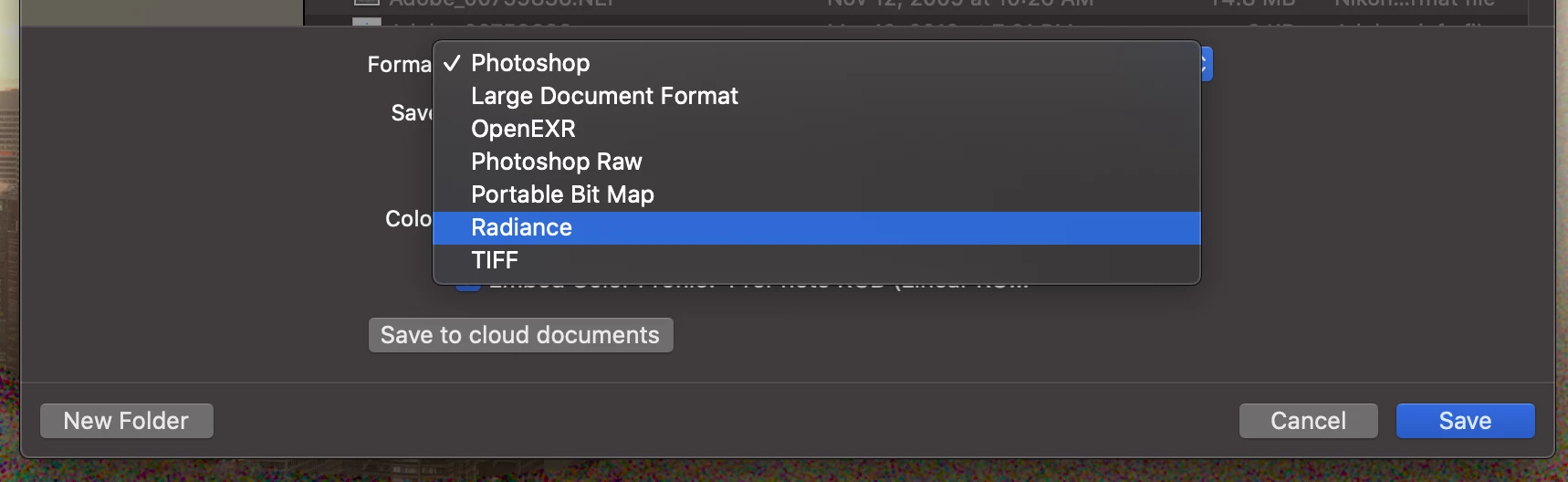
THe main problem was that i`m a bit frustrated but the way to get it to save is 2 merge all your layers and than in the normal save as menu you can choose radiance (HDRI ect.)


If you're using Photoshop 22.x or 23.x, make sure your document is a 32-bit document (Image > Mode > 32-bits/channel) then go to File > Save a Copy... and select "Radiance" from the Format pop-up.


7 replies

Chris Cox
Legend
Feb 25, 2010 1:43 AM UTC

The HDR (Radiance) file format will only be available in 32 bit/channel.

Converting an 8 or 16 bit image to 32 bit and saving is missing the point -- you've got a low dynamic range image to start with!

Translate
Participating Frequently
Jun 6, 2021 10:30 AM UTC

not realy since you photographed at multiuple exposures and should be able to automomatically make it form an hdri in this overpriced piece of software.

Also i simply dont even have the option to save as hdri/radiance

Ald al i did ws edit a file that ws already an HDRi so i`m stuck here anyone that can help ?


Translate
Participant
Nov 10, 2021 3:37 PM UTC

Same problem here, did you find a solution?

Translate