
Pocket Clouds
Inspiring
March 10, 2026
Answered

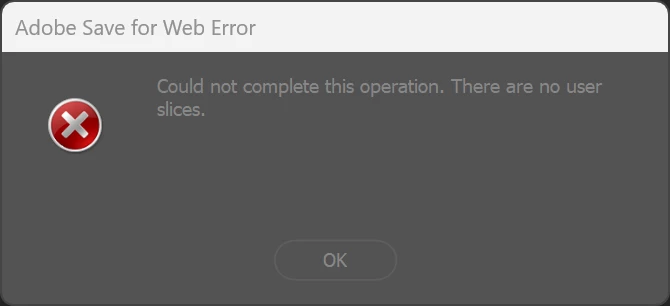
Save for web don't save because there are no user slices

  • March 10, 2026
  • 5 replies
  • 77 views

Hi, I did sliced canvas in Photoshop 24.7 and after I clean all the slices. I try to export with “Save For Web” and this window appears. How can I fix it?

 

    Correct answer Pocket Clouds

    For a strange reason the slices broken the script I use to export layers to PNG without trimming.
    I had to completely reinstall Photoshop and re-put the script on the scripts folder.

    5 replies

    Pocket Clouds
    Pocket CloudsAuthorCorrect answer
    Inspiring
    March 12, 2026

    For a strange reason the slices broken the script I use to export layers to PNG without trimming.
    I had to completely reinstall Photoshop and re-put the script on the scripts folder.

    Nancy OShea
    Community Expert
    Community Expert
    March 10, 2026

    Can we ask WHY you are slicing the image?

    I could be overlooking something, but honestly can’t think of a single reason to use old-fashioned Image Slices in 2026. That approach was popular in the 1990s when everyone had slow computers & dial-up internet service. 


    Nancy O'Shea— Product User & Community Expert
    Pocket Clouds
    Inspiring
    March 12, 2026

    I have been animated a walking character with different positions to be used in a game. All the animations are inside the same file for a better comparation.

    Nancy OShea
    Community Expert
    Community Expert
    March 10, 2026

    Legacy Save for Web is throwback technology to the old CompuServe computer days when the web was in its infancy.  Hardly anyone uses Save for Web anymore.


    Nowadays, WebP is superior to Animated GIF.

    https://ezgif.com/webp-maker

    And for static web images in JPG, PNG or GIF with/out transparency, use  File ⇒ Export ⇒ Export As. 


    Hope that helps.


    Nancy O'Shea— Product User & Community Expert
    Pocket Clouds
    Inspiring
    March 12, 2026

    Yeah I know, I wrote animated gif just because it is pixel-art but the final output is png.

    Chris 486
    Community Expert
    Community Expert
    March 10, 2026

    As other have said, we’ll probably need some more information with screen shots and your step by step process of trying to save. 


    In the meantime, these work-arounds may help to keep you moving.


    1. Create a new slice that covers the canvas you are trying to use the “Save for web” feature.
    2. Use “export as” to save out your file. It’s also located under File>export
    c.pfaffenbichler
    Community Expert
    Community Expert
    March 10, 2026

    Please post a screenshot of the Save for Web-dialog. 

    jane-e
    Community Expert
    Community Expert
    March 10, 2026

    In addition, a screenshot of your image that includes the user slices that you created would also be helpful.


    Jane