Participant
December 6, 2019
Question

Save for web error - Mac OS Catalina

  • December 6, 2019
  • 42 replies
  • 81295 views

Hello everyone,

I have an issue saving gif for web with my OS to Catalina (10.15.2).

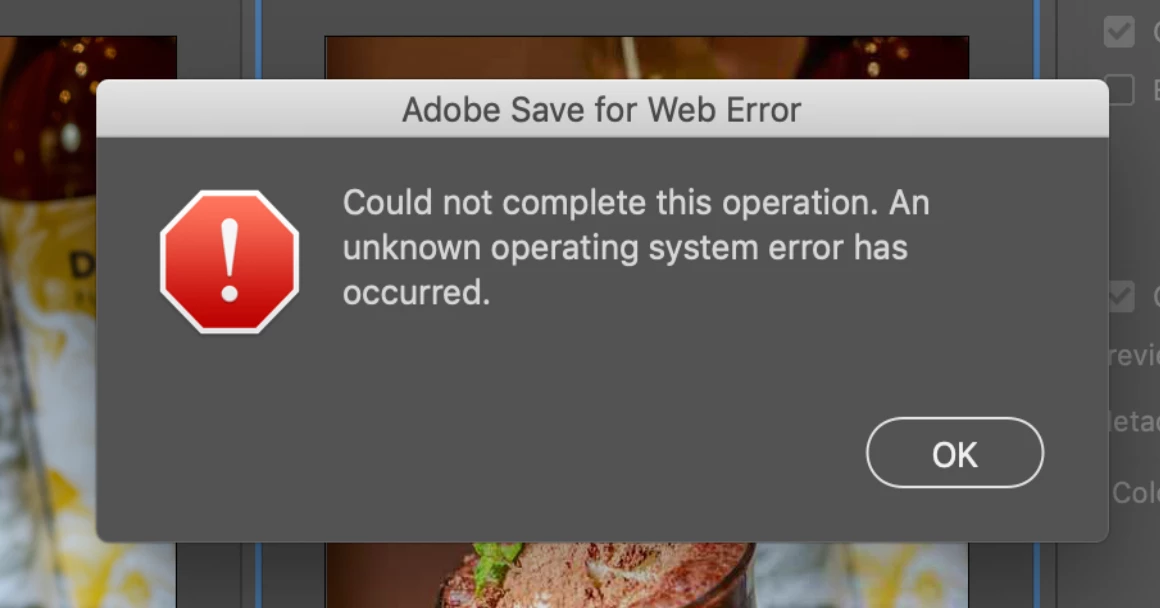
When I try to save, there's a message saying :

"Adobe save for web error. Could not complete this operation. An unknown operating system error has occured."

I tried to delete "save for web prefs.psp" but nothing has changed.


42 replies

epolimus
Participant
November 21, 2020

Big Sur 11.0.1
PS 22.0.1
Same problem. I deleted the preferences, restarted and cannot save for web legacy.
Are we going to get this fixed or nah? 

Alexandre Becquet
Community Expert
Community Expert
November 30, 2020

Hello, I'm on Catalina 10.15.7 with PS 22.0.1 and all is working when i use "save for the web legacy".  At this time i can't test with Big Sur but i'm going to find ther answer.
For the preferences do you do like this ?

https://helpx.adobe.com/photoshop/using/preferences.html

You can also try with Creative Cloud Cleaner :

https://helpx.adobe.com/creative-cloud/kb/cc-cleaner-tool-installation-problems.html

Let us know if it help

epolimus
Participant
November 30, 2020

Hi there, it actually started working again. I have no idea what changed.

Thank you for reolygin.

[Priavte information removed by Moderator]

Participant
November 18, 2020

Adobe, have you come up with a solution for this yet? Is been almost a year since this post, and I wasn't able to find solutions to the problem in this thread. Very frustating.

I am experiencing the same problem with my Photoshops (I tried it with Photoshop 21 (22.0.1), 20 (21.2.2) and 19 (20.0.7) and all have some exporting problem when saving for web) on macOS Catalina 10.15.5.
I had this problem yesterday, but it has already happened before a few times in the past – it is not a constant problem. I tried resetting photoshop and my computer, but it was ineffective.

This is enfuriating. It is such a small bug that made me lose 30 min of work trying to solve it yesterday, before I luckily could send the .psd to a colleague to export .gifs for me.
I'm very afraid of the day in which photoshop will let me down when I need it the most to solve something fast.

Claire DeRosa
Participant
October 28, 2020

I re-saved my gif file to a new location under a different name on my laptop and I'm able to Save to Web (Legacy)

Jakub Zet.
Known Participant
November 17, 2020

But sill not working with sliced document.
Cheked on macOS Big Sur - still unresolved problem 😞

Jakub Zet.
Known Participant
November 17, 2020

Participant
October 22, 2020

Continuing this thread after downloading the PS 2021 v 22.0 update on 10/21/20. Bug was not solved, and I still can not save for web (legacy). Trying to convert a .mp4 into a .gif.  Adobe admins, please help!

Participant
October 21, 2020

I am having the same problem with saving to Export Save for Web / Legacy. I am trying to save an animated Gif. I have Adobe Photoshop CC 2019 and my OS is Catalina 10.15.6. iMac Late 2015 system. My school system will not allow me to update to 2020. I have tried resetting the PRAM twice. Any one know of another solution?

Participant
October 22, 2020

I just got the new 2021 update, released today (10/21/20). Running a 2015 MacBook pro. Catalina OS. Bug is not resolved with the new update. Trying to do the same as you.

Jakub Zet.
Known Participant
October 21, 2020

Hello,

Has anyone solve that problem? I have same issue

Participant
October 3, 2020

I have found a simple and easy workaround for this. All you need to do is visit https://www.photopea.com/ and upload your PSD file there. Now you can export it as a png or any other format and it will download as a zip file containing all the slices as different images.

Participant
October 22, 2020

Can you elaborate? In photoshop I am already able to import an mp4 via "import video frames to layers" (which generates layers frame by frame), so why would it help to use photopea to generate a zip file with the same images?

Participant
November 18, 2020

Because the problem is with exporting. Photopea is not good for editing but it can import psd files so in case you are able to completely edit your stuff in photoshop but are not able to export it then you can upload your photoshop file on photopea and export it from there.


Participant
August 7, 2020

Hello! Does anyone have a solution to this problem? It started happening to me again, and I REALLY need to "save for web". Both macOS and photoshop are in the latest version available. Thank you.

Participant
August 7, 2020

Interestingly, I'm not having this problem anymore (OS 10.15.6), but now when I try to save a Photoshop document as a JPG - if it has layers, it often gives me an error message and will not save it. So I go to export for web and save it at 100 percent quality. It's like the opposite problem.

Yardmax
Known Participant
August 7, 2020

I'm not having any issues still, but I'm at 10.15.5. Maybe I won't allow the most recent upgrade, if this all is going to start happening again. 

Participant
July 13, 2020

I had the same problem for the past 6 months or so, unable to make animated gifs, save any files or preview files in web browser within the Save for Web (legacy) window. I tried all of the help in this thread and as a last resort I updated to version CC2020 (I'm on Catalina 10.15.5) - hey presto it's now working! What a sense of relief!

Participant
June 25, 2020

Same problem here with Photoshop 2018 version.
I didn't read the whole thread and I am not sure if anyone mentioned this already but I just realized that Adobe Illustrator can open PSD files with slices (I flattened mine in the import process by checking the options Flatten Layers to a Single Image and Import Slices) and managed to export the slices as png files through SAVE FOR WEB which seems to work fine. Adobe Illustrator 2019 version installed.