
phoebe-m
Participant
March 23, 2017
Answered

Save for Web Error? [PS 2014]

  • March 23, 2017
  • 12 replies
  • 182838 views

I am currently trying to export a GIF from Photoshop CC 2014 but I keep encountering this error message:
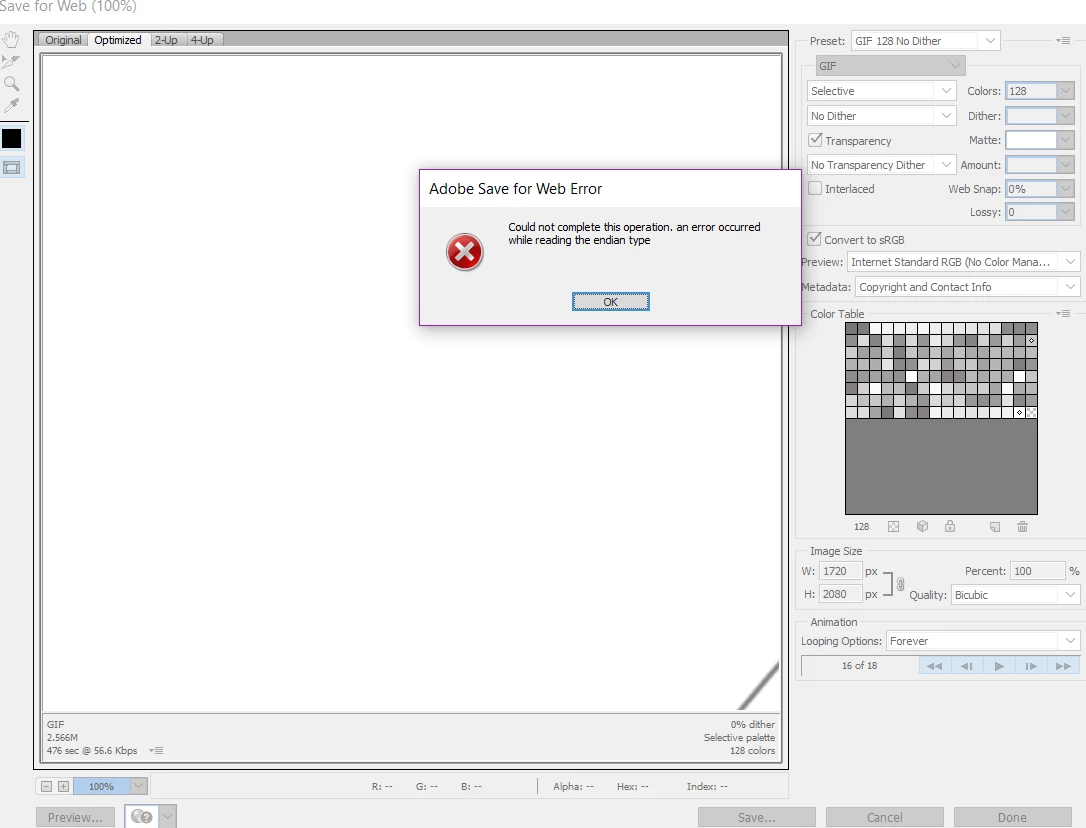
I have read previous forum post saying to delete Adobe Save For Web 12.0 Prefs but I cannot navigate to the

file's location, nor does it come up in a search. I have also tried changing the image/canvas size of the gif too.

It was exporting GIFs perfectly 24 hours ago. Any help or tips would be greatly appreciated.


I am using Windows 10.

Correct answer bzareenk

If this issue persists, try checking the image size to compare to the canvas size. I had the same issue and found this to help. Make sure the image size is not something like 20,000 inches. Try making it smaller or changing the measurement to pixels, if it is not already. Next, make sure the canvas size is not smaller than the image size, nor bigger than it. If so, change it to the same size with the same measurement of pixels or whatever the image's is. Try saving for web, again. This should work, if not then try removing the profile files (Users/[Username]/Library/Preferences/Adobe Save For Web 12.0 Prefs). Then restart your Mac and relaunch photoshop. Hope this helped!

12 replies

saeedalkarmi
Participating Frequently
March 24, 2017

try to decrease the image size u have from Image > image size

i think maybe u have a problem with a font u used! try to change..

regards,

CanalogSE
Known Participant
March 13, 2019

I have tried the action you recommended in your e-mail, however with no success. In general,

I am very skeptical to removing pre-installed files in the way you suggest (removing the profile files) 

You write "This should work, if not then try removing the profile files (Users/[Username]/Library/Preferences/Adobe Save For Web 12.0 Prefs). Then restart your Mac and relaunch photoshop."

Removing files that originally were installed to facilitate Photoshop CC usage, seems risky to me.

I hav tried another remedy, and even if it perhaps does not give me full satisfaction, is is however better now than is was at first.

I created my own personal preset alternative, named it my first name and saved it that way. Now I do get the result I want, with the minor exception that the "Metadata setting" does not accept "all" for this self-created preset but has to be changed for every image save procedure I conduct. But the other variables, e.g. Jpeg, quality, etc. are indeed covered in "my personal" preset .

For the time being I can live with this but would really appreciate that this feature in Photoshop CC would work as it used to in previous Photoshop CC versions.

Best regards

Participant
April 3, 2019

How did you create your own personal preset alternative? I'm in the same boat as you: skeptical to delete original program files, can't export GIF no matter the settings I change, etc.) I was suspicious that I had too many frames (it will allow me to export files with less frames), but once I reach 50+ frames, I receive the 'can't save for web' error. Any help is appreciated! Thank you

bzareenkCorrect answer
Inspiring
March 24, 2017

If this issue persists, try checking the image size to compare to the canvas size. I had the same issue and found this to help. Make sure the image size is not something like 20,000 inches. Try making it smaller or changing the measurement to pixels, if it is not already. Next, make sure the canvas size is not smaller than the image size, nor bigger than it. If so, change it to the same size with the same measurement of pixels or whatever the image's is. Try saving for web, again. This should work, if not then try removing the profile files (Users/[Username]/Library/Preferences/Adobe Save For Web 12.0 Prefs). Then restart your Mac and relaunch photoshop. Hope this helped!