Trevor.Dennis
Community Expert
Community Expert
August 23, 2025
Answered

Save For Web Legacy - The System Cannon Find the Path Specified [Solved - hopefully]

  • August 23, 2025
  • 4 replies
  • 189 views

My turn to ask for some help.


Regulars will know that I make a a fair few Frame Animations.  To night I am suddenly getting this error message.
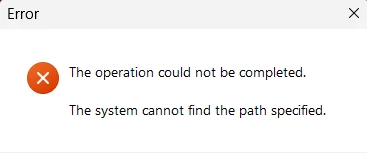
Google thought it might be a protection thing, so I completely uninstalled NordVPN.

I tried the current release, beta and v22.2

I saved the PSD in different locations.

I tried exporting other frame animations.

I created a new frame animation.

I reset Preferences. (not using the manual method)


The fact that it is the same with three versions of Photoshop suggests a possible OS issue. 

This is Windows 11. 

I can try it on a MacBook Pro which will probably work, but I'd like to get my desktop system working.


I can't think what else to try, so any ideas?

Correct answer Trevor.Dennis

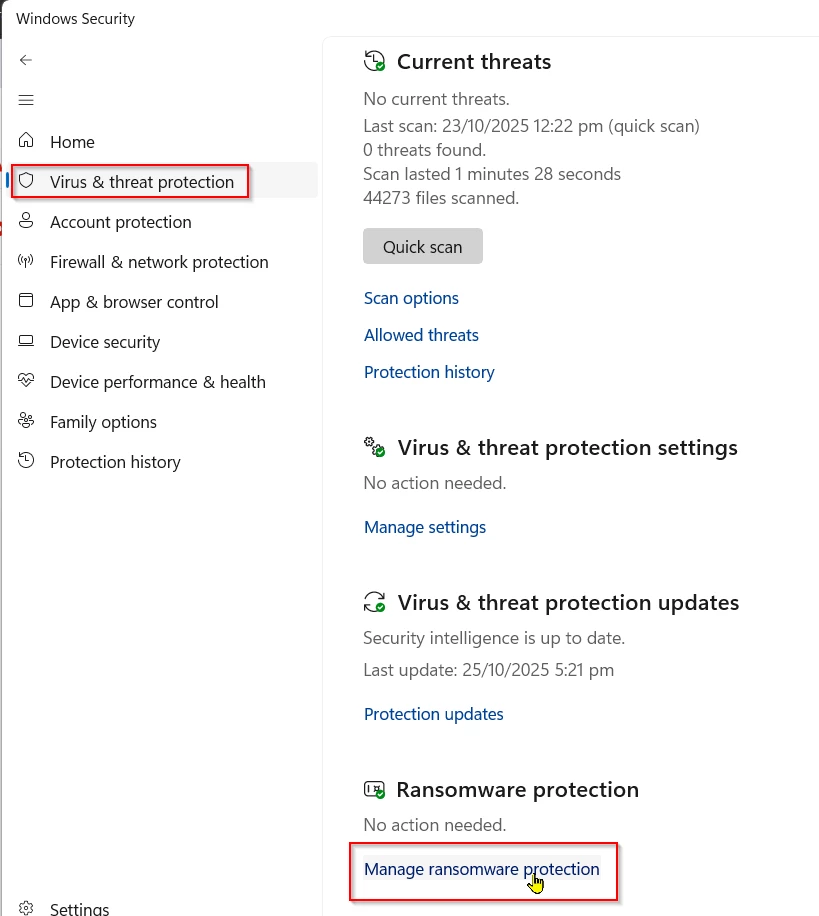
I had this happen again today, and this time I found how to fix it — with Windows at least.


 Open Windows Security from the Task Bar.

Open Virus & Threat Protection > Ransomeware Protection and turn it off.

Job done.


4 replies

Trevor.Dennis
Community Expert
Trevor.DennisCommunity ExpertAuthorCorrect answer
Community Expert
October 25, 2025

I had this happen again today, and this time I found how to fix it — with Windows at least.


 Open Windows Security from the Task Bar.

Open Virus & Threat Protection > Ransomeware Protection and turn it off.

Job done.


Conrad_C
Community Expert
Community Expert
August 23, 2025

One thing to look at is all the places in Save for Web where a path can be specified, and make sure they’re still valid. For example, if a path is specified for Background in the screen shot below and it doesn’t work on the current computer, maybe that’s a possible cause? The screen shot is from the Save for Web menu up where the file formats are, the command is Edit Output Settings, and there are several sub-panels in that dialog box to check.


Trevor.Dennis
Community Expert
Community Expert
August 23, 2025

Well that's wierd.  I tried it again this morning, and it worked straight away.  Photoshop (beta in this case) has been open all night with frame animation open, and the computer has not restarted.  


I have a fairly decent file management system which was using, but I had already tried different file location and that included the root directory of another drive.  So I am at a loss, but relieved as I'd spent some time on the frame animation I was trying to export out to GIF.


Thanks for the suggestions guys.

Stephen Marsh
Community Expert
Community Expert
August 23, 2025

@Trevor.Dennis - If this is a directory/path length issue, try saving to a location with a shorter path and shorter file name. Sorry, I'm not sure where this happens in the various steps.

Trevor.Dennis
Community Expert
Community Expert
August 23, 2025

I foregot to mention that I restarted the computer after resetting preferences.