


carlo prearo
Participant
Apr 1, 2022 6:28 PM UTC
Answered

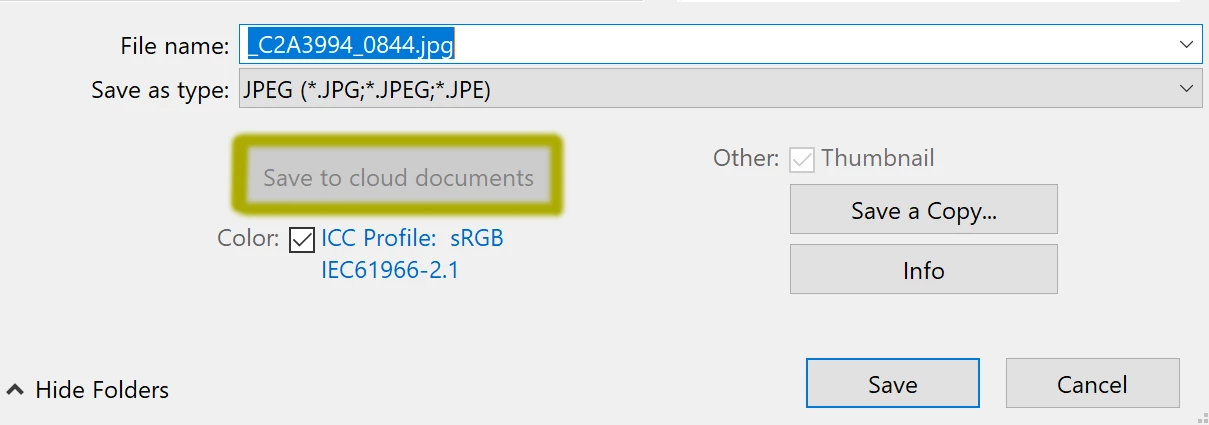
SAVE TO CLOUD DOCUMENTS GREY IN PHOTOSHOP

when I go to save the image Photoshop does not allow me to choose to save it to cloud document. The icon is not active and remains grey. (see picture). I have never saved my images to the cloud, so maybe is a dummy question. What can I do to activate it?



This topic is closed to new replies. Start a new post to keep the conversation going.
savannahh_20
savannahh_20Correct answer
Participant
Aug 16, 2024 7:07 AM UTC

For anyone that is recently having this problem check if Camera Raw needs an update in Creative Cloud...that fixed the problem for me

21 replies

savannahh_20
savannahh_20Correct answer
Participant
Aug 16, 2024 7:07 AM UTC

For anyone that is recently having this problem check if Camera Raw needs an update in Creative Cloud...that fixed the problem for me

Translate
Participant
Aug 25, 2024 4:26 PM UTC

That actually worked. thanks a lot!

Translate
VanderHAKS
Participant
May 28, 2026 4:34 PM UTC

That worked! 
Why? Don’t ask why.
Thanks

Translate
PixieTink
Participating Frequently
Aug 8, 2024 3:00 AM UTC

So basically no fix for this or the same suggestions that people are saying are not the issue? Which I am saying are not my issue. I can't restart or will lose my work. Guessing it's a bug since they just updated again. 

Translate
Participating Frequently
Mar 6, 2023 4:49 AM UTC

I had this issue as well. I was able to fix it by logging into creative cloud and checking to see if I had any new pending Photoshop Updates. Once I installed the updates and re-opened my Photoshop document the Save to Cloud Documents button was no longer greyed out! Hope this works for you too!

Translate
Participant
Mar 8, 2023 12:12 AM UTC

Thank you, this worked!

Translate
Bojan Živković11378569
Community Expert
Community Expert
Mar 3, 2023 7:57 AM UTC

I am testing and it works when file type is changed to PSD as already suggested by @jane-e . I am on Windows Phortoshop 24.2.0.

Translate
Participant
Feb 27, 2023 10:42 PM UTC

I am having the same issue and have been experiencing it since the last update. The icon is greyed out and I am connected to internet, cloud is synched, and have tried all file types. The previous update I had issues with 'saved to cloud' files simply dissapearing. Now this last update doesn't allow me to save to the cloud at all. 

Translate
Participant
Mar 3, 2023 4:56 AM UTC

Same here I've never had this issue until 2023! Glad to know I'm not alone but really hoping I find a solution.

Translate
jane-e
Community Expert
Community Expert
Apr 1, 2022 6:57 PM UTC


@carlo prearo 

You are trying to save a jpeg as a Cloud document. Does the icon become active when you change the file format from jpeg to psd?


Jane


Translate
PeggyJS61
Participating Frequently
Nov 12, 2023 10:16 AM UTC

Ummm... no... I'm not trying to save it as a jpeg to Cloud. I'm trying to save as psd to cloud.

Translate
jane-e
Community Expert
Community Expert
Nov 12, 2023 11:23 AM UTC


You are trying to save a jpeg as a Cloud document. Does the icon become active when you change the file format from jpeg to psd?

By @jane-e


Ummm... no... I'm not trying to save it as a jpeg to Cloud. I'm trying to save as psd to cloud.

By @PeggyJS61


Peggy, are you and Carlo the same person? Carlo's screenshot showed a jpeg and my reply from April 2022 that you have just now responded to was specifically to Carlos and his situation. 


Jane


Translate