Participating Frequently
Sep 15, 2020 10:21 AM UTC
Question

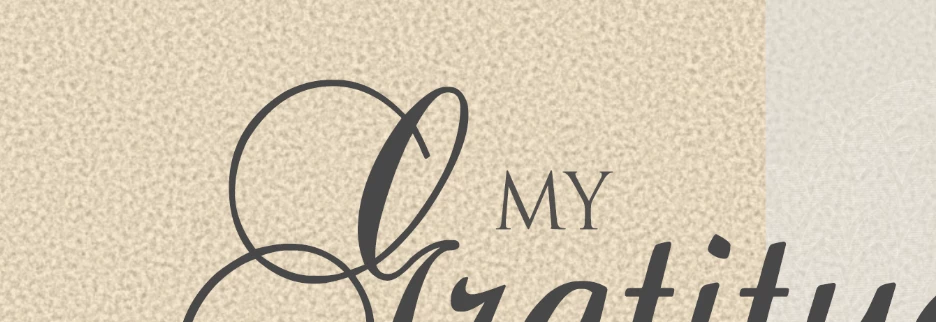
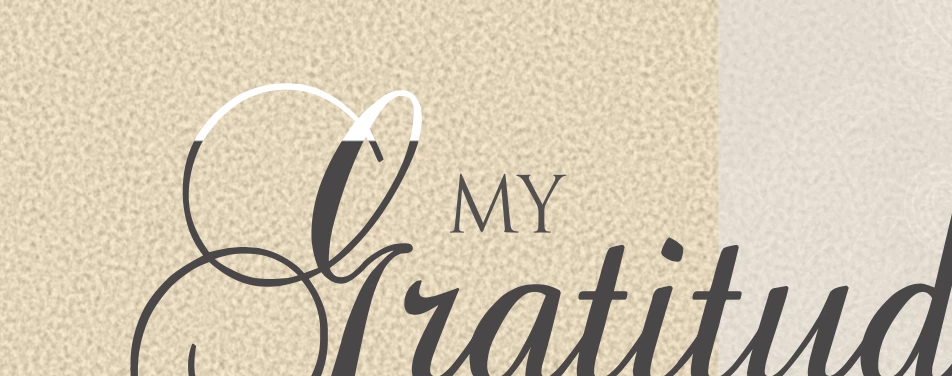
Saving PDF from photoshop, part text is white

I use Photoshop 2020 v.21.2.3

When I save as PDF (High Quality Print)

It should look like this...
But it saves like this...
 

Any advice?


Thank you

21 replies

Participant
Sep 8, 2024 10:29 PM UTC

Возможно кому-то это поможет!!!
Столкнулся с подобной проблемой, перепробовал абсолютно всё.

Попробуйте это:

Редактирование текста - изменить размер шрифта - применить - редактирование текста - установить изначальный размер шрифта. 

Мне помогло только это, надеюсь и вам поможет.

Причём качество не теряется, видать в фотошопе какой-то баг

Translate
Participant
Apr 22, 2023 9:11 AM UTC

Try to to save as pft after makeing the text layer rasterzis


Translate
c.pfaffenbichler
Community Expert
Community Expert
Apr 22, 2023 11:58 AM UTC

I would prefer Type > Convert to Shape in order to maintain vector output in a pdf. 

Translate
Participant
Jan 11, 2024 2:20 AM UTC

I converted to test to a smart object and it worked. 

Translate
soerenj64494347
Participant
Jan 18, 2022 1:35 AM UTC

Exact same issue here. Running latest Photoshop (v23.1), trying to export my images to PDF, and encountering that a few latters are partly white.


I tried playing around with many pdf export settings, without luck.


I need the font layers to be persisted, of course when flattening the image the problem is gone, but that cannot be the solution.

Translate
Participant
Jan 20, 2022 6:52 PM UTC

Did you convert to shape?

Translate
soerenj64494347
Participant
Jan 20, 2022 9:52 PM UTC

No, but that's the point: I don't want to convert to shape, as I need/want to embed the fonts in my resulting pdf so they are displayed as (vectorized) fonts, not as pixels.


Of course, that would be a workaround, but it cannot be the solution.

Translate
Participant
Nov 4, 2021 3:57 PM UTC

Any update to this?  Currently encountering this

Translate
Participant
Nov 4, 2021 3:59 PM UTC

Update: I converted the problem text to shape and it worked.

Translate
Bob_Hallam
Legend
Sep 15, 2020 10:51 AM UTC

What version of PDF are you saving as?

Translate
ICC programmer and developer, Photographer, artist and color management expert, Print standards and process expert.
Participating Frequently
Sep 15, 2020 11:00 AM UTC

Acrobat 5 (PDF 1.4)


Translate
Bob_Hallam
Legend
Sep 15, 2020 11:23 AM UTC

Try saving at a higher level PDF such as 1.7 or 1.7+ also remove the fast web preview if this is for print work and that should solve the problem.  

Translate
ICC programmer and developer, Photographer, artist and color management expert, Print standards and process expert.