Participant
April 14, 2025
Answered

Saving settings to a tool.

  • April 14, 2025
  • 5 replies
  • 240 views

I'm trying to figure out how to save settings to a particular tool. I would like to save settings to the smudge tool. When I hit the smudge tool I would like it to default to a brush that I made and to an opacity of 10%. It seems to do this on its own after I use it for a while for some reason, but with each new update it defaults to the old method of giving me a round brush with 90% opacity. How can I fix this? 


 Thanks

    Correct answer Trevor.Dennis
    quote

    I'm trying to figure out how to save settings to a particular tool. I would like to save settings to the smudge tool. When I hit the smudge tool I would like it to default to a brush that I made and to an opacity of 10%. It seems to do this on its own after I use it for a while for some reason, but with each new update it defaults to the old method of giving me a round brush with 90% opacity. How can I fix this? 


     Thanks


    By @docjoque1


    I don't think you can force the Smudge tool to always open with the same preset.  It should open with whatever prest or settings it had when Photoshop last closed.  What you can do is to create your ideoa preset for the Smudge tool, and export it to a .abr file.  Idealy you would make this some kind of favourites group that you would keep at the top of the brush right click menu.


    If you have all of these options checked in the right click menu
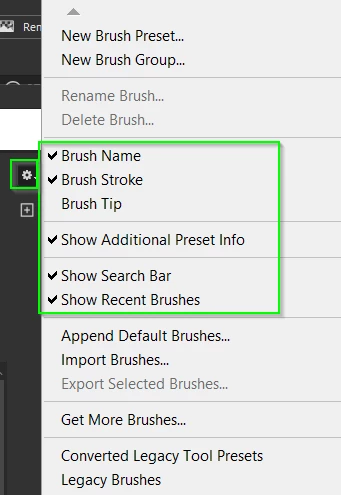
    Then you can see what tool each preset will switch to, and what the tip looks like
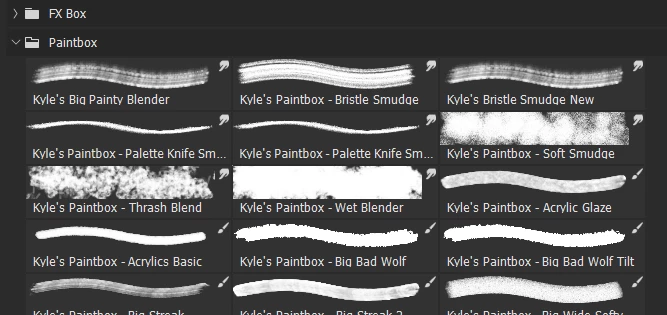
     

    So you can select the Smudge tool and set i up, and then save New Brush Preset

    You can do this with all tools that use selectable cursors (some tools don')

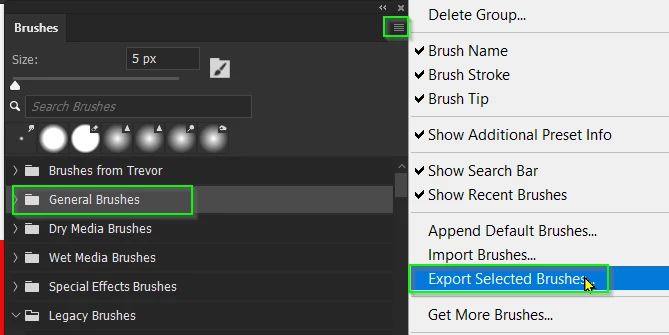
    Place them in a group, select that group and choose Export selected brushes

    This will create a new .abr file in the presets folder.

    Note Export Brushes will be greyed out if no presets or group(s) are selected.
    5 replies

    Trevor.Dennis
    Community Expert
    Trevor.DennisCommunity ExpertCorrect answer
    Community Expert
    April 15, 2025
    quote

    I'm trying to figure out how to save settings to a particular tool. I would like to save settings to the smudge tool. When I hit the smudge tool I would like it to default to a brush that I made and to an opacity of 10%. It seems to do this on its own after I use it for a while for some reason, but with each new update it defaults to the old method of giving me a round brush with 90% opacity. How can I fix this? 


     Thanks


    By @docjoque1


    I don't think you can force the Smudge tool to always open with the same preset.  It should open with whatever prest or settings it had when Photoshop last closed.  What you can do is to create your ideoa preset for the Smudge tool, and export it to a .abr file.  Idealy you would make this some kind of favourites group that you would keep at the top of the brush right click menu.


    If you have all of these options checked in the right click menu

    Then you can see what tool each preset will switch to, and what the tip looks like


    So you can select the Smudge tool and set i up, and then save New Brush Preset

    You can do this with all tools that use selectable cursors (some tools don')

    Place them in a group, select that group and choose Export selected brushes

    This will create a new .abr file in the presets folder.

    Note Export Brushes will be greyed out if no presets or group(s) are selected.

    CMass
    Legend
    April 14, 2025

    Hi @docjoque1! It sounds like you're hoping to customize the Smudge Tool so it always opens with your preferred brush and settings. 


    To help figure this out with you, could you let us know:

    • Are you using Photoshop on desktop, and if so, which version?

    • When you say it seems to "do this on its own after a while," are you referring to it remembering your last-used settings within the same session, or across sessions?

    • Have you tried creating a custom Brush Preset (https://adobe.ly/44mGllB) for the Smudge Tool?

    Appreciate any extra details you can share — we’d love to help get this working the way you need


    ^CM


    PS. Thank you, @kglad , @Peru Bob, & @John T Smith, for helping direct the OP to the right board. ❤️ 

    John T Smith
    Community Expert
    Community Expert
    April 14, 2025

    Moved to Photoshop based on your only other message About docjoque1 - Adobe Community

    Peru Bob
    Community Expert
    Community Expert
    April 14, 2025

    Photoshop?

    kglad
    Community Expert
    Community Expert
    April 14, 2025

    what app?


