

bobtem
Inspiring
April 16, 2026
Answered

Scale a imported linked object?

  • April 16, 2026
  • 3 replies
  • 45 views

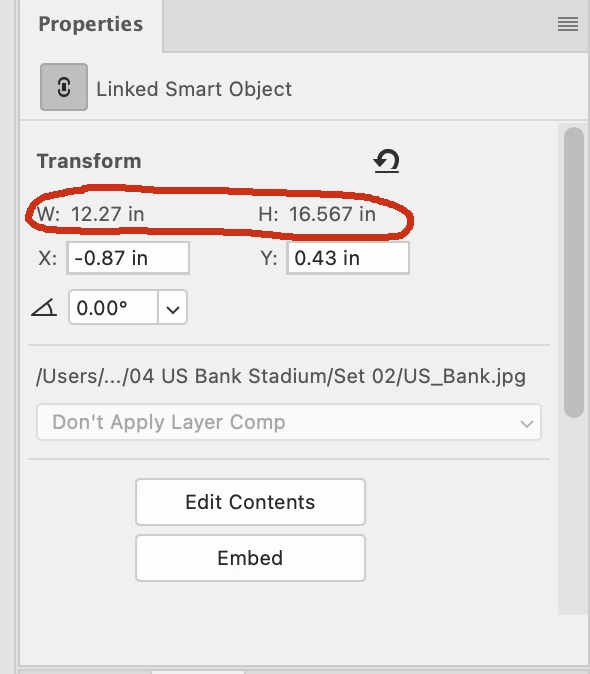
What am I doing wrong? I import an object as a linked object, and I want to scale it using numbers, not handle dragging. I look in the  Properties palette, but the W and H fields are not available. Why am I having to post a question about this?...
 

    Correct answer davescm

    ‘I used the guides method. But still strange to me that you can enter values for the XY coordinates, but not for the W and H values?’

    You can, directly in the options bar -  see my reply above
    Dave

    3 replies

    davescm
    Community Expert
    Community Expert
    April 17, 2026

    If you use Ctrl+T (transform) the option does become available in the options bar - and whilst it defaults to % input you can type in whatever unit you like - just include the unit with the number e.g. you can type in 100mm or 3.94in or 283.4pt etc

    Dave

    Trevor.Dennis
    Community Expert
    Community Expert
    April 17, 2026

    That sort of information is generally in the Options bar.

    You can use math in a lot of the fields (i.e.  /2 , +100)

    You can drag guides out from a ruler, and they will snap to an object.

    You can then drag the Grid zero/zero point to the intersection of those guides giving you a top left corner reference.

    You can then resize the object by eye, or place guides at right and bottom locations, and Free Transform will snap to those guides.


    I wonder if you are trying to use Photoshop for CAD?   It’s not especially well suited for CAD.

    Personally, I use SketchUp for CAD, but there are heaps of options, and some of them are free.  I suspect that tools like 3D printers and laser cutters might come supplied with CAD software.  Anyone know if that is the case?


    Chuck Uebele
    Community Expert
    Community Expert
    April 17, 2026

    @Trevor.Dennis Yea, I often create an exact rectangle using the shape tool that I can then snap guides and size things. It is convoluted and an option to enter an exact size in the transform bar or property box would be nice. I’ve also been known to use PS as a CAD program, even though I do have a couple CAD programs.

    Chuck Uebele
    Community Expert
    Community Expert
    April 17, 2026

    If you use Ctrl/cmd-T you you can use the size box, but it’s in percentage rather than actual pixel size. This is the same with embedded and normal pixel layers.