Known Participant
September 28, 2019
Answered

script for phone case mockup

  • September 28, 2019
  • 10 replies
  • 11557 views

can someone help me how to replace image on mockup with auto action or script and save it as jpeg ?

i try action but keep fail and dont know wahts wrong with my action script

i still new on photoshop and sry for my bad english

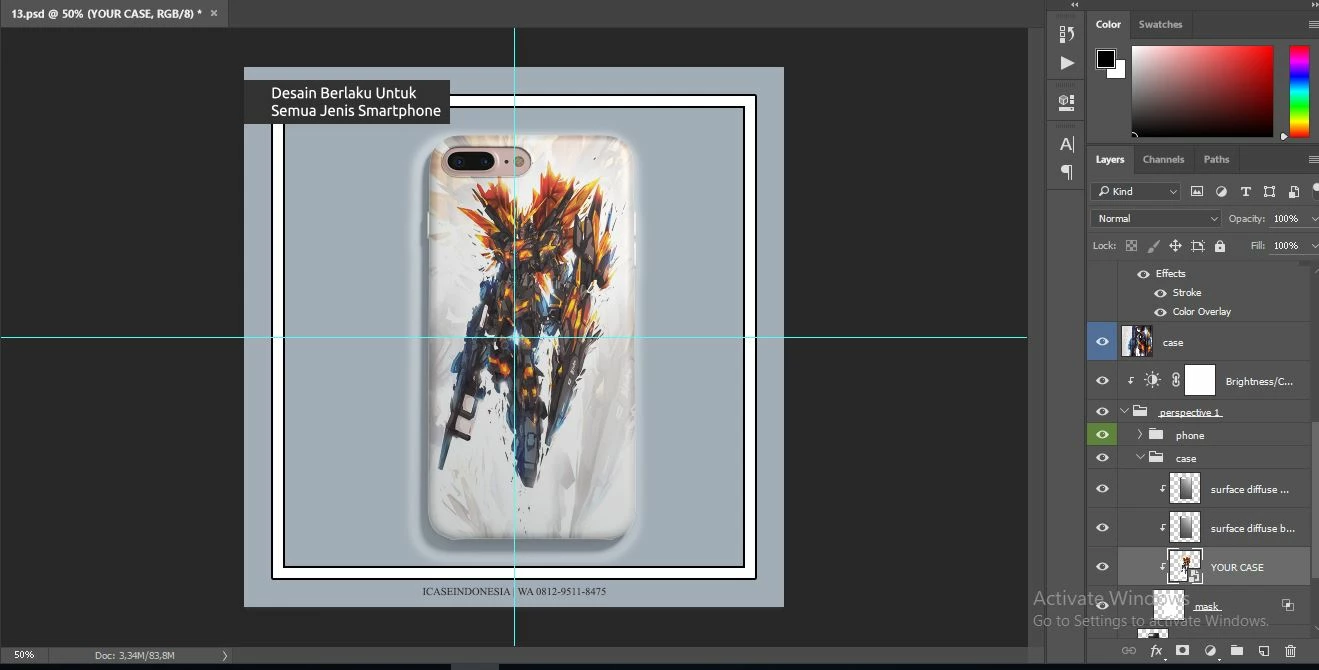
this is my mockup and photo example

This topic has been closed for replies.
Correct answer Chuck Uebele

Here is a script that will replace the selected Smart Object layer with a file from a source folder, then save the file as a jpg to an output folder. It will loop through the source folder and replace the original smart object with each file in the source folder, All the source files have to be the same size! In the script, I have the source folder being on the desktop and called "source files." The output folder is a subfolder, in source files, called "done." You can change the code to reflect whatever folders you want to use. I also added a "-Flat" suffix to the saved jpg files to avoid overwriting anything.


var srcFolder = new Folder('~/desktop/source files/');
var outputFolder = new Folder('~/desktop/source files/done/');

var searchMask = '*.???'
var fileList = srcFolder.getFiles(searchMask);

var doc = activeDocument;
var curLayer = doc.activeLayer;
var soName
var jpgOptions = new JPEGSaveOptions();
jpgOptions.quality = 8;

for (var i=0;i<fileList.length;i++){
    replaceSO (fileList[i]);
    var fName = fileList[i].name.split('.')[0];
    dupeFile ();
    var doc2 = activeDocument;
    doc2.saveAs(new File(outputFolder +'/'+fName + '-flat.jpg'),jpgOptions);
    doc2.close(SaveOptions.DONOTSAVECHANGES);
    }

function replaceSO(file){
    var idplacedLayerReplaceContents = stringIDToTypeID( "placedLayerReplaceContents" );
        var desc5 = new ActionDescriptor();
        var idnull = charIDToTypeID( "null" );
        desc5.putPath( idnull, new File( file ) );
    executeAction( idplacedLayerReplaceContents, desc5, DialogModes.NO );
    }

function dupeFile(){
    var idDplc = charIDToTypeID( "Dplc" );
        var desc11 = new ActionDescriptor();
        var idnull = charIDToTypeID( "null" );
            var ref1 = new ActionReference();
            var idDcmn = charIDToTypeID( "Dcmn" );
            var idOrdn = charIDToTypeID( "Ordn" );
            var idFrst = charIDToTypeID( "Frst" );
            ref1.putEnumerated( idDcmn, idOrdn, idFrst );
        desc11.putReference( idnull, ref1 );
        var idMrgd = charIDToTypeID( "Mrgd" );
        desc11.putBoolean( idMrgd, true );
    executeAction( idDplc, desc11, DialogModes.NO );    
    }

10 replies

Participant
January 18, 2023

Your solution worked great for me.

Participant
January 20, 2023

I did a presentation with a set of phone case mockups on design bundles. It's much easier. This way, you can showcase your logos, branding, and more with their mockups. After all, they are made in high resolution. And smart objects can save a lot of time. Just click on the smart object a couple of times, add your graphics, and save the result. I took the iPhone 14 Pro Max case as an example. There are different colors and types here, so I grouped them by type and color in my presentation.

Participant
January 16, 2023

Thanks for sharing the script!

Chuck Uebele
Community Expert
Community Expert
February 25, 2021

@mattheww79231319 

Try this script. Hopefully, it will so what you want.


#target photoshop

    var srcFolder = new Folder('~/desktop/source files/');
    var outputFolder = new Folder('~/desktop/source files/done/');

    var searchMask = '*.???'
    var fileList = srcFolder.getFiles(searchMask);

    var doc = activeDocument;
    var curLayer = doc.activeLayer;
    var soName
    var jpgOptions = new JPEGSaveOptions();
    jpgOptions.quality = 8;
    var count = 1

    for (var i=0;i<fileList.length;i++){
        var layerName = doc.activeLayer.name
        replaceSO (fileList[i]);
        var fName = fileList[i].name.split('.')[0];
        dupeFile ();
        var doc2 = activeDocument;
        try{
            saveFile (outputFolder +'/'+fName + layerName +'-'+count+'.jpg')
            }
        catch(e){
            count++
            saveFile (outputFolder +'/'+fName + layerName + '-'+count+'.jpg')
            }
        doc2.close(SaveOptions.DONOTSAVECHANGES);
        count++
        }

    function replaceSO(file){
        var idplacedLayerReplaceContents = stringIDToTypeID( "placedLayerReplaceContents" );
            var desc5 = new ActionDescriptor();
            var idnull = charIDToTypeID( "null" );
            desc5.putPath( idnull, new File( file ) );
        executeAction( idplacedLayerReplaceContents, desc5, DialogModes.NO );
        }

    function dupeFile(){
        var idDplc = charIDToTypeID( "Dplc" );
            var desc11 = new ActionDescriptor();
            var idnull = charIDToTypeID( "null" );
                var ref1 = new ActionReference();
                var idDcmn = charIDToTypeID( "Dcmn" );
                var idOrdn = charIDToTypeID( "Ordn" );
                var idFrst = charIDToTypeID( "Frst" );
                ref1.putEnumerated( idDcmn, idOrdn, idFrst );
            desc11.putReference( idnull, ref1 );
            var idMrgd = charIDToTypeID( "Mrgd" );
            desc11.putBoolean( idMrgd, true );
        executeAction( idDplc, desc11, DialogModes.NO );    
        }
    
    function saveFile(saveName){
    var idsave = charIDToTypeID( "save" );
        var desc10 = new ActionDescriptor();
        var idAs = charIDToTypeID( "As  " );
            var desc11 = new ActionDescriptor();
            var idEQlt = charIDToTypeID( "EQlt" );
            desc11.putInteger( idEQlt, 12 );
            var idMttC = charIDToTypeID( "MttC" );
            var idMttC = charIDToTypeID( "MttC" );
            var idNone = charIDToTypeID( "None" );
            desc11.putEnumerated( idMttC, idMttC, idNone );
        var idJPEG = charIDToTypeID( "JPEG" );
        desc10.putObject( idAs, idJPEG, desc11 );
        var idIn = charIDToTypeID( "In  " );
        desc10.putPath( idIn, new File( saveName ) );
        var idDocI = charIDToTypeID( "DocI" );
        desc10.putInteger( idDocI, 474 );
        var idCpy = charIDToTypeID( "Cpy " );
        desc10.putBoolean( idCpy, true );
        var idsaveStage = stringIDToTypeID( "saveStage" );
        var idsaveStageType = stringIDToTypeID( "saveStageType" );
        var idsaveSucceeded = stringIDToTypeID( "saveSucceeded" );
        desc10.putEnumerated( idsaveStage, idsaveStageType, idsaveSucceeded );
    executeAction( idsave, desc10, DialogModes.NO );  
mattheww79231319
Participating Frequently
February 25, 2021

Hi Chuck,


Thank you so much for sending this over!


At first I got the message "no matching closing brace found. Line 56," so I added one after the executeAction on Line 80 to match what you had done for the other functions.


Once I did that and went to load the script I unfortunately got the error "functionality may not be available in this version of Photoshop," specifically it looks like in reference to the executeAction on Line 79.  Interestingly when I ran it a second time it indicated the Command "Replace Contents" in reference the executeAction on Line 38 was the issue.


I guess generally the executeAction is not happy. I currently have my Photoshop up-to-date. Is there an older version you work with that I should download to give this a try?


Thanks again so much for your help with this, you're amazing!


Best,

Matthew

Chuck Uebele
Community Expert
Community Expert
February 26, 2021

It seems to be working for me, and I too am using the latest version. You do have the smart object layer selected, when you run the script?

Chuck Uebele
Community Expert
Community Expert
January 18, 2021

Try this script. I don't know why they other one was stopping to save the image, but this one seems to work.

#target photoshop

    var srcFolder = new Folder('~/desktop/source files/');
    var outputFolder = new Folder('~/desktop/source files/done/');

    var searchMask = '*.???'
    var fileList = srcFolder.getFiles(searchMask);

    var doc = activeDocument;
    var curLayer = doc.activeLayer;
    var soName
    var jpgOptions = new JPEGSaveOptions();
    jpgOptions.quality = 8;
    var count = 1

    for (var i=0;i<fileList.length;i++){
        replaceSO (fileList[i]);
        var fName = fileList[i].name.split('.')[0];
        dupeFile ();
        var doc2 = activeDocument;
        try{
            saveFile (outputFolder +'/'+fName + '-flat-'+count+'.jpg')
            }
        catch(e){
            count++
            saveFile (outputFolder +'/'+fName + '-flat-'+count+'.jpg')
            }
        doc2.close(SaveOptions.DONOTSAVECHANGES);
        count++
        }

    function replaceSO(file){
        var idplacedLayerReplaceContents = stringIDToTypeID( "placedLayerReplaceContents" );
            var desc5 = new ActionDescriptor();
            var idnull = charIDToTypeID( "null" );
            desc5.putPath( idnull, new File( file ) );
        executeAction( idplacedLayerReplaceContents, desc5, DialogModes.NO );
        }

    function dupeFile(){
        var idDplc = charIDToTypeID( "Dplc" );
            var desc11 = new ActionDescriptor();
            var idnull = charIDToTypeID( "null" );
                var ref1 = new ActionReference();
                var idDcmn = charIDToTypeID( "Dcmn" );
                var idOrdn = charIDToTypeID( "Ordn" );
                var idFrst = charIDToTypeID( "Frst" );
                ref1.putEnumerated( idDcmn, idOrdn, idFrst );
            desc11.putReference( idnull, ref1 );
            var idMrgd = charIDToTypeID( "Mrgd" );
            desc11.putBoolean( idMrgd, true );
        executeAction( idDplc, desc11, DialogModes.NO );    
        }
    
    function saveFile(saveName){
    var idsave = charIDToTypeID( "save" );
        var desc10 = new ActionDescriptor();
        var idAs = charIDToTypeID( "As  " );
            var desc11 = new ActionDescriptor();
            var idEQlt = charIDToTypeID( "EQlt" );
            desc11.putInteger( idEQlt, 12 );
            var idMttC = charIDToTypeID( "MttC" );
            var idMttC = charIDToTypeID( "MttC" );
            var idNone = charIDToTypeID( "None" );
            desc11.putEnumerated( idMttC, idMttC, idNone );
        var idJPEG = charIDToTypeID( "JPEG" );
        desc10.putObject( idAs, idJPEG, desc11 );
        var idIn = charIDToTypeID( "In  " );
        desc10.putPath( idIn, new File( saveName ) );
        var idDocI = charIDToTypeID( "DocI" );
        desc10.putInteger( idDocI, 474 );
        var idCpy = charIDToTypeID( "Cpy " );
        desc10.putBoolean( idCpy, true );
        var idsaveStage = stringIDToTypeID( "saveStage" );
        var idsaveStageType = stringIDToTypeID( "saveStageType" );
        var idsaveSucceeded = stringIDToTypeID( "saveSucceeded" );
        desc10.putEnumerated( idsaveStage, idsaveStageType, idsaveSucceeded );
    executeAction( idsave, desc10, DialogModes.NO );        
    }
Chuck Uebele
Community Expert
Community Expert
December 3, 2019

Try this script. It will add a number after the new saved file.

#target photoshop

    var srcFolder = new Folder('~/desktop/source files/');
    var outputFolder = new Folder('~/desktop/source files/done/');

    var searchMask = '*.???'
    var fileList = srcFolder.getFiles(searchMask);

    var doc = activeDocument;
    var curLayer = doc.activeLayer;
    var soName
    var jpgOptions = new JPEGSaveOptions();
    jpgOptions.quality = 8;
    var count = 1

    for (var i=0;i<fileList.length;i++){
        replaceSO (fileList[i]);
        var fName = fileList[i].name.split('.')[0];
        dupeFile ();
        var doc2 = activeDocument;
        try{
            doc2.saveAs(new File(outputFolder +'/'+fName + '-flat-'+count+'.jpg'),jpgOptions);
            }
        catch(e){
            count++
            doc2.saveAs(new File(outputFolder +'/'+fName + '-flat-'+count+'.jpg'),jpgOptions)
            }
        doc2.close(SaveOptions.DONOTSAVECHANGES);
        count++
        }

    function replaceSO(file){
        var idplacedLayerReplaceContents = stringIDToTypeID( "placedLayerReplaceContents" );
            var desc5 = new ActionDescriptor();
            var idnull = charIDToTypeID( "null" );
            desc5.putPath( idnull, new File( file ) );
        executeAction( idplacedLayerReplaceContents, desc5, DialogModes.NO );
        }

    function dupeFile(){
        var idDplc = charIDToTypeID( "Dplc" );
            var desc11 = new ActionDescriptor();
            var idnull = charIDToTypeID( "null" );
                var ref1 = new ActionReference();
                var idDcmn = charIDToTypeID( "Dcmn" );
                var idOrdn = charIDToTypeID( "Ordn" );
                var idFrst = charIDToTypeID( "Frst" );
                ref1.putEnumerated( idDcmn, idOrdn, idFrst );
            desc11.putReference( idnull, ref1 );
            var idMrgd = charIDToTypeID( "Mrgd" );
            desc11.putBoolean( idMrgd, true );
        executeAction( idDplc, desc11, DialogModes.NO );    
        }
Chuck Uebele
Community Expert
Community Expert
December 3, 2019

Something is not right with your file. It looks like PS crashed and you opned a recovered file, based on the name.


Known Participant
December 3, 2019

This happen after 5-8 image not from first image.

Chuck Uebele
Community Expert
Community Expert
December 3, 2019

Can you post a screen shoot of your psd file with the layer panels showing? Also show what the file names are for the files in your source folder.

Chuck Uebele
Community Expert
Community Expert
September 29, 2019

To run the script, put in Photoshop's subfolder: Presets/Scripts, then restart Photoshop. Go to File>Scripts in the main menu, and you should see your script listed. If not, use the browse butto . To navigate to it to run it. Just make sure you have your source and output folders setup as I mentioned in my previous post, or change the paths in the code to where you have those folders.

Known Participant
September 29, 2019
Ohh iget it. So i just need chanve source code and done to my file name right ? After that i just need go to file>script and click on my scriot
Chuck Uebele
Community Expert
Community Expert
September 29, 2019
Yes, but the script I wrote works on a folder of files, so you have to make sure the path is for the folder, and not just one file. If you only have one file that you want to replace in your smart object, then just put that one in the source folder.
Chuck Uebele
Community Expert
Community Expert
September 29, 2019

Yes, save as plain text with an extension of .jsx.

Known Participant
September 29, 2019
I already save it as jsx. So what i must do to run the script ?
Chuck Uebele
Community Expert
Chuck UebeleCommunity ExpertCorrect answer
Community Expert
September 29, 2019

Here is a script that will replace the selected Smart Object layer with a file from a source folder, then save the file as a jpg to an output folder. It will loop through the source folder and replace the original smart object with each file in the source folder, All the source files have to be the same size! In the script, I have the source folder being on the desktop and called "source files." The output folder is a subfolder, in source files, called "done." You can change the code to reflect whatever folders you want to use. I also added a "-Flat" suffix to the saved jpg files to avoid overwriting anything.


var srcFolder = new Folder('~/desktop/source files/');
var outputFolder = new Folder('~/desktop/source files/done/');

var searchMask = '*.???'
var fileList = srcFolder.getFiles(searchMask);

var doc = activeDocument;
var curLayer = doc.activeLayer;
var soName
var jpgOptions = new JPEGSaveOptions();
jpgOptions.quality = 8;

for (var i=0;i<fileList.length;i++){
    replaceSO (fileList[i]);
    var fName = fileList[i].name.split('.')[0];
    dupeFile ();
    var doc2 = activeDocument;
    doc2.saveAs(new File(outputFolder +'/'+fName + '-flat.jpg'),jpgOptions);
    doc2.close(SaveOptions.DONOTSAVECHANGES);
    }

function replaceSO(file){
    var idplacedLayerReplaceContents = stringIDToTypeID( "placedLayerReplaceContents" );
        var desc5 = new ActionDescriptor();
        var idnull = charIDToTypeID( "null" );
        desc5.putPath( idnull, new File( file ) );
    executeAction( idplacedLayerReplaceContents, desc5, DialogModes.NO );
    }

function dupeFile(){
    var idDplc = charIDToTypeID( "Dplc" );
        var desc11 = new ActionDescriptor();
        var idnull = charIDToTypeID( "null" );
            var ref1 = new ActionReference();
            var idDcmn = charIDToTypeID( "Dcmn" );
            var idOrdn = charIDToTypeID( "Ordn" );
            var idFrst = charIDToTypeID( "Frst" );
            ref1.putEnumerated( idDcmn, idOrdn, idFrst );
        desc11.putReference( idnull, ref1 );
        var idMrgd = charIDToTypeID( "Mrgd" );
        desc11.putBoolean( idMrgd, true );
    executeAction( idDplc, desc11, DialogModes.NO );    
    }
Known Participant
September 29, 2019
Waw thank u so much for your help. Can i ask u another question ? Did i must copy that script on notepad and save them as jsx ?