
Script to Batch Mockups from Multiple PSD files [Photoshop Scripts]
Hi Everyone,
I know im not the first one to come here and ask a similar question/request about Photoshop Scripts for mockups, but i have been going all over discord and reddit without a solution and seems like i was looking at the wrong place.
I have been playing with ChatGPT to create a Photoshop script which seems to be almost there but still encountering errors.
My Objective for the script:
Once it is loaded, I want it to:
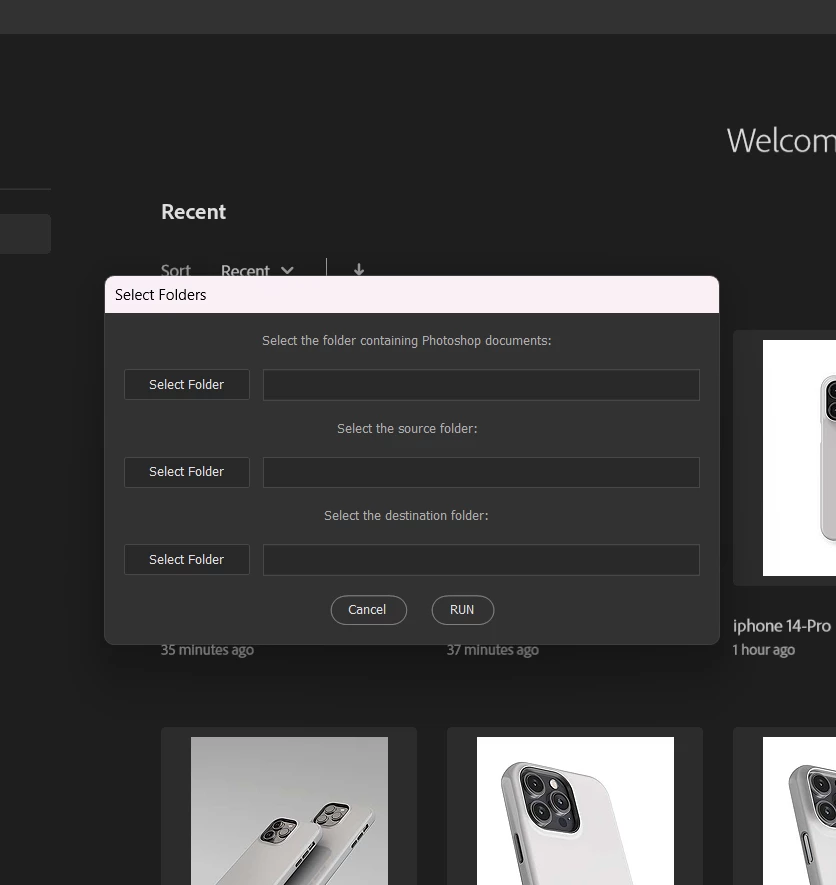
1. Open a window Modalt hat allows me to select 3 folders.
1 button for me to select the Folder/psd files i want to open for it to edit
1 button for me to select the Folder that contains the source IMGs to be used (Jpgs, pngs, etc)
1 button for me to select the destination folder where all the exported images are going to be saved
Here is an example of the window i created. You can suggest a better/easier/different idea as well. I just want it to be as simple as possible but to work to automate the most i can.
2. I would like the exported images to be named after the PSD document name and saved into a Subfolder that is named after each image. So if the file name of the Image is "A", i want the subfolder to be named A and so on for all images.
This is because the images are for an Online Store Product Listing. So, if the design is named A, it will have multiple angles, so i want all PSD files for Design "A" to be saved into a folder called "A" and the same for B, etc.
3. Once the script start running, I assume it will loop through all the PSD files that it will find on the folder i select. So Once the PSD file is open, I believe it needs to look for a specific layer. I thought it could search for an Smart Object Layer by name. In my case let's say i'll name the layer i need to edit "smart_object".
All my images are going to be the Same Size and Same DPI. Let me know if this must be changed/edited.
4. Finish.
Note: This is the code i made using chatGPT. Right now the code i had was working. It looped through the PSD files and everything but at the end, no image was exported. Probably some errors or something.
Any input greatly appreciated !!!


 AdChoices