Thanks, so pretty much the same hack as adding a new blank layer to force the dupe to work correctly. I was hoping for something magic! :]
I have it sorted now, thanks r-bin...
Now I have discovered a different issue to fix!
As previously mentioned, this can (mostly) be performed using an action, duplicating the layers to a new file. With conditional actions it can gracefully handle a flattened file.
This is performed by duplicating the layers to a new file. NOTE: Paths, alpha channels, guides, colour samplers and other document-level objects will not carry over to the new file (which may be a good thing if this is for a client, they usually don’t require your intermediate “workings”, you are just supplying a layered file if that is the requirement over a flattened file).
(action download)
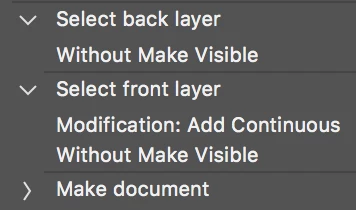
I have used “relative” keyboard shortcuts to navigate and select the layers rather than “absolute” recordings.
NOTE: The updated script code has been removed for reworking...





 AdChoices