

Whatevermajorloser
Inspiring
June 24, 2015
Answered

Script UI dialogs not displaying correctly on any Photoshop version older than CC 2015..

  • June 24, 2015
  • 2 replies
  • 1438 views

Hello,

I've written a script to display a dialog with a list of buttons as options. Having tested this on my computer at home and work (both of which have the latest version of Photoshop CC 2015 installed), the dialog displays all options fine. Like so:
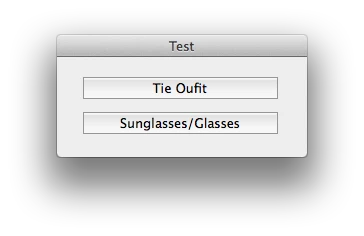
For some reason though, when I try to run this script on any Photoshop version older than the one I have, the second option just doesn't appear:
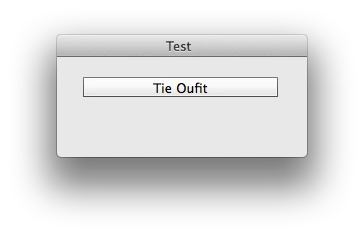
This is the code I am using for this particular dialog:

var dlg = new Window('dialog', 'Test',[1200,540,1450,640]);

            dlg.btnPnl = dlg.add('group', [20,20,315,190],);

            dlg.btnPnl.TieOutfit = dlg.btnPnl.add('button', [6,0,201,20], 'Tie Oufit', {name:'ok'}); // Tie Outfit

            dlg.btnPnl.Glasses = dlg.btnPnl.add('button', [6,35,201,20], 'Sunglasses/Glasses', {name:'ok'}); // Sunglasses/Glasses Outfit

            dlg.btnPnl.TieOutfit.onClick = function() { loadTemp('file:///Volumes/Creative/images/TEMPLATES/Mr%20P%20SHIRT%20FOR%20TIE%20OU%20SHOT/TIE%20OU%20SHIRT.tif', 'TIE OU SHIRT.tif'); }; //Loads Tie Outfit Template

            dlg.btnPnl.Glasses.onClick = function() { doAction('[Sunglasses]', 'Template Loader') }; //Loads Sunglasses/Glasses action


            dlg.show(); // Shows the Dialog

After reading the forums, I've become aware of an issue with groups blocking each other out, as detailed here: Photoshop Help | Photoshop UI toolkit for plug-ins and scripts. But surely - if I understood it correctly, this should be happening on my version of Photoshop rather than the older ones?

I've tried changing the size of the dialog etc, but nothing seems to work. I'm new to Javascript (and programming in general) and so would appreciate any help I can get!

This topic has been closed for replies.
Correct answer I have gone

It should be this:-

dlg.btnPnl.Glasses = dlg.btnPnl.add('button', [6,35,201,55], 'Sunglasses/Glasses', {name:'ok'}); // Sunglasses/Glasses Outfit 

Left , Top, Right, Bottom

Your code is putting both buttons at 20 pixels.

2 replies

Pedro Cortez Marques
Legend
June 26, 2015

ScriptUI has inner default values that we can use when creating our panels.

Try this:

var dlg = new Window('dialog', 'Test');

dlg.margins = 20; // default = 15 // pixels arround the inner group. It coud be also dlg.margins = [10,0,20,40]; for different margins

dlg.btnPnl = dlg.add('group');

dlg.btnPnl.orientation = "column";

dlg.btnPnl.spacing = 20; // default = 10 // space between the childrens in the group

dlg.margins = 0; // default = 0  // It coud be also dlg.margins = [10,0,20,40]; for different margins

// if xy = undefined, then the width/height are relative to button itself, other wise are absolute (relative to panel)

dlg.btnPnl.TieOutfit = dlg.btnPnl.add('button', [undefined,undefined,201,20], 'Tie Oufit', {name:'ok'});

dlg.btnPnl.Glasses = dlg.btnPnl.add('button', [undefined,undefined,201,20], 'Sunglasses/Glasses', {name:'ok'});

dlg.btnPnl.TieOutfit.onClick = function() { alert("bt1"); };

dlg.btnPnl.Glasses.onClick = function() { };

dlg.show();

Whatevermajorloser
Inspiring
June 28, 2015

Hi Pedro, that's a much simpler way than I was doing it! It works great, thank you very much!

Is there a thorough guide around anywhere for using script UI in photoshop?

Pedro Cortez Marques
Legend
June 29, 2015

Dispite the name (I didn't name it) here it is:

ScriptUI for dummies | Peter Kahrel (pdf)


The next links helps to get the "should be" only environment of scriptUI on photoshop, bridge, indesign, ESTK, etc, but each of this apps have different bugs depending on the inner framework implemented (and not updated for years, neither in projection of debugging in the future). But, in the middle of the all, some stuff is still working.

Adobe InDesign CS4 (6.0) Object Model JS: ScriptUIGraphics

Adobe Illustrator CS6 Type Library JS: UIEvent

CS3 JS: Table of Contents, ScriptUI Classes

I have goneCorrect answer
Inspiring
June 24, 2015

It should be this:-

dlg.btnPnl.Glasses = dlg.btnPnl.add('button', [6,35,201,55], 'Sunglasses/Glasses', {name:'ok'}); // Sunglasses/Glasses Outfit 

Left , Top, Right, Bottom

Your code is putting both buttons at 20 pixels.

Whatevermajorloser
Inspiring
June 24, 2015

Philip, thank you so much for your quick response! That has indeed fixed it (so obvious now that I see it..), but I'm curious as to why this wasn't an issue in CC 2015?

Inspiring
June 24, 2015

Maybe a bug in CC2015