


Legend
April 8, 2020
Answered

[Scripting actions] Is there a way to determine if an action is currently being recorded?

  • April 8, 2020
  • 3 replies
  • 2835 views

Is there a way to determine if an action is currently being recorded?

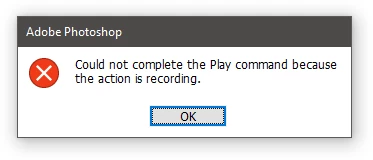
The most obvious way is to try playing a known action or run menu items that are usually locked during recording (for example, duplicate a command, delete a command, etc.). If an error occurs, then recording is in progress. However, in this case, a system dialogue appears that cannot be suppressed by try... catch or DialogModes.NO 😞
 

Correct answer r-bin

try to ctreate droplet from this action.

3 replies

JJMack
Community Expert
Community Expert
April 8, 2020

Plug-in scripts sort or do that. While recorging an action you can record using a script. When you record a step menu File>automate>Fit Image.... The fit image script will open its dialog so you can enter the width height and option. When you Click The script will record the settings you entered into its dialog into the action step and do the document constrain resize. The settings may be written bey the action recorder because if the code in the first 1000 characters in the script.  When the action is played the action players will pass a message to the script ant the script will bypass displayine its dialog and uset the pass setting if you did nit force the dialoog to be displayed vvia checking thr mernu boox in the action step 

JJMack
jazz-yAuthor
Legend
April 9, 2020

My script already works in plug-in mode. The problem is not in editing and saving the settings, but in fact that the script should start the action in which it recoredered itself as a result of its work. Because of this, a system dialog appears with a message about the impossibility of starting the action in the recording process (which, however, does not affect the recording of the action and its launch with the settings are successfully recorded as a command).
The problem with launching an action during the recording process can be solved in two ways - either to "understand" that the operation is being recorded and not to activate the launch of the action inside the script, or to disable the launch of the action in normal script operation mode. So far I have chosen the second option, but I am looking for ways to implement the first.

P.S. the script is very simple - it launches the active action sequentially for each selected layer. However, I decided to add a little recursion and added the ability to run the same action into which the script itself was recorded - the problem occurs when recording at this point

Kukurykus
Legend
April 9, 2020

Did 'Insert Menu Item' not work as well?

r-binCorrect answer
Legend
April 8, 2020

try to ctreate droplet from this action.

jazz-yAuthor
Legend
April 9, 2020

A droplet is simply created without causing any errors or changing the state of the action record.

Legend
April 9, 2020

You are confusing something. If the action is playing or recording, then it will not work to make a droplet from it. The error is easily caught.

Nancy OShea
Community Expert
Community Expert
April 8, 2020

Open your Actions Panel.

If the round record button is red, you are recording an action.

To stop recording, hit the square stop playing/recording button to the left.

See screenshot.


Nancy O'Shea— Product User & Community Expert
jazz-yAuthor
Legend
April 8, 2020

... tag is "Actions and scripting". I want to do it not by my eyes, but in script 🙂