
Participating Frequently
September 14, 2022
Question

Scripting an answer for Warning Dialogue Box
  • September 14, 2022
  • 4 replies
  • 646 views


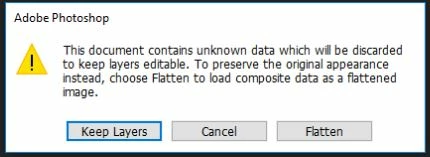
During an automated process, is there a way to script an answer to this warning dialogue box? The correct choice in the process always is "Flatten". Is there a way to automatically chose this option via a script or process, or setting so the automated process does not automatically go with "Keep Layers"? 


I know there is a way to supress Dialogs but is there a way to change their default answers? 


This topic has been closed for replies.

4 replies

Legend
September 15, 2022

As an option.

Use some third party psd to tif(jpg,png,etc) converter working from the command line.

Instead of opening psd(b), run the converter with app.system() and then open the converted file.

M RankinAuthor
Participating Frequently
September 15, 2022

That might be an option as well. Thanks.

Stephen Marsh
Community Expert
Community Expert
September 14, 2022

You can try this code:


// Save the current dialog display settings
var savedDisplayDialogs = app.displayDialogs;
// Disable dialog display
app.displayDialogs = DialogModes.NO;
// Open a file dialog
open(File.openDialog("Please select the file:"));
// Restore the dialogs
app.displayDialogs = savedDisplayDialogs;


This is for a single file, it is of course possible to open multiple files, or a folder, or hard code a specific file etc.

M RankinAuthor
Participating Frequently
September 15, 2022

Unfortunately if you suppress the dialogues it opens the file without the gradient map before you can flatten it. Then it just flattens the incorrect appearance and saves anyway. We were trying to find a way to prevent that from happening by addressing thte dialog choice before it has the chance to open incorrectly.  Thanks for the help though. 

Stephen Marsh
Community Expert
Community Expert
September 15, 2022

There are 3rd party macro tools which can record and play mouse movements/clicks and keyboard.

Stephen Marsh
Community Expert
Community Expert
September 14, 2022

Can you provide a link to an image that triggers this dialog?

M RankinAuthor
Participating Frequently
September 14, 2022

https://drive.google.com/file/d/107uNJKgaG3vBIjtBC1bcsxi75YNJszBb/view?usp=sharing


This was built in a new version than 22.5.6 that is running the hot folder. If you open it in 22.5+ it might not trigger the warning. = \

Stephen Marsh
Community Expert
Community Expert
September 14, 2022

I don't get any warning in Ps 2022 (23.5.1)... While in Ps 2021 (22.5.9) I receive the following message, which is different to your screenshot:


I also receive a message about missing fonts in the text layers, which is expected.


Mylenium
Legend
September 14, 2022

I don't think you can change that behavior, as it's automatically derived from selections, edit states of layers and what secondary data they contain. Depending on what you actually do you can probably use other methods and create custom dialogs if needed. This particular dialog for instance would likely not appear if you built the relevant checks into your script and then do a manual merge layers / flatten instead of relying on the pre-check done by the save functions.


Mylenium