


Participant
Mar 15, 2018 11:21 PM UTC
Question

Scripting support for the FILTER GALLERY

Hello folks!

I use a lot of photoshop scripting and digging through the documentation i was not able to find scripting support for a photoshop feature that i think can be really useful. Under the Filter Menu tab , Photoshop 2017.0.1 has a plug in "Filter Gallery" ...

If you access that menu item you will see something like this ...
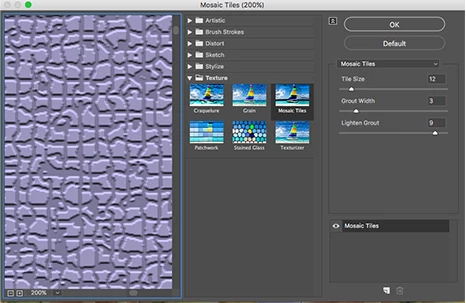
I am trying to find away to access this feature via script to no avail ...
In the scripting reference i found no way of accessing this app feature , nor any ArtLayers methods that could be used to apply effects from this menu...
I would appreciate any advice OR if Photoshop Scripting​ would provide us with such feature!
It is located under Filter > Filter Gallery ...

This topic is closed to new replies. Start a new post to keep the conversation going.

5 replies

tokuredit
Inspiring
Mar 16, 2018 12:02 AM UTC

executeAction( charIDToTypeID( "GEfc" ), new ActionDescriptor(), DialogModes.ALL );

Translate
Kukurykus
Legend
Mar 16, 2018 12:06 AM UTC

With SL you got more options:

function cTT(v) {return charIDToTypeID(v)}; function sTT(v) {return stringIDToTypeID(v)}

function mP(v1, v2, v3) {

     (dsc1 = new ActionDescriptor()).putEnumerated(cTT('GEfk'), cTT('GEft'), sTT('mosaicPlugin'))

     dsc1.putInteger(sTT('tileSize'), v1), dsc1.putInteger(sTT('groutWidth'), v2)

     dsc1.putInteger(sTT('lightenGrout'), v3), executeAction(cTT('GEfc'), dsc1, DialogModes.NO);

}

mP(12, 3, 9)

Translate
Wes AdamsAuthor
Participant
Mar 19, 2018 5:19 PM UTC

@tokuredit  Thank you gentlemen !

Translate
Kukurykus
Legend
Mar 15, 2018 11:59 PM UTC

You need ScriptListener.8li plugin: Downloadable plug-ins and content in Photoshop

Translate