
Participant
March 21, 2026
Answered

ScriptingListener et Photoshop 2026: cela fonctionne t-il ?

  • March 21, 2026
  • 6 replies
  • 42 views

Bonjour, Je parviens à charge le plug-in scripting listener et je le mets dans le dossier prévu plugins de l’application Photoshop 2026. Mais je ne trouve pas de fichier log tel que décrit après une suite d’actions simples. Faut-il enregistrer ce fichier (et alors comment) ?) ou y a-t-il une autre explication ?

Merci
    Correct answer Jeff Arola

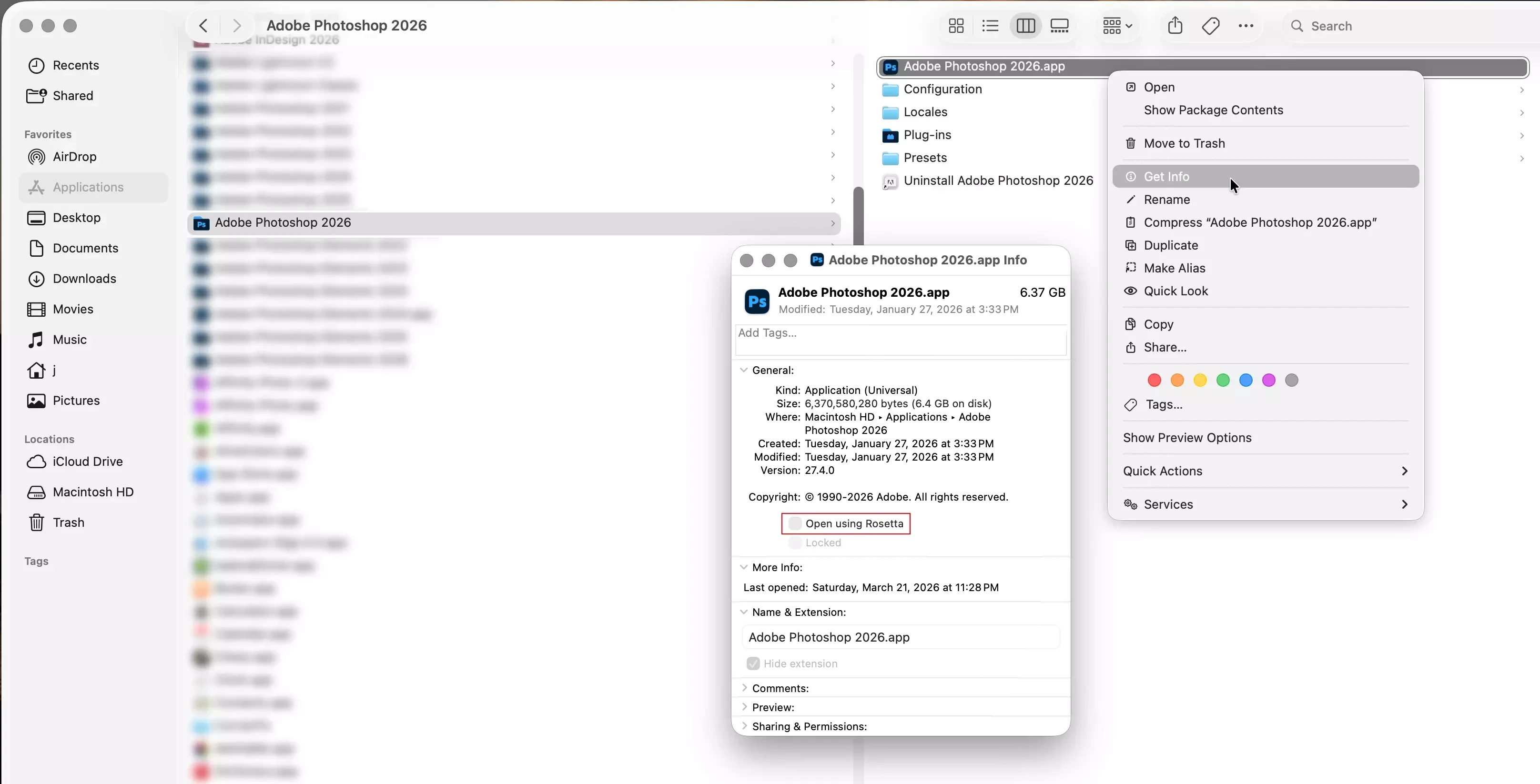
    You need to run Photoshop 2026 under Rosetta for the ScriptingListener plug-in to work on a Mac with an Apple Silicon processor.


    You can do that by going to Applications/Adobe Photoshop 2026

    right clicking on the Adobe Photoshop 2026.app, click Get Info, then click the checkbox for Open using Rosetta.


    6 replies

    jaladuvarAuthor
    Participant
    March 23, 2026

    I’ll have a look at it. Thanks

    Inspiring
    March 23, 2026

    I stopped using Script Listener when I found the amazing Alchemist plugin which creates much cleaner & easier to read BatchPlay functions ! 

    jaladuvarAuthor
    Participant
    March 21, 2026

    Thank you, I haven’t known this. Apparently Rosetta will be available until OS 27...

    Jeff Arola
    Community Expert
    Jeff ArolaCommunity ExpertCorrect answer
    Community Expert
    March 21, 2026

    You need to run Photoshop 2026 under Rosetta for the ScriptingListener plug-in to work on a Mac with an Apple Silicon processor.


    You can do that by going to Applications/Adobe Photoshop 2026

    right clicking on the Adobe Photoshop 2026.app, click Get Info, then click the checkbox for Open using Rosetta.


    jaladuvarAuthor
    Participant
    March 21, 2026

    I did follow the instructions. But after making a few tasks on one photo no record of the log file. Where is it I go wrong ?

    my installation Mac OS 26.3.1 MacMini m4 pro


    Ged_Traynor
    Community Expert
    Community Expert
    March 21, 2026

    Sorry I’m not a Mac user, I tested on my Windows PC, and it worked as expected, hopefully someone that uses a Mac will see this thread and help you out

    Ged_Traynor
    Community Expert
    Community Expert
    March 21, 2026

    @jaladuvar did you follow the instructions here

    https://helpx.adobe.com/photoshop/kb/downloadable-plugins-and-content.html

    I just installed it to test, and the log files are created on the desktop as per the instructions, using Photoshop version 27.4