Known Participant
March 2, 2025
Answered

select Skin tones and make it to new layer using script

  • March 2, 2025
  • 1 reply
  • 334 views

Hi everyone,

I want to do the following work by script but I don't know how to do it, 

I always do this:

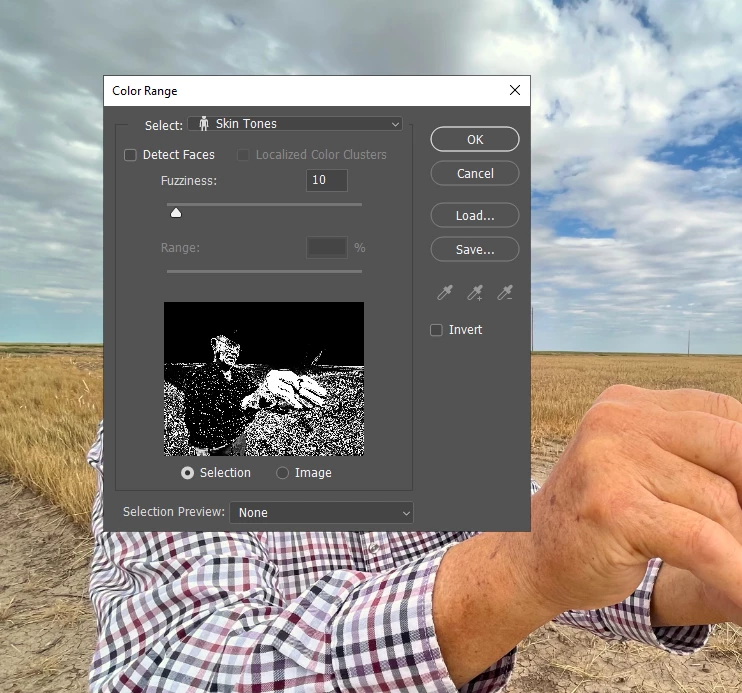
Step 1:  go to Select Menu -> Color Range
   select: Skin Tones
   Fuzziness: 10
   -> Click OK

Step 2:  Ctrl + J (make the selection range to a new layer).


please guide me, I appreciate your help.

Correct answer Stephen Marsh

@powerful_Zephyr5EF9 – Have you downloaded and installed the ScriptingListener plugin?


https://helpx.adobe.com/au/photoshop/kb/downloadable-plugins-and-content.html


This is necessary for things the basic Photoshop ExtendScript DOM does not cover.


Doing so would give you something like this:


var idcolorRange = stringIDToTypeID( "colorRange" );
    var desc376 = new ActionDescriptor();
    var idfuzziness = stringIDToTypeID( "fuzziness" );
    desc376.putInteger( idfuzziness, 10 );
    var idcolors = stringIDToTypeID( "colors" );
    var idcolors = stringIDToTypeID( "colors" );
    var idskinTone = stringIDToTypeID( "skinTone" );
    desc376.putEnumerated( idcolors, idcolors, idskinTone );
    var idcolorModel = stringIDToTypeID( "colorModel" );
    desc376.putInteger( idcolorModel, 0 );
executeAction( idcolorRange, desc376, DialogModes.NO );

var idcopyToLayer = stringIDToTypeID( "copyToLayer" );
executeAction( idcopyToLayer, undefined, DialogModes.NO );


1 reply

Stephen Marsh
Community Expert
Stephen MarshCommunity ExpertCorrect answer
Community Expert
March 2, 2025

@powerful_Zephyr5EF9 – Have you downloaded and installed the ScriptingListener plugin?


https://helpx.adobe.com/au/photoshop/kb/downloadable-plugins-and-content.html


This is necessary for things the basic Photoshop ExtendScript DOM does not cover.


Doing so would give you something like this:


var idcolorRange = stringIDToTypeID( "colorRange" );
    var desc376 = new ActionDescriptor();
    var idfuzziness = stringIDToTypeID( "fuzziness" );
    desc376.putInteger( idfuzziness, 10 );
    var idcolors = stringIDToTypeID( "colors" );
    var idcolors = stringIDToTypeID( "colors" );
    var idskinTone = stringIDToTypeID( "skinTone" );
    desc376.putEnumerated( idcolors, idcolors, idskinTone );
    var idcolorModel = stringIDToTypeID( "colorModel" );
    desc376.putInteger( idcolorModel, 0 );
executeAction( idcolorRange, desc376, DialogModes.NO );

var idcopyToLayer = stringIDToTypeID( "copyToLayer" );
executeAction( idcopyToLayer, undefined, DialogModes.NO );

Known Participant
March 2, 2025

it's work.

thank you very much.

Stephen Marsh
Community Expert
Community Expert
March 3, 2025

You're welcome.