

jakael3
Participant
June 4, 2026
Question

Selection brush tool usage on the same area causes deselection

  • June 4, 2026
  • 1 reply
  • 15 views

This issue is on Photoshop 27.7 and Photoshop (Beta) as well. I’m using a macbook with macOS 26. 

Whenever I use selection brush tool to select a part of an image, then if I use it again and it intersects with the selection i had previously created, that intersected part gets de-selected for some reason even though the “ADD” function is on. This problem should be fixed and it’s been a nuisance for a long time now. 
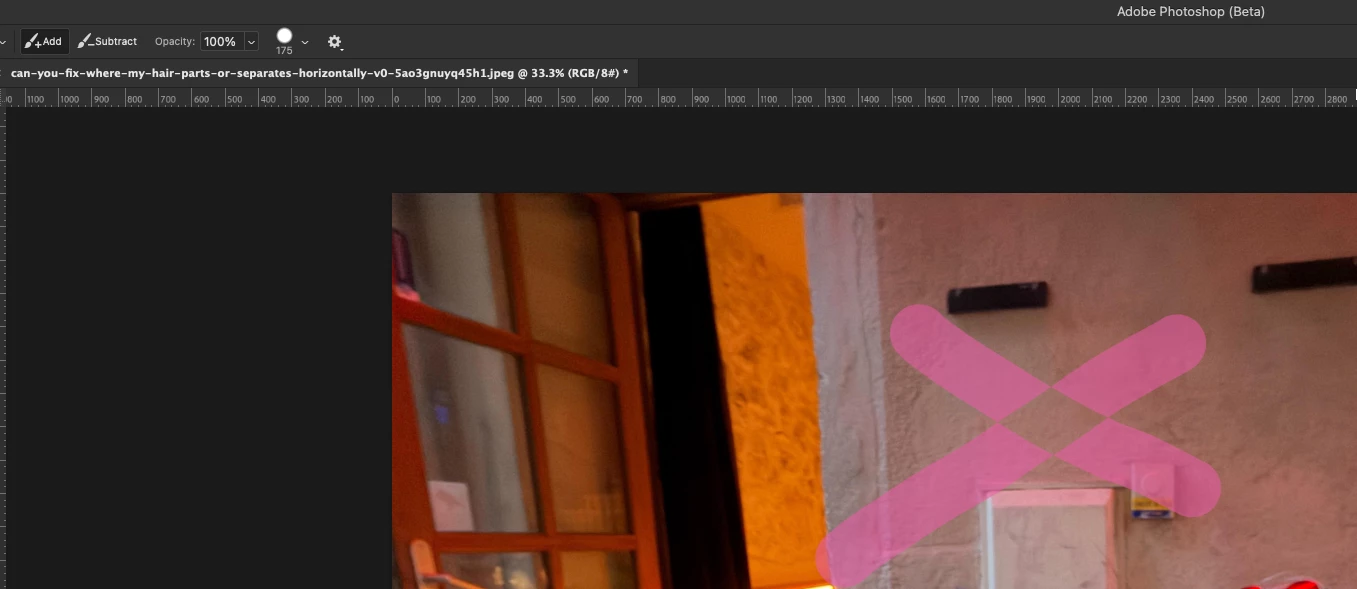
As you can see, the “ADD” function is on, and the place where the pink lines intersect get de-selected. 


    1 reply

    Sameer K
    Community Manager
    Community Manager
    June 4, 2026

    Hey, @jakael3. Welcome to the Photoshop Community. I'll need more info to help you figure this out. 

    I just tried this and couldn’t reproduce it; Photoshop behaved normally.


    In this case, you can start by resetting the Selection Brush Tool. Right-click the Tool icon in the Toolbar menu, then select Reset Tool.


    Thanks! 
    Sameer K

    (Type '@' and type my name to mention me when you reply)