
Participating Frequently
November 1, 2021
Answered

Selection tool not working correctly

  • November 1, 2021
  • 2 replies
  • 33229 views

Photoshop version 23.0.0 and windows 10.

Selection tool just makes random selection. Simple click makes also random selection dragging the click jumsp between random selections.

Video attached
Correct answer marliton

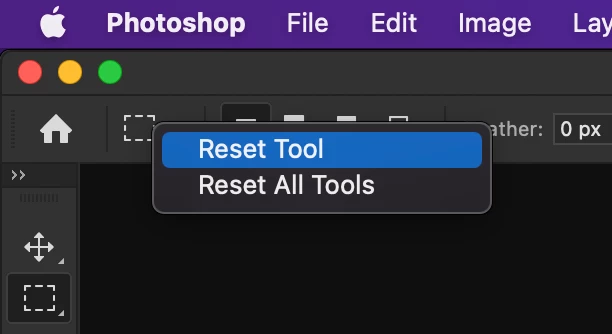
Hi. Please try Reseting the selection tool: Select the Selection tool, right-click (Win) / Control-click (Mac) on the Tool Presets icon (in the Options panel) and select Reset Tool from the menu.


2 replies

marjappee
Participant
February 10, 2026

I have the same problem with selection tools and some other tools. They live their own lives when I use them. I reset them all but didn’t get help. I have lot of works and I really need help. 

Ged_Traynor
Community Expert
Community Expert
February 10, 2026

@marjappee you’re replying to a 4-year-old thread, there’s a more recent thread here


marliton
Community Expert
marlitonCommunity ExpertCorrect answer
Community Expert
November 1, 2021

Hi. Please try Reseting the selection tool: Select the Selection tool, right-click (Win) / Control-click (Mac) on the Tool Presets icon (in the Options panel) and select Reset Tool from the menu.


Marlon Ceballos
Participant
January 21, 2023

Maybe try resetting the tools that are working on this software.  I've used it for 20 years and have had more issues in the last few months like this than I can ever remember.

For instance, I have had to restart Photoshop over 20 times because something as simple as (CTRL-T) will generate the bounding box but you cannot click and drag, or anything.  The resolution?  Completely shut down the software and close all open projects - then restart - and voila!  Fixed.

Seriously.  You're getting lazy.