
Participant
September 27, 2023
Answered

Serious problem with Photoshop menus [RightFont]

  • September 27, 2023
  • 23 replies
  • 4892 views

Hello, I have a serious problem with Photoshop. Cannot access any menu. After clicking menu item, i.e. "Image" submenu appears but I cannot go any further. It flickers, disappears randomly when I move mouse pointer over it, all submenu items are greyed out. It started with Photoshop 2023 few weeks ago, after PS 2024 update it was OK for a couple of days but now it's back. PS is now basically useless. Resetting preferences, clean reinstall, trying different mouse didn't help. My setup: Mac Mini M1, Photoshop 25.0.0, Mac OS 14.0. Any help, please?


["RightFont" added to subject line by moderator to assist others who search]
This topic has been closed for replies.
Correct answer

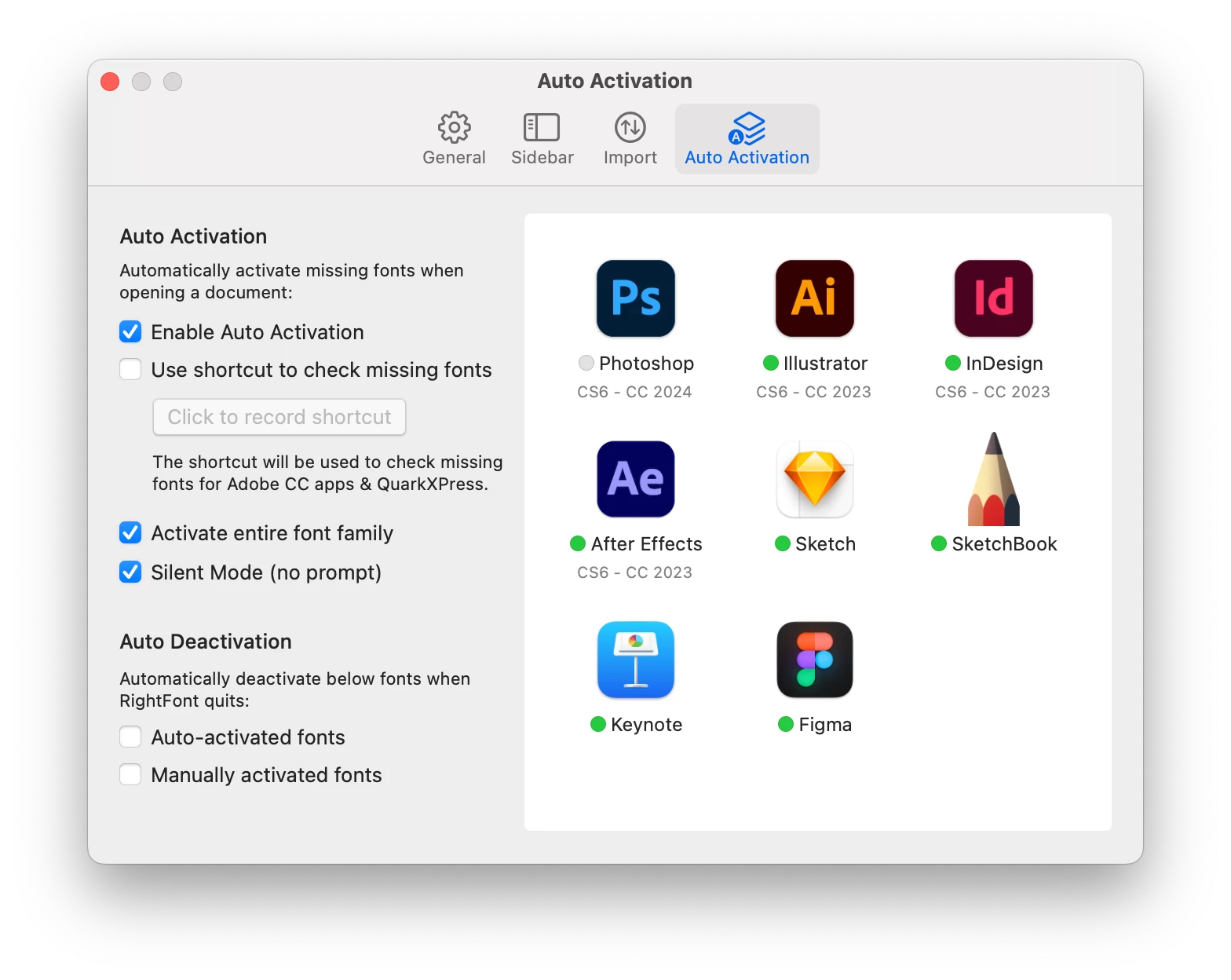
Just to add to this solution, it seems that you can keep RightFont running and just disable the auto-activation feature for Photoshop. In RightFont settings, click the green circle next to Photoshop to deactivate the feature. They are now working alongside eachother just fine. 

23 replies

jane-e
Community Expert
Community Expert
October 1, 2023

@petewaw 


Try resetting Preferences. If you do it manually by renaming the file, a new file will be created when you relaunch, but you can retrieve the old one if neeeded.

https://helpx.adobe.com/photoshop/using/preferences.html


Jane

dpcom
Participating Frequently
October 1, 2023

Hello

I am facing the same issue on MacOS; it's impossible to use Photoshop 2024 or even Photoshop Beta. The menus are flickering and cannot be accessed. I've been using MacOS Sonoma for a few days, and everything was working fine initially. However, after a few days, Photoshop became unusable. Please, can you help me?

Best

David from France, Paris


themarinacc
Participating Frequently
September 27, 2023

Ciao,

since i've updated to Mac OSX Sonoma when i go with the mouse for example to the Edit - Transform and try to reach the Flip Horizontally the submenu suddenly disappear, it flicker and then all the voices are disabled and the submenu keep flashes on.

Same problem on two different computer.

Any idea?

September 27, 2023

I'm having the exact same issue and can't find a solution. Tried downgrading to v24 and v22 but they all have the same issue.

Even trying to navigate menus using the keyboard is useless as the selection keeps jumping around.

Photoshop is completely unusable. Should've known better than to upgrade to a new macOS right away.