Known Participant
April 9, 2025
Answered

Set measurement scale

  • April 9, 2025
  • 1 reply
  • 343 views

I am not clear on how to use the "Set measurement scale" function.
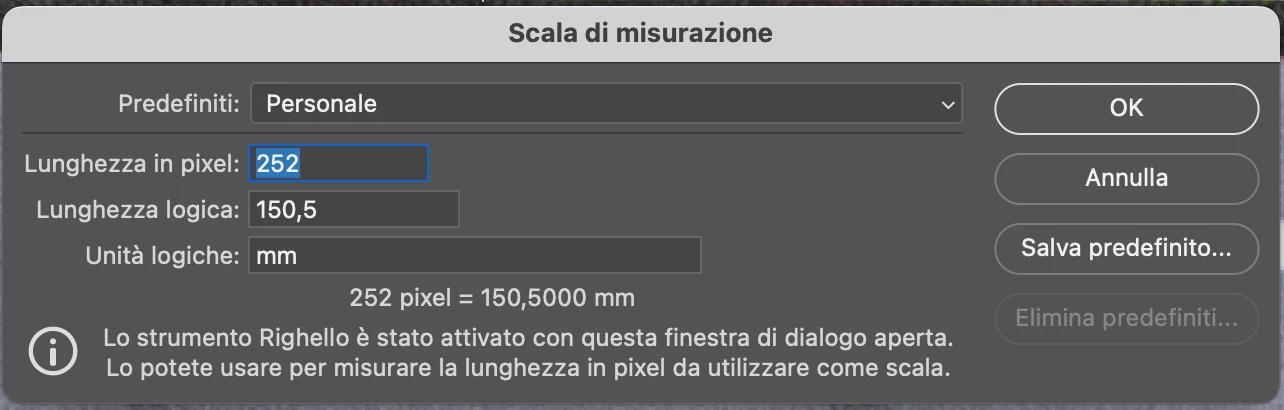
I set the value of 250 as pixel length and 150.5 as logical length, unit of measurement millimeters.
but when I go to measure with the ruler the measurements do not match.



Correct answer davescm

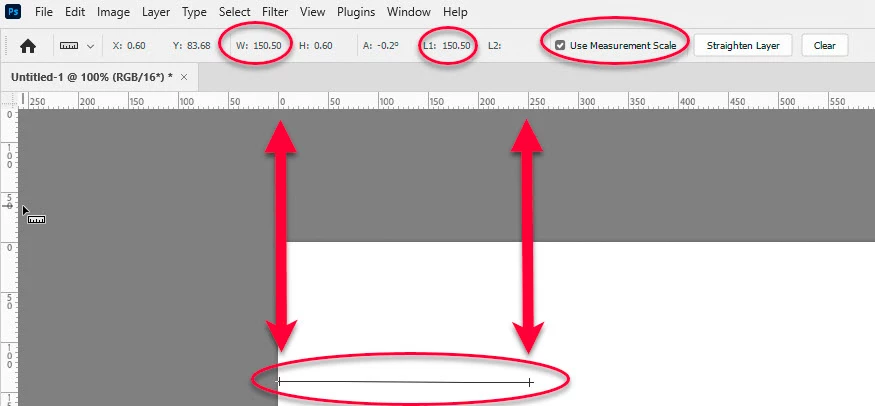
Your screenshot shows 252 pixels not 250 but, that aside, I've just tested the measurement ruler set to 250 pixels and 150.5mm as you describe. I made sure that 'Use Measurement Scale' was set in the options bar and drew out a ruler line of 250 pixels. The reading showed 150.5 as expected.


This is Photoshop v 26.5 on Windows 11


Dave

1 reply

davescm
Community Expert
davescmCommunity ExpertCorrect answer
Community Expert
April 9, 2025

Your screenshot shows 252 pixels not 250 but, that aside, I've just tested the measurement ruler set to 250 pixels and 150.5mm as you describe. I made sure that 'Use Measurement Scale' was set in the options bar and drew out a ruler line of 250 pixels. The reading showed 150.5 as expected.


This is Photoshop v 26.5 on Windows 11


Dave

Known Participant
April 9, 2025

you are right.

my wrong was to search the value in the info panel instead of the area you signed with red circle.

thx

davescm
Community Expert
Community Expert
April 9, 2025

No problem. I'm glad it is sorted. 🙂

Dave