

brucekorb
Inspiring
October 16, 2024
Answered

Setting the default image size resolution

  • October 16, 2024
  • 2 replies
  • 709 views

Surely there must be a way. Ultimately, the image is pixels by pixels, but when I want to ready an image for printing to a particular size, I first resize the image to fit in the 4X5 or 4X6 or 8X16 or whatever image I'm creating. But, to do that, I must either multiply those numbers by 300 and do it in pixels or I have to remember to change the resolution from 240 to 300. It'd be really nice to have the "image size" window pop up in 300 dpi resolution by default, but I can't figure out how to do that. If that is not possible, then this is an RFE for Adobe.

This topic has been closed for replies.
Correct answer D Fosse
quote

have to remember to change the resolution from 240 to 300.


By @brucekorb


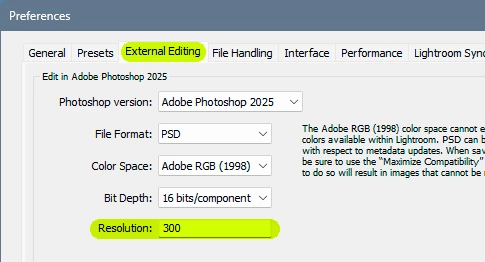
Sounds like you're opening from ACR or Lightroom Classic (where 240 is the default number). Change it there.


But correct, there's nothing special about the 300 number. It's just a theoretical upper limit for a 150 lines per inch halftone screen (pretty standard for offset book/magazines). It's the point where individual pixels disappear in the halftone screen. Any higher resolution is wasted - but it can still look perfectly sharp at lower resolution. The sharpness is determined by the halftone screen.


Optimal ppi decreases with bigger size and hence increased viewing distance. A billboard can be 10 ppi and razor sharp.


So, for people working at bigger sizes than a magazine spread, 300 ppi makes no sense.

2 replies

D Fosse
Community Expert
D FosseCommunity ExpertCorrect answer
Community Expert
October 16, 2024
quote

have to remember to change the resolution from 240 to 300.


By @brucekorb


Sounds like you're opening from ACR or Lightroom Classic (where 240 is the default number). Change it there.


But correct, there's nothing special about the 300 number. It's just a theoretical upper limit for a 150 lines per inch halftone screen (pretty standard for offset book/magazines). It's the point where individual pixels disappear in the halftone screen. Any higher resolution is wasted - but it can still look perfectly sharp at lower resolution. The sharpness is determined by the halftone screen.


Optimal ppi decreases with bigger size and hence increased viewing distance. A billboard can be 10 ppi and razor sharp.


So, for people working at bigger sizes than a magazine spread, 300 ppi makes no sense.

Legend
October 16, 2024

300ppi is not magical nor always the best resolution for printing. And you could use a script or preset if you absolutely MUST have a specific size and resolution. Some of us wouldn't want a default 300ppi setting, so having that automatically selected is a hard no here.

brucekorb
brucekorbAuthor
Inspiring
October 16, 2024

I understand that. I don't want 300 dpi for everyone always, I want to change the default on only my system, probably only for a particular session at that. *THIS* time, I changed 240 to 300 on all 20 images I prepped for printing. Anyway, it seems that setting the image size in PS defaults to the dpi passed in by LR. SO, that's the fix. Not especially obvious to me.