makusvdw
Participating Frequently
July 21, 2026
Question

Shadows/Highlights Radius resetting after any changes

  • July 21, 2026
  • 2 replies
  • 27 views

When applying Shadows/Highlights (show more options) the radius settings for both Shadows and Highlights reset every time you make a change anywhere in the dialogue box.

  • Photoshop 27.8.0
  • MacOS 26.5.2
  1. With an image open
  2. Image > Adjustments > Shadows/Highlights
  3. Show more Options selected make ajustments, e.g. set Shadow value, set Tone value, set Radius value. When you attempt to make any other change Radius resets back to 0.

In the previous versions Radius did not reset.

Video attached.

    2 replies

    Ged_Traynor
    Community Expert
    Community Expert
    July 21, 2026

    @makusvdw it seems to be a bug in the macOS version as it works fine for me with the modern user interface enabled on Windows 11

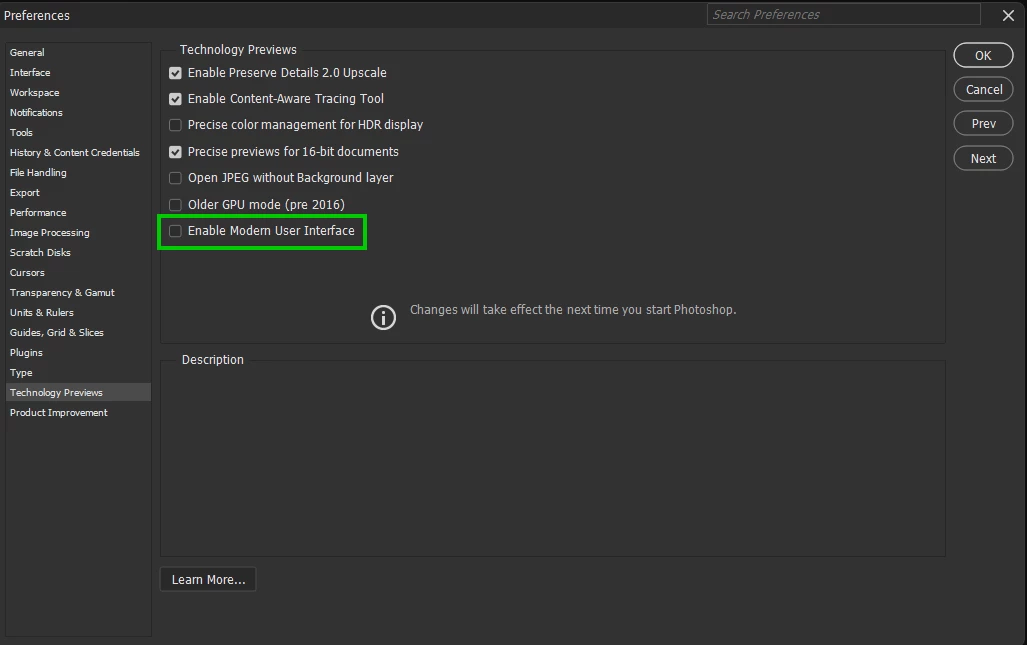
    The modern user interface option is still a work in progress and is more of a Beta option

    Sameer K
    Community Manager
    Community Manager
    July 21, 2026

    Hey, @makusvdw. Welcome to the Photoshop Community. I'll help you figure this out.

    I couldn't recreate this on macOS in my attempts. I tested on the latest version of Photoshop (beta) and couldn't reproduce it there either.


    It could be a case of corruption in Photoshop's preferences. Please ensure there are no stale preferences in your Photoshop. You can go to the location of the preference folder below and rename it to back it up. (https://adobe.ly/3u7u84j)

    This method is more effective compared to the in-app Reset Preferences at quit method. 


    macOS: Hold down the Option key in the Finder when using the Go menu. The library will appear below the current user's home directory.

    Library > Preferences > Adobe Photoshop [version] Settings

    Rename the Adobe Photoshop folder by adding a .old at the end. (Adobe Photoshop 2026 > Rename > Adobe Photoshop 2026.old)


    This will give Photoshop a fresh start as a new installation.

    Let me know if it helps. Thanks!
    Sameer K

    (Type '@' and type my name to mention me when you reply)

    makusvdw
    makusvdwAuthor
    Participating Frequently
    July 21, 2026

    @Sameer K Thank you for your response. I remove preference files every time I start teaching a new class. I started a new Photoshop class last week, so my preferences were deleted just before the first class started.

    But as a test I have cleared my preferences again, just to be sure.

    The issue still persists. 🧐

    Ged_Traynor
    Community Expert
    Community Expert
    July 21, 2026

    @makusvdw I cannot replicate the issue on my Windows PC, try disabling this option in the preferences and restarting Photoshop to see if it helps


    makusvdw
    makusvdwAuthor
    Participating Frequently
    July 21, 2026

    @Ged_Traynor That works… but that would mean that it is some bug and something they would need to fix.

    Deactivating modern user interface — panel works as expected.

    Switching to modern interface — same issue.