
Participating Frequently
July 22, 2024
Answered

Shift + Ctrl + C doesn't copy merged, opens chat box instead

  • July 22, 2024
  • 3 replies
  • 691 views

Help! My hotkeys seem to have siuddenly broken.

The basic function of making a lasso selection and using Shft+Ctrl+C to make a merged copy of the layers in the selection is no longer working. Instead it opens some weird chat / dialogue box that I've never seen or used before.

I can still use this function if I go to the Edit menu and select Copy Merged but the hotkey doesn't work.
This topic has been closed for replies.
Correct answer shoomlah

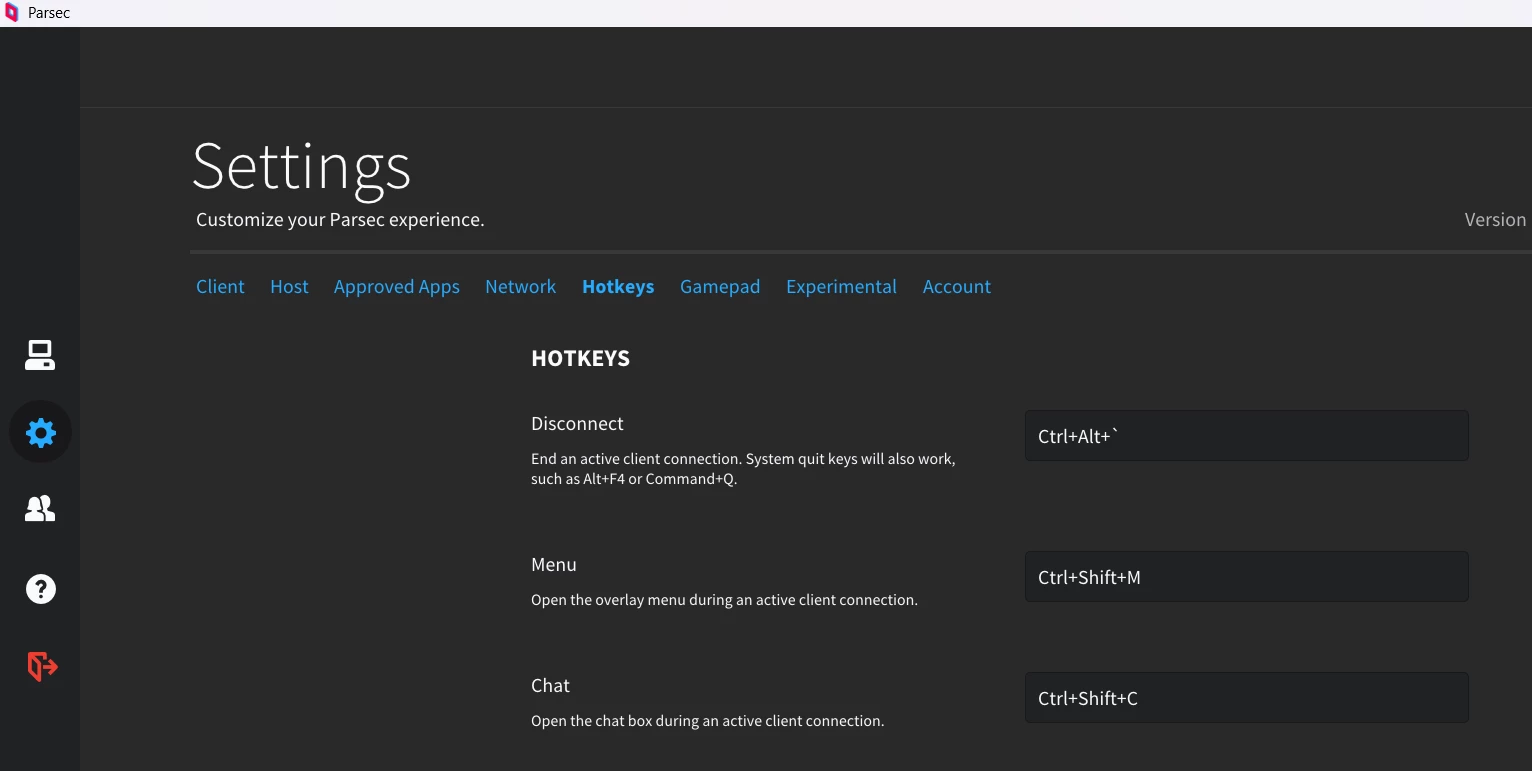
WELP just in case other folks run into this same issue: turns out it was a chat box being activated within Parsec, the remote desktop application I was using to access my home computer! For whatever reason it inexplicably has a built-in chat system with zero information or branding that can be pulled up with Shift+Ctrl+C, which I immediately disabled in the settings the moment I figured it out. Felt like I was going INSANE for a second there. 😑


3 replies

shoomlah
Participant
April 16, 2025

Did you ever find the solution to this issue? This suddenly started happening to me and I can't for the life of me figure out what's causing it.

shoomlah
shoomlahCorrect answer
Participant
April 16, 2025

WELP just in case other folks run into this same issue: turns out it was a chat box being activated within Parsec, the remote desktop application I was using to access my home computer! For whatever reason it inexplicably has a built-in chat system with zero information or branding that can be pulled up with Shift+Ctrl+C, which I immediately disabled in the settings the moment I figured it out. Felt like I was going INSANE for a second there. 😑


Participating Frequently
January 31, 2026

Thanks! I use Parsec for work, this must be the cause of the problem for me as well.

jane-e
Community Expert
Community Expert
August 13, 2024

@Kate27886979hdz4 


The keyboard shortcut to stamp layers is not Ctrl+Shift+C, which is also a Microsoft shortcut for a screenshot.


From Adobe Help for Stamp Visible:

You can disable the layers that you do not wish to stamp by turning off their visibility in the Layers panel and then pressing Shift+Opt+Cmd+E (macOS) / Shift+Alt+Ctrl+E (Windows). Also, you can hold Opt (macOS)/ Alt (Windows) as you select Merge Visible from the Layers panel’s menu to merge them into a new layer.

https://helpx.adobe.com/photoshop/using/layers.html#stamp-layers


Jane


Participating Frequently
August 13, 2024

I'm talking about using "Copy merged",  Shft+Ctrl+C.

I've always used this for creating a merged copy of whatever is in a selection. Never had issues with it before.


c.pfaffenbichler
Community Expert
Community Expert
July 24, 2024

Could you please post screenshots with the pertinent Panels (Toolbar, Layers, Options Bar, …) and the dialog visible? 

Is the shortcut assigned correctly under the Edit > Keyboard Shortcuts? 


If the dialog is not an actual Photoshop UI element it would seem that the shortcut has been assigned to something else on the OS level. 

Participating Frequently
August 13, 2024

Yes, it's assigned correctly in Photoshop's keyboard shortcuts. I've never changed the shortcut there.

This is the dialogue box that pops up. 

c.pfaffenbichler
Community Expert
Community Expert
August 13, 2024
quote

Yes, it's assigned correctly in Photoshop's keyboard shortcuts.

But that’s probably not the problem; it would seem that the shortcut has been assigned to something else on the OS level.