
Inspiring
January 31, 2017
Answered

Shortcut for close without saving?

  • January 31, 2017
  • 3 replies
  • 7343 views

Is there a shortcut for close without saving? I've doing a book-length project that will have a few thousand jpegs. After I've found the crop I like in the psd file I save it, change the image to size it will be used at, then save it as a jpg and then close the psd document without saving that last change (the reduction in size). It would be nice if I could avoid the "did you really mean to save without changing" dialog box.
    Correct answer Jeff Arola

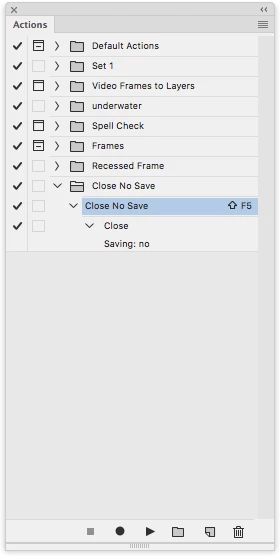
    You could record an action of closing a file without saving and then assign a function key as a shortcut.

    3 replies

    Participant
    December 12, 2023

    You can hold down the "D" key until all the images X out without saving.

    Participant
    December 12, 2023

     *when the Save / Don't save prompt window comes up 

    Benjamin Root
    Legend
    January 31, 2017

    Right before you close your next PSD, start an Action recording. Hit Ctrl+W or Cmd+W then choose "no" when it asks if you'd like to save. Stop the Action recording. Set a shortcut, such as Shift+F3, then use that to close the documents from now on.

    Hope this helps!

    Jeff Arola
    Community Expert
    Jeff ArolaCommunity ExpertCorrect answer
    Community Expert
    January 31, 2017

    You could record an action of closing a file without saving and then assign a function key as a shortcut.

    Inspiring
    January 31, 2017

    OMG!!!!!!!!!!!!