

Buckminster
Participant
Oct 5, 2023 9:56 PM UTC
Question

Shortcut Keys F5/F6+ Missing in Menus

Photoshop 25.0

macOS 13.5.2


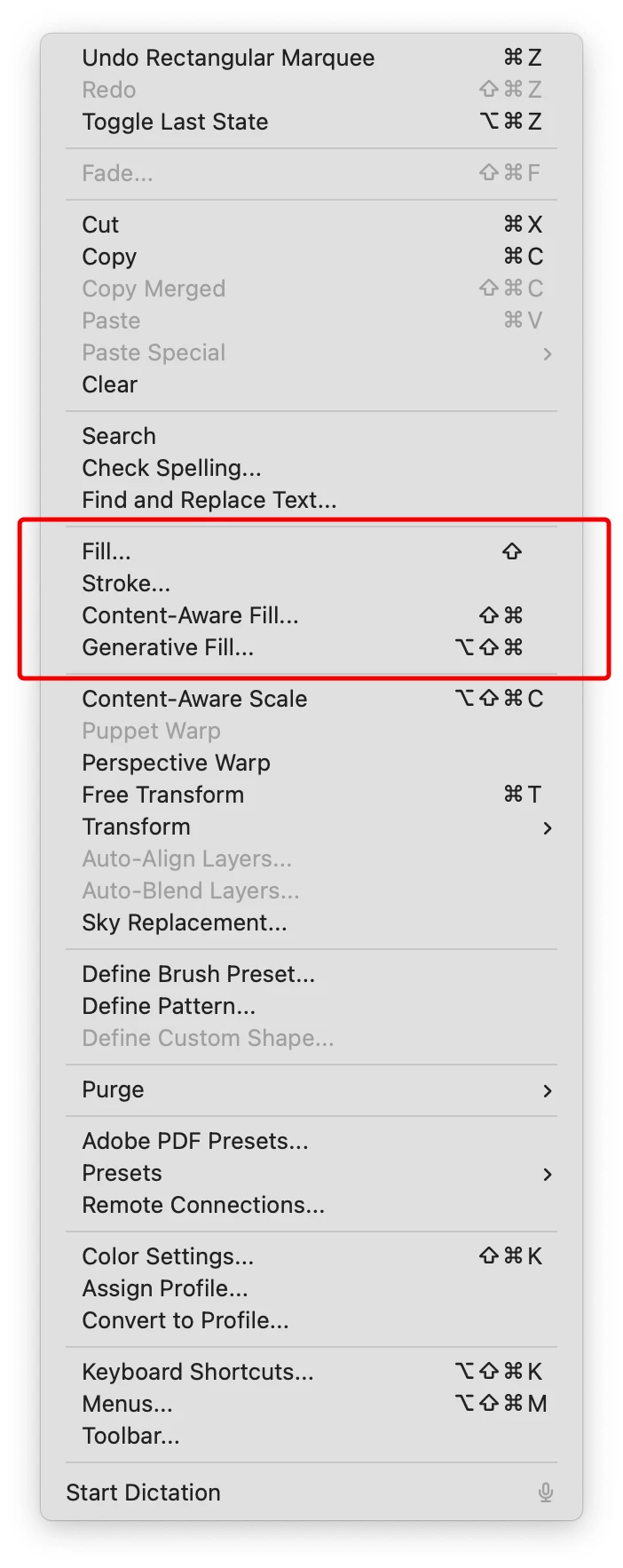
Steps: Assign custom function key shortcuts to fill, content-aware fill, and generative fill. Then click the Edit menu.

Expected Result: Function key shortcut full names appear next to menu items

Actual Result: Function keys missing
This topic is closed to new replies. Start a new post to keep the conversation going.

2 replies

Shangara Singh
Inspiring
Nov 20, 2023 8:29 AM UTC

The Photoshop team is aware of this bug. It's fixed in Ventura and Ps Beta.

Translate
Shangara SINGH.
Known Participant
Nov 20, 2023 8:15 AM UTC

Same problem with Photoshop 25.1.0 on macOS Sonoma 14.1.1 – all shortcuts (both custom and default) using function keys are missing in the menus. Very annoying!

Translate