Participant
November 18, 2023
Question

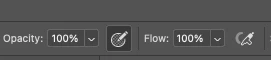
Shortcuts for opacity start switching the flow.
  • November 18, 2023
  • 2 replies
  • 255 views

Shortcuts for opacity start switching the flow.
Even without an enabled airbrush. The build-up feature is turned off in brush settings.

Does anyone know the reason?

This topic has been closed for replies.

2 replies

Jeff Arola
Community Expert
Community Expert
November 18, 2023

Is your Shift key stuck?


Are you using any kind of drawing tablet?


You could try a Tools reset and then if that doesn't work a photoshop preferences reset.


Reset the Brush Tool or all Tools by right clicking on the big Brush Tool icon on the lefthand side of the tool options bar


Reset photoshop preferences

https://helpx.adobe.com/photoshop/using/preferences.html

Participant
November 19, 2023

Thank you so much! Reset Photoshop preferences worked. For now it works properly 🙏❤️

Jeff Arola
Community Expert
Community Expert
November 18, 2023

What version of macOS and photoshop are you using?


Are you using the Brush Tool?


Do other painting tools with both opacity and flow such as the Eraser Tool or Clone Stamp Tool do the same?

Participant
November 18, 2023

Last version photoshop 25.1.0, macOS 13.2.1
Yes, it's happening with a brush tool.  I didn't notice that with an eraser. It have happened randomly