Participant
April 30, 2024
Answered

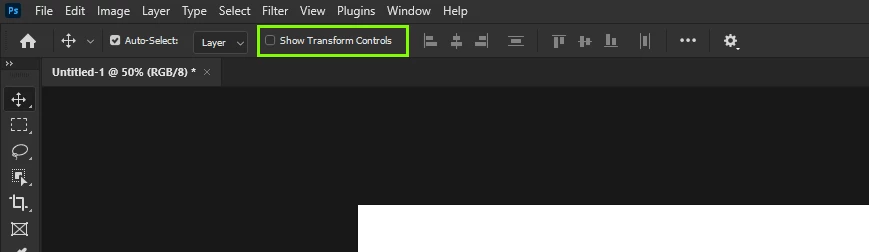
SHOW TRANSFORM CONTROL missing at the top

  • April 30, 2024
  • 3 replies
  • 891 views

It used to display here. Now i have to click the gear in order to access it. Can somebody help?

Correct answer Ged_Traynor

With Photoshop version 25.12 update, the "Show Transform Controls" is back to the original location

3 replies

Participant
August 21, 2025

Photoshop 26.9 appears to have done away with the Show Transform Contrls option again 😞

The Move Tool automatically triggers the Free Transform option from the Edit Menu and there's no way of deactivating it while the Move Tool is selected.

Anyone find a fix for this on PS 26.9?

Ged_Traynor
Community Expert
Community Expert
August 21, 2025

@Paulo-SPIRIT disable this option in the preferences and restart Photoshop

Participant
August 25, 2025

@Ged_Traynor That worked! Thanks a lot 🙂

Ged_Traynor
Community Expert
Ged_TraynorCommunity ExpertCorrect answer
Community Expert
September 11, 2024

With Photoshop version 25.12 update, the "Show Transform Controls" is back to the original location

gener7
Community Expert
Community Expert
April 30, 2024

Since this is a change at the program level, I don't know of a way to bring it back other than to downgrade to an earlier version that has it. I think you could get used to the extra step of clicking on the gear and checking the box there when you need it. Some Tools have a "Legacy (old way) Mode", but I don't see it here.


You could place a feature request here:

https://community.adobe.com/t5/photoshop-ecosystem/ct-p/ct-photoshop?page=1&sort=latest_replies&filter=all&lang=all&tabid=ideas&topics=label-macos

saml25Author
Participant
May 1, 2024

Thank you! I was not aware that was part of a program update. I thought I clicked something.