


sidpalas
Inspiring
Jun 1, 2018 7:43 AM UTC
Question

Simple Logging Utility

Hi Everyone --

I wanted a way to easily create unique log files for each run of my scripts so I wrote a simple library to help with that:

GitHub - sidpalas/extendscript-logging: logging utility for Adobe ExtendScript

I'm using Photoshop CC 19.1.3 on macOS High Sierra. If you are on another version/system YMMV (May need to tweak path definitions for Windows?).

Example usage can be found in main.jsx, the contents of which are included below:

#target photoshop

//@include "./logging.jsxlib"

var defaultLog = new LogFile();

defaultLog.log("Logging to the default log!");

defaultLog.log("Logging to the default log again...");

var normalLog = new LogFile('normal');

normalLog.log("Logging to the normal log!");

var specialLog = new LogFile('special');

specialLog.log("Logging to the special log!");

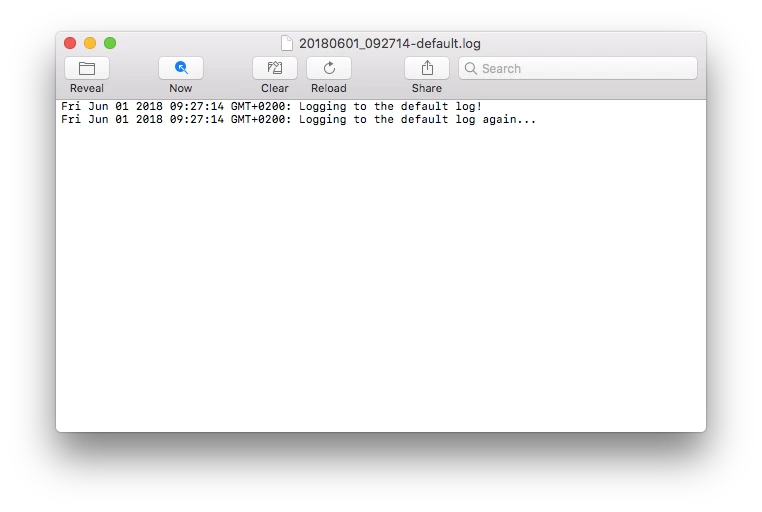
This produces 3 log files with a date/time stamp in the filename and each logged message:
Feel free to use/adapt to your needs. I'm happy to answer any questions people have about it as well.

Cheers,

Sid

Message was edited by: sid palas (changed syntax from original posting and updated usage examples)

This topic is closed to new replies. Start a new post to keep the conversation going.

5 replies

Geppetto Luis
Legend
Jun 1, 2018 8:29 PM UTC

sorry but I did not understand how to use it

you could put an example that I can understand

thank you

Translate
sidpalas
sidpalasAuthor
Inspiring
Jun 2, 2018 12:05 AM UTC

If you go to the GitHub repository I linked you will find both the library file ("logging.jsxlib") and a script showing an example of how to use it ("main.jsx").

You can download a copy of the whole repo as a zip file using this link: https://github.com/sidpalas/extendscript-logging/archive/master.zip

Then simply run main.jsx (either from Photoshop or using ExtendScript Toolkit) and it should generate 3 log files as described.

One thing to point out is the relative path I used within main.jsx of "./logging.jsxlib". The two files need to be in the same directory for that include statement to work properly.

Hopefully that helps!

Translate
Geppetto Luis
Legend
Jun 2, 2018 7:51 AM UTC

Once the 3 files have been created, I have to use them

I would like to understand this

excuse my curiosity

Translate