


Known Participant
August 13, 2026
Answered

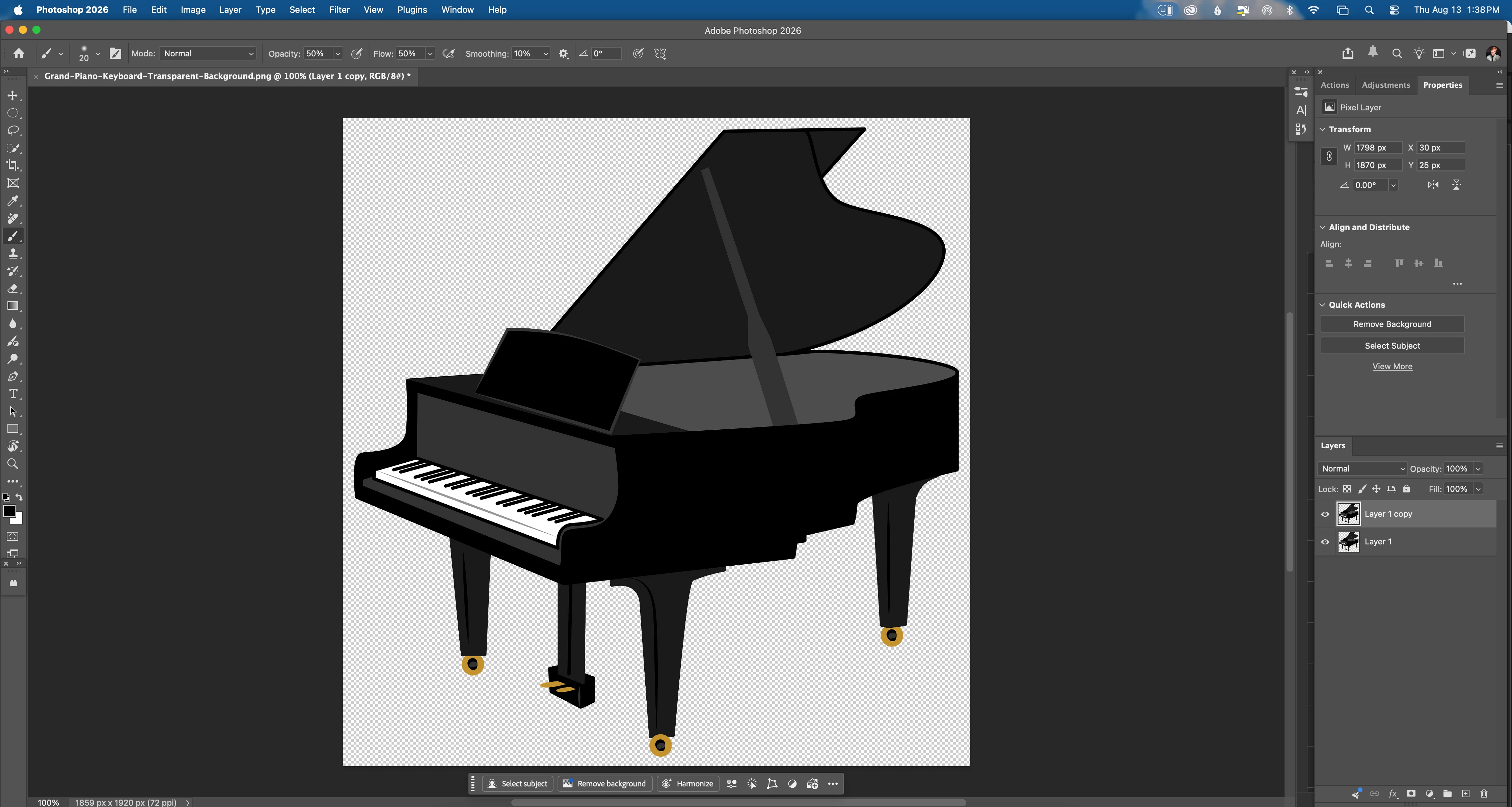
Since the latest photoshop update (27.9.1) when I choose Quick Action>View More all the choices are hidden behind my panels. I literally have to move my panels over to be able to see what's behind. it. Is there a fix for this?

  • August 13, 2026
  • 3 replies
  • 39 views

Since the latest photoshop update (27.9.1) when I choose Quick Action>View More all the choices are hidden behind my panels. I literally have to move my panels over to be able to see what's behind. it. Is there a fix for this?


    This topic is closed to new replies. Start a new post to keep the conversation going.
    Correct answer Awais+Digital

    Possible workaround

    I’ve seen similar Photoshop UI/panel issues after recent updates. As a quick workaround, try pressing Tab to hide all panels before opening Quick Actions > View More, then press Tab again to restore them. You can also try resetting your workspace via Window > Workspace > Reset Essentials.

    Adobe’s documentation confirms that Tab temporarily hides the panels, and Quick Actions are accessed through the Discover panel.

    If the problem only started with 27.9.1, it may be a UI bug rather than something wrong with your workspace. I’d also report it to Adobe with a screenshot and your OS/display setup so they can reproduce it.

    3 replies

    Awais+Digital
    Awais+DigitalCorrect answer
    Participating Frequently
    August 13, 2026

    Possible workaround

    I’ve seen similar Photoshop UI/panel issues after recent updates. As a quick workaround, try pressing Tab to hide all panels before opening Quick Actions > View More, then press Tab again to restore them. You can also try resetting your workspace via Window > Workspace > Reset Essentials.

    Adobe’s documentation confirms that Tab temporarily hides the panels, and Quick Actions are accessed through the Discover panel.

    If the problem only started with 27.9.1, it may be a UI bug rather than something wrong with your workspace. I’d also report it to Adobe with a screenshot and your OS/display setup so they can reproduce it.

    Known Participant
    August 13, 2026

    Thanks for that. I did try that but it did not hide my panels. I could see an edge of ht quick actions behind it but still can’t bring it to the front.