


Participant
August 1, 2025
Answered

Size requirements for contest

  • August 1, 2025
  • 1 reply
  • 151 views

I am entering a photo contest that has the following format requirements: "Format: Images must be in RGB color format, horizontal, 300 dots per inch, 8 bit, and at least 9x12 inches when printed at 300 dpi. The pixel width should be 3600 and pixel height should be 2700."  I have no issue setting this in Photoshop, however, the submission page requires maximum of 5mg size.  How can I reduce the MB size without reducing the format required. I have tried saving as jpeg, gif and png and using Windows 11.
Correct answer ExUSA

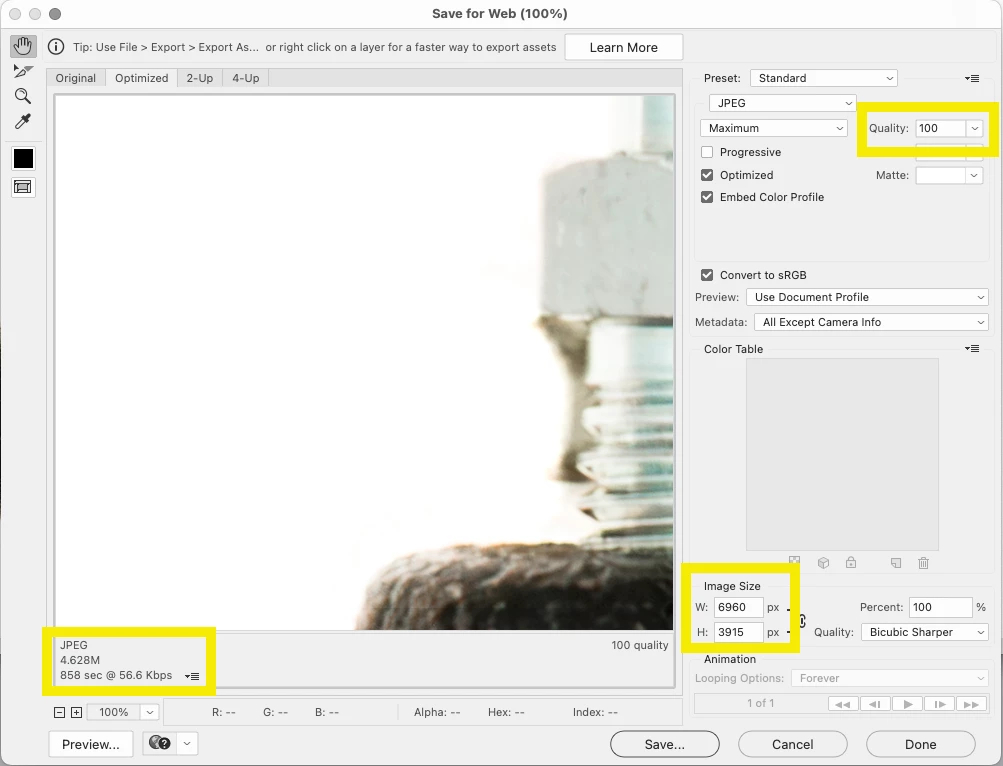
You can use File->Export->Save for Web to set a target size. I'd export as an sRGB JPEG file. File size is heavily dependent on the image content, so the quality level could vary a great deal.


Note on this sample image the dimensions, quality level, and file size.


1 reply

ExUSACorrect answer
Legend
August 1, 2025

You can use File->Export->Save for Web to set a target size. I'd export as an sRGB JPEG file. File size is heavily dependent on the image content, so the quality level could vary a great deal.


Note on this sample image the dimensions, quality level, and file size.


Participant
August 1, 2025

Thank you so much for this information.  It worked perfectly!