

Participating Frequently
August 31, 2025
Answered

Sketch overlay

  • August 31, 2025
  • 2 replies
  • 407 views

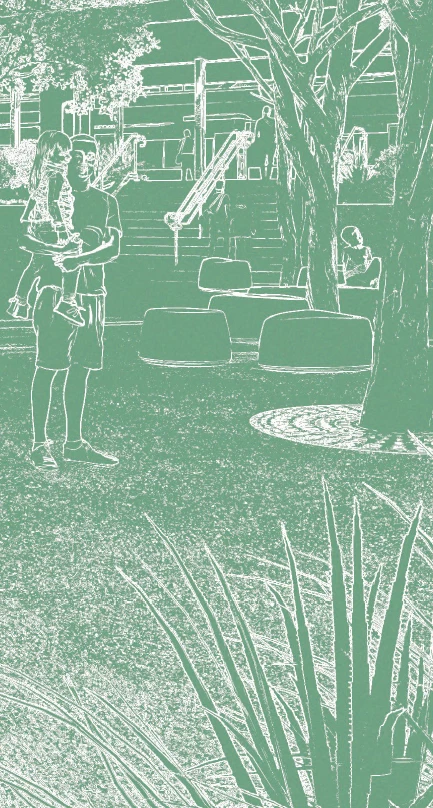
Hi everyone, hoping for some guidance in creating a coloured sketch overlay in Photoshop. I can get the sketch part, but not the colouring. I need to take photos and turn them into this kind of style.

 

Correct answer Trevor.Dennis

Thanks everyone.

That last one is close. I'm now waiting on the architect to send me his actions. We'll get there!!


You can make the line drawing stage finer with the right image (not too busy) by using the Oil Paint filter.  You'd try to smooth out the details getting a semi cartoon effect.  There are lots YouTube video describing the workflow, and they were producing beautifully fine lined line drawings.  The invert and colorize stage would be the same after that.

2 replies

Trevor.Dennis
Community Expert
Community Expert
August 31, 2025

People are talkiong about Gemini 2.5 and Nano Banana right now, and it is pretty amazing.

I found an image something like your example, asn asked Gemini to make it into a B&W line drawing.

I opened the result in Photoshop. Inverted it and colourized with a Hue/Saturation layer.


This is what Gemini 2.5 can do


Participating Frequently
August 31, 2025

Yes, this is what I was thinking, but would like the steps to do it in Photoshop, rather than using Gemini 2.5. 

Trevor.Dennis
Community Expert
Community Expert
August 31, 2025

I can't get it as close using just Photoshop.


Filter > Stylize > Find Edges

Desaturate (Ctrl Shift U)

Curves layer


Invert (Ctrl i)

Hue/Saturation layer set to Colorize

Adjust saturation and lightness to suit

Stephen Marsh
Community Expert
Community Expert
August 31, 2025

So, instead of solid green, you want the colour of the original image on the sketch processing? 

Can you post the original photo?

Participating Frequently
August 31, 2025

This is the original snippet.


Stephen Marsh
Community Expert
Community Expert
August 31, 2025

@default37fx00worwjb - Here is the sample image that I prepared earlier, before/after:


And here is your sample:


Which is the colour component, without the luminosity. This can be blended in many ways, but I'm not sure if this is what you are looking for?
