
grfern
Known Participant
August 14, 2025
Answered

Sky photos in CC Library do not show in sky replacement tool.

  • August 14, 2025
  • 2 replies
  • 367 views

I have many sky photos (some I took myself) in my Photoshop CC library. For some reason they do not show in the sky replacemnt tool. I only have the default skies. I've tried imprting from the sky replacement dialogue box but I can not find the path for the CC library. I found the default sky path at C:\Program Files\Adobe\Adobe Photoshop 2025\Required\Sky_Presets. My problem is I cannot find the library path. I just realized it's in the cloud and I have that open, I still cannot fiue out how to get them to the default sky folder.  Believe me I have tried. I did not want to bother the group but it's been 2 hours searching and asking Google with no results. I am using Windows 11. PS- I've also opened up my CC Library and tried to copy that path into the sky replacement box, No go there also.

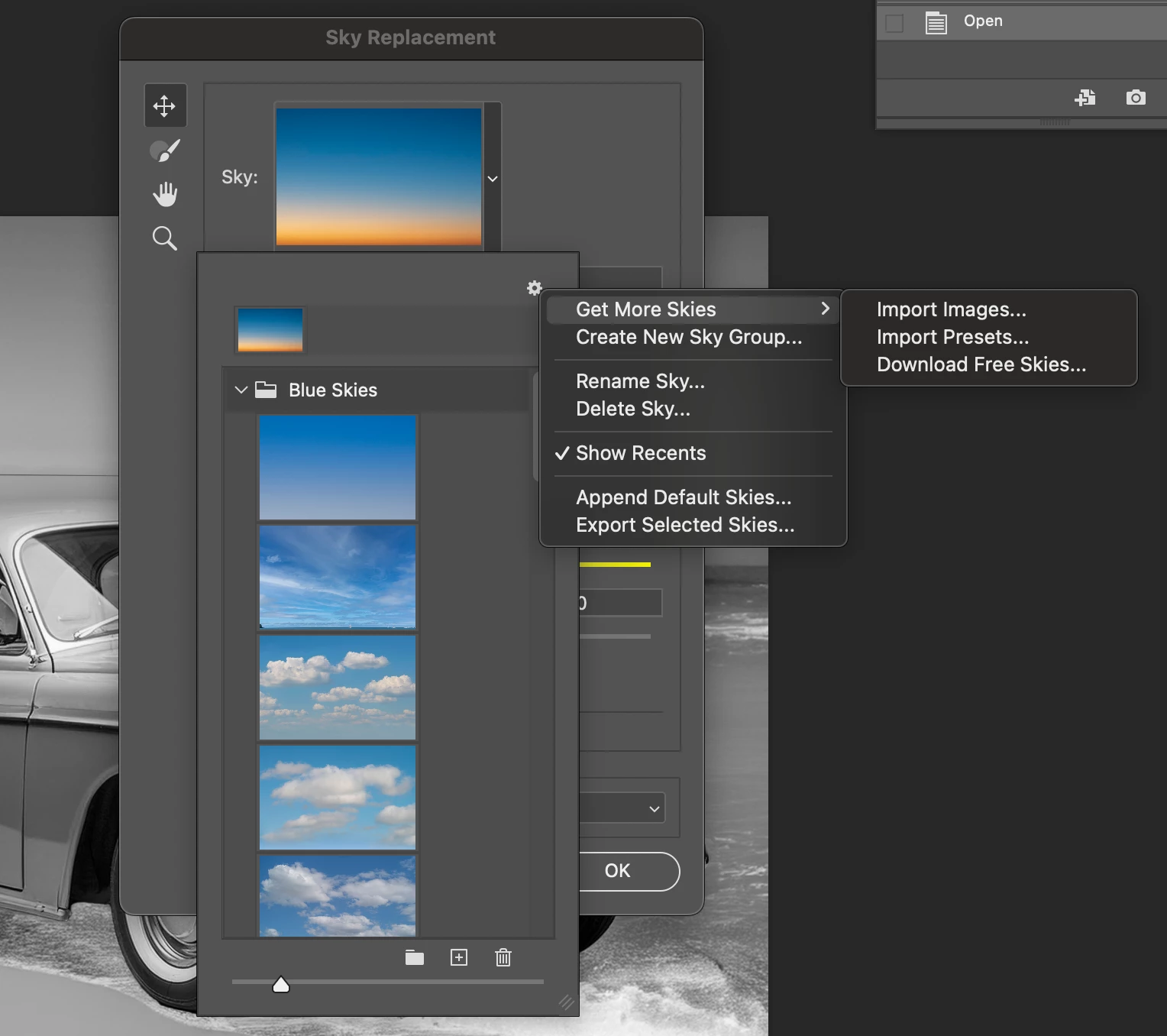
Correct answer CMass

Hey @grfern

The community is always here to help troubleshoot however we can, so let’s try to figure this out together.

 
> Can you confirm that you imported your images by going to Sky Replacement > clicking the down arrow on the sky image > selecting the Gear icon > Get More Skies > Import Images (see attached image)?


> What type of files are you importing?

I’ve also included an article about Sky Replacement here: https://adobe.ly/4mMKMML

^CM


2 replies

Participant
August 15, 2025

aSky Replacement doesn’t pull skies from CC Library automatically. CC Library content is cloud-based, so there’s no local path like Sky_Presets. To use them: In CC Libraries panel → right-click sky → Save to computer. In Photoshop: Edit → Sky Replacement → click sky thumbnail → Import Skies from Images → select saved file. Once imported, Photoshop stores it locally in your Sky Presets so it appears next time. There’s no way to link CC Library directly to the Sky Replacement panel — manual import is required.

grfern
grfernAuthor
Known Participant
August 15, 2025

I apprecate your help. I wish there was a way to directly link the library to the sky replacemt panel but now that I have all of them imported (thanks again) I won't have to go to the library. It's almost useless seeing them there but if I ever get into composits or making AI art, I'll not use them for anything but my photography. Thanks so much for your explanation. It was a great help.

Participant
October 14, 2025

You’re absolutely right — the Sky Replacement panel doesn’t connect directly to CC Libraries. I had the same issue and found that saving skies from the CC Library to my computer first, then importing them manually into Photoshop, works best. Once imported, the skies show up locally in your Sky Presets folder, so you don’t have to repeat the process next time.By the way, if anyone ever needs low-voltage contracting or structured data cabling services in Phoenix, AZ, our team at Datatelaz provides fully certified installations with free consultations and over 23 years of experience.

CMass
Community Manager
CMassCommunity ManagerCorrect answer
Community Manager
August 15, 2025

Hey @grfern

The community is always here to help troubleshoot however we can, so let’s try to figure this out together.

 
> Can you confirm that you imported your images by going to Sky Replacement > clicking the down arrow on the sky image > selecting the Gear icon > Get More Skies > Import Images (see attached image)?


> What type of files are you importing?

I’ve also included an article about Sky Replacement here: https://adobe.ly/4mMKMML

^CM


grfern
grfernAuthor
Known Participant
August 15, 2025

Thanks so much for the invaluable help. The article was a big help. I had taken some of my own (saved to the computer)and a class I took (long ago) had about 100 high quality .jpgs that weere included. I had just uploaded them to CC but did not realize they wold not be in Sky Replacement. It turns out last night before you answered my question I figured out the solution which was just what the aricle you sent recommended. It just took me some time organizing the types of skies and importing them after I made a new folder in the Sky Replacement drop down. I appreciate your help. I should have asked the question a lot earlier, It would have saved me some hair pulling!  Thanks again.

CMass
Community Manager
Community Manager
August 15, 2025

@grfern, Yay!Photoshop is a powerful tool, but I don't know one person who knows everything about it. That is why we are here to help as a community! I'm so happy the article helped. ❤️ Reach out any time!