I have a JPG that I’m slicing up for email html. When I save for web it only saved one slice as my selected JPG output format, the other slices saved as PNG.
I’ve tried selecting all slices before save for web. I’ve tried selecting all slices in the save for web window. Nothing seems to enforce my intended output format of JPG.
Also, I have no idea why it’s choosing PNG. This image started life as a JPG. There is no transparency at all. This issue has been plaguing me for months!
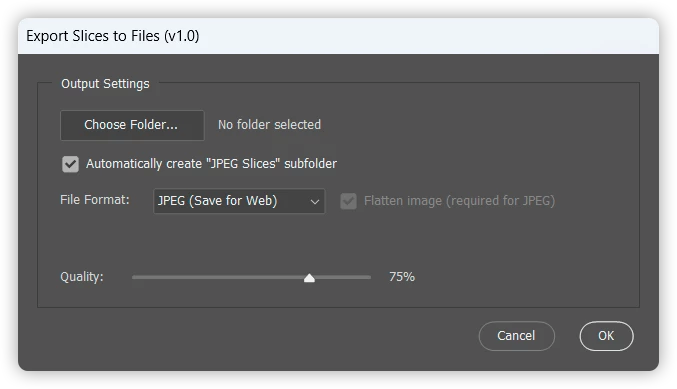
The following script can be used to save all slices to file (JPEG, PNG, WEBP, PSD, TIFF).
/* Save Slices to Files Stephen Marsh 25th July 2026 - v1.0: Initial release 8th August 2026 - v1.1: Cleaned up the various save/export functions and preference variables. Added WebP Photoshop version support check. 10th August 2026 - v1.2: Added a "PNG (Save for Web)" export option, alongside the existing standard "PNG" Save As option. https://community.adobe.com/questions-712/slices-save-for-web-format-1633676 Based on a script from jazz-y https://community.adobe.com/t5/photoshop-ecosystem-discussions/script-for-splitting-multiple-psds-to-defined-slices/m-p/12592481 https://community.adobe.com/t5/photoshop-ecosystem-discussions/divide-my-image-to-layers/m-p/12467520 */
#target photoshop
// Adjust the following "user friendly" variables as required. A GUI for these file format options isn't planned!
// JPEG (standard Save As) var jpegEmbedColorProfile = true; // Boolean: true | false var jpegFormatOptions = FormatOptions.STANDARDBASELINE; // FormatOptions.STANDARDBASELINE | FormatOptions.OPTIMIZEDBASELINE | FormatOptions.PROGRESSIVE var jpegMatte = MatteType.NONE; // MatteType.NONE | MatteType.WHITE | MatteType.BLACK var jpegQuality = 10; // Numeric: 0 - 12 (fallback if dialog quality is unavailable)
// JPEG (Save for Web) var sfwIncludeProfile = true; // Boolean: true | false var sfwInterlaced = 0; // 0 = false, 1 = true (ExportOptionsSaveForWeb uses numeric) var sfwOptimized = true; // Boolean: true | false var sfwQuality = 70; // Numeric: 0 - 100 (fallback if dialog quality is unavailable)
// PNG (standard Save As) var pngCompression = 9; // Numeric: 0 - 9 (Smaller number = higher file size) var pngInterlaced = false; // Boolean: true | false
// PNG (Save for Web) var pngSfwPNG8 = false; // Boolean: true | false (false = PNG-24, true = PNG-8) var pngSfwTransparency = true; // Boolean: true | false var pngSfwInterlaced = false; // Boolean: true | false var pngSfwQuality = 100; // Numeric: 0 - 100 (only relevant when pngSfwPNG8 is true) var pngSfwIncludeProfile = true; // Boolean: true | false
// WEBP // Compression type: "compressionLossless" | "compressionLossy" // When "compressionLossy", quality (0-100) is taken from the dialog slider var webpCompressionType = "compressionLossy"; var webpIncludeXMPData = true; // Boolean: true | false var webpIncludeEXIFData = true; // Boolean: true | false var webpIncludePsExtras = true; // Boolean: true | false var webpSaveAsCopy = true;
// PSD var embedColorProfile = true; // Boolean: true | false var alphaChannels = true; // Boolean: true | false var annotations = true; // Boolean: true | false var spotColors = true; // Boolean: true | false
// TIFF var tiffEmbedColorProfile = true; // Boolean: true | false var tiffByteOrder = ByteOrder.IBM; // ByteOrder.MACOS | ByteOrder.IBM var tiffTransparency = true; // Boolean: true | false var tiffLayerCompression = LayerCompression.ZIP; // LayerCompression.RLE | LayerCompression.ZIP var tiffInterleaveChannels = true; // Boolean: true | false var tiffAlphaChannels = true; // Boolean: true | false var tiffAnnotations = true; // Boolean: true | false var tiffSpotColors = true; // Boolean: true | false var tiffSaveImagePyramid = false; // Boolean: true | false var tiffImageCompression = TIFFEncoding.TIFFLZW; // TIFFEncoding.NONE | TIFFEncoding.JPEG | TIFFEncoding.TIFFLZW | TIFFEncoding.TIFFZIP
//////////
main();
///// SCRIPTUI DIALOG - START ///// function showExportDialog() { var dlg = new Window("dialog", "Export Slices to Files (v1.2)"); dlg.orientation = "column"; dlg.alignChildren = "fill"; dlg.spacing = 10; dlg.margins = 16;
// Main panel/group holding all the export settings var mainPanel = dlg.add("panel", undefined, "Output Settings"); mainPanel.orientation = "column"; mainPanel.alignChildren = "left"; mainPanel.spacing = 10; mainPanel.margins = [16, 20, 16, 16];
// Row 1: folder picker button + statictext path (to the right of the button) var folderGroup = mainPanel.add("group"); folderGroup.orientation = "row"; folderGroup.alignChildren = "center";
var chooseFolderBtn = folderGroup.add("button", undefined, "Choose Folder...");
var pathText = folderGroup.add("statictext", undefined, "No folder selected", { truncate: "middle" }); pathText.preferredSize.width = 320;
var formatItems = ["JPEG (Save for Web)", "JPEG", "PNG (Save for Web)", "PNG"];
// Create the conditional dropdown options array based on Photoshop version 2022 check/test if (parseFloat(app.version) >= 23) { formatItems.push("WEBP"); }
formatItems.push("PSD", "TIFF");
var formatDropdown = formatGroup.add("dropdownlist", undefined, formatItems); formatDropdown.selection = 0; // default to "JPEG (Save for Web)"
// Flatten image checkbox - mandatory (and locked) for both JPEG formats, optional for PSD/TIFF/PNG/WEBP var flattenCheckbox = formatGroup.add("checkbox", undefined, "Flatten image (required for JPEG)"); flattenCheckbox.value = true;
// Row 4: JPEG quality dropdown (0-12, default 9) - shown only for "JPEG" var qualityGroup = mainPanel.add("group"); qualityGroup.orientation = "row"; qualityGroup.alignChildren = "center";
var qualityItems = []; for (var q = 0; q <= 12; q++) { qualityItems.push(q.toString()); } var qualityDropdown = qualityGroup.add("dropdownlist", undefined, qualityItems); qualityDropdown.selection = 9; // default to "9"
// Row 5: Quality/compression slider (0-100%, default 75%) - shown for // "JPEG (Save for Web)" and "WEBP", which both take a 0-100 quality value. var sfwQualityGroup = mainPanel.add("group"); sfwQualityGroup.orientation = "row"; sfwQualityGroup.alignChildren = "center";
var sfwValueText = sfwQualityGroup.add("statictext", undefined, "75%"); sfwValueText.preferredSize.width = 36;
sfwQualityGroup.visible = false; // hidden until a matching file format is chosen
function updateFlattenCheckboxState() { var format = formatDropdown.selection.text; var isJpeg = (format === "JPEG" || format === "JPEG (Save for Web)"); if (isJpeg) { flattenCheckbox.value = true; flattenCheckbox.enabled = false; } else { flattenCheckbox.value = false; flattenCheckbox.enabled = true; } }
function updateSfwValueText() { sfwValueText.text = Math.round(sfwSlider.value) + "%"; } sfwSlider.onChanging = updateSfwValueText; // fires continuously while dragging sfwSlider.onChange = updateSfwValueText; // fires on keyboard arrow-key changes
function getFormatFolderName() { var format = formatDropdown.selection.text; // Both "JPEG" and "JPEG (Save for Web)" save as .jpg, so they share one folder name. if (format === "JPEG (Save for Web)") return "JPEG"; // Both "PNG" and "PNG (Save for Web)" save as .png, so they share one folder name. if (format === "PNG (Save for Web)") return "PNG"; return format; }
function updateFormatOptionsVisibility() { var format = formatDropdown.selection.text; qualityGroup.visible = (format === "JPEG"); sfwQualityGroup.visible = (format === "JPEG (Save for Web)" || format === "WEBP"); updateSubfolderCheckboxLabel(); updateFlattenCheckboxState(); updatePathText(); dlg.layout.layout(true); dlg.layout.resize(); } formatDropdown.onChange = updateFormatOptionsVisibility; updateFormatOptionsVisibility(); // set correct initial visibility/labels for the default file format
// Keep track of the raw selected folder (before the optional subfolder is appended) var selectedFolder = null;
function updatePathText() { if (!selectedFolder) { pathText.text = "No folder selected"; pathText.helpTip = ""; return; } var displayPath = selectedFolder.fullName; if (subfolderCheckbox.value) { displayPath = displayPath + "/" + getFormatFolderName() + " Slices"; } pathText.text = displayPath; pathText.helpTip = displayPath; }
chooseFolderBtn.onClick = function() { var folder = Folder.selectDialog("Select output folder for image slices"); if (folder) { selectedFolder = folder; updatePathText(); } };
// Button row - OUTSIDE the main panel/group, right-aligned var btnGroup = dlg.add("group"); btnGroup.orientation = "row"; btnGroup.alignment = "right";
var cancelBtn = btnGroup.add("button", undefined, "Cancel", { name: "cancel" }); var okBtn = btnGroup.add("button", undefined, "OK", { name: "ok" });
var dialogResult = null;
okBtn.onClick = function() { if (!selectedFolder) { alert("Please choose an output folder before continuing."); return; }
var outputFolder = selectedFolder; if (subfolderCheckbox.value) { outputFolder = new Folder(selectedFolder.fsName + "/" + getFormatFolderName() + " Slices"); if (!outputFolder.exists) { outputFolder.create(); } }
var format = formatDropdown.selection.text; var quality = null; if (format === "JPEG") { quality = parseInt(qualityDropdown.selection.text, 10); } else if (format === "JPEG (Save for Web)" || format === "WEBP") { quality = Math.round(sfwSlider.value); }
// On first open, ScriptUI sometimes computes the window's height slightly // short (cutting off the OK/Cancel row) before the window has actually been // rendered. Forcing another relayout once it's shown fixes that first-open // case, matching the correct size seen after any dropdown interaction. dlg.onShow = function() { dlg.layout.layout(true); dlg.layout.resize(); };
var shown = dlg.show(); if (shown === 1) { return dialogResult; } return null; } ///// SCRIPTUI DIALOG - END /////
///// FUNCTIONS /////
function main() {
///// PRE-DIALOG SHOW CHECKS - START /////
// 1) Check for an open document if (app.documents.length === 0) { alert("No document is open.\nPlease open a document that contains slices and try again."); return; }
// Suppress Photoshop's own dialogs (e.g. "Maximize Compatibility") for the // duration of this script, so saving the document never pops up a window. var originalDisplayDialogs = app.displayDialogs; app.displayDialogs = DialogModes.NO;
var s2t = stringIDToTypeID, AR = ActionReference, AD = ActionDescriptor;
// 2) Check for slices. The document's "slices" list always includes one // extra entry for the full-canvas auto slice, so at least one user-defined // slice means the list contains more than a single entry. var slices; try { (r = new AR).putProperty(s2t('property'), p = s2t('slices')); r.putEnumerated(s2t('document'), s2t('ordinal'), s2t('targetEnum')); slices = executeActionGet(r).getObjectValue(p).getList(p); } catch (e) { app.displayDialogs = originalDisplayDialogs; alert("This version of Photoshop does not have access to slices."); return; }
if (slices.count <= 1) { app.displayDialogs = originalDisplayDialogs; alert("No slices were found in this document.\nPlease define slices and try again."); return; } ///// PRE-DIALOG CHECKS - END /////
var userSettings = showExportDialog(); if (!userSettings) { // User clicked Cancel (or closed the window) - do nothing. app.displayDialogs = originalDisplayDialogs; return; }
///// EXPORT - START /////
app.activeDocument.save(); // Save for later revert
app.activeDocument.mergeVisibleLayers(); // Merge visible for slice
if (userSettings.flatten) { activeDocument.flatten(); }
try { try { (r = new AR).putProperty(s2t('property'), p = s2t('layerID')); r.putEnumerated(s2t('layer'), s2t('ordinal'), s2t('targetEnum')); var id = executeActionGet(r).getInteger(p); } catch (e) { throw "No layer selected!"; }
(r = new AR).putProperty(s2t('property'), p = s2t('resolution')); r.putEnumerated(s2t('document'), s2t('ordinal'), s2t('targetEnum')); var res = executeActionGet(r).getDouble(p);
(r = new AR).putProperty(s2t('property'), p = s2t('title')); r.putEnumerated(s2t('document'), s2t('ordinal'), s2t('targetEnum')); var nm = executeActionGet(r).getString(p).replace(/\..+$/, '');
try { (r = new AR).putProperty(s2t('property'), p = s2t('fileReference')); r.putEnumerated(s2t('document'), s2t('ordinal'), s2t('targetEnum')); var pth = executeActionGet(r).getPath(p); } catch (e) { throw "File not saved!"; }
var outputFolderPath = userSettings.folder.fsName; var totalSlices = slices.count - 1; // number of real slices, excluding the auto full-canvas entry
for (var i = 0; i < slices.count - 1; i++) { (r = new AR).putIdentifier(s2t('layer'), id); (d = new AD).putReference(s2t('target'), r); executeAction(s2t('select'), d, DialogModes.NO);
(r = new AR).putProperty(s2t('channel'), s2t('selection')); (d = new AD).putReference(s2t('target'), r); d.putObject(s2t('to'), s2t('rectangle'), function(b, d) { for (var i = 0; i < b.count; i++) d.putUnitDouble(k = (b.getKey(i)), s2t('pixelsUnit'), b.getInteger(k)) return d; }(slices.getObjectValue(i).getObjectValue(s2t('bounds')), new AD) ); executeAction(s2t('set'), d, DialogModes.NO);
try { (d = new AD).putString(s2t("copyHint"), "pixels"); executeAction(s2t("copyEvent"), d, DialogModes.NO);
executeAction(s2t("revealAll"), new AD, DialogModes.NO); if (userSettings.flatten) { executeAction(s2t("flattenImage"), undefined, DialogModes.NO); }
var sliceNumber = totalSlices - i; // reversed: first slice gets the highest number var extension = (userSettings.format === "PSD") ? ".psd" : (userSettings.format === "TIFF") ? ".tif" : (userSettings.format === "PNG" || userSettings.format === "PNG (Save for Web)") ? ".png" : (userSettings.format === "WEBP") ? ".webp" : ".jpg"; var outFile = File(outputFolderPath + '/' + nm + '-' + ('0' + sliceNumber).slice(-2) + extension);
switch (userSettings.format) { case "JPEG (Save for Web)": // Quality (0-100) from the dialog slider exportJPEG(outFile, userSettings.quality); // Photoshop's Save for Web engine keeps internal state between // calls and will silently do nothing on the 2nd+ call within a // single script run unless its caches are purged in between. app.purge(PurgeTarget.ALLCACHES); break;
case "PSD": // saveLayers: keep layers when the user did not request flatten savePSD(outFile, !userSettings.flatten); break;
case "TIFF": saveTIFF(outFile, !userSettings.flatten); break;
case "PNG": savePNG(outFile); break;
case "PNG (Save for Web)": exportPNG(outFile); // Same Save for Web caching quirk as the JPEG (Save for Web) // case above - purge so the next call actually exports. app.purge(PurgeTarget.ALLCACHES); break;
case "WEBP": saveWebP(outFile, userSettings.quality); // requires Photoshop 23.2 / 2022 or later break;
default: // "JPEG" // Quality (0-12) from the dialog dropdown saveJPEG(outFile, userSettings.quality); break; }
executeAction(s2t("close"), new AD, DialogModes.NO);
(r = new AR).putProperty(s2t('channel'), s2t('selection')); (d = new AD).putReference(s2t('null'), r); d.putEnumerated(s2t('to'), s2t('ordinal'), s2t('none')); executeAction(s2t('set'), d, DialogModes.NO); } catch (e) { // Log the failure for this slice but keep going, so one bad // slice doesn't silently abort every slice after it. $.writeln("Export Slices to JPEG - Error on slice " + (totalSlices - i) + ": " + e); // Clean up a stray temp document if one was left open. try { if (app.documents.length > 1) { activeDocument.close(SaveOptions.DONOTSAVECHANGES); } } catch (cleanupError) {} } } } catch (e) { // No dialogs after OK is pressed - log any error to the ExtendScript // console instead of alerting, so the export stays silent. $.writeln("Export Slices to JPEG - Error: " + e); }
// Deselect any active selection so the document is left in a clean state. try { activeDocument.selection.deselect(); } catch (e) {}
app.displayDialogs = originalDisplayDialogs; ///// EXPORT - END ///// }
function saveWebP(file, quality) { /* Adapted from v1.1 - 12th March 2023, Stephen Marsh https://community.adobe.com/t5/photoshop-ecosystem-discussions/saving-webp-image-by-script/td-p/13642577 Preferences (compression type, metadata, save-as-copy) are set at the top of the script. Quality (0-100) is taken from the dialog slider when using lossy compression. */ function s2t(s) { return app.stringIDToTypeID(s); } var descriptor = new ActionDescriptor(); var descriptor2 = new ActionDescriptor();
// Metadata options (from preferences at top of script) descriptor2.putBoolean(s2t("includeXMPData"), webpIncludeXMPData); descriptor2.putBoolean(s2t("includeEXIFData"), webpIncludeEXIFData); descriptor2.putBoolean(s2t("includePsExtras"), webpIncludePsExtras);
// WebP format and save path descriptor.putObject(s2t("as"), s2t("WebPFormat"), descriptor2); descriptor.putPath(s2t("in"), file);
// Save As = false | Save As a Copy = true descriptor.putBoolean(s2t("copy"), webpSaveAsCopy);
Have you checked the optimization settings for each individual slice?
In Photoshop’s Save for Web dialog, each slice can have its own export settings. Even if you select all slices, one or more slices may still be carrying a different optimization setting (such as PNG).
Try selecting the Slice Select Tool, click each slice, and verify that the format is set to JPEG in the Optimize panel before exporting. You can also try resetting the Save for Web settings or recreating the slices to see if the issue persists.
If possible, it would also help to know your Photoshop version and whether these slices were created manually or generated from guides/layers, as that may affect the behavior.
Translate
Making a Difference since 2007 at SmashingApps as Founder & Writer [Do not share PII or websites on signatures. This could cause a ban in the future]
As stated in the OP...i already tried modifying the Format for each individual slice (and all slices at once) in the Save for Web window, and the image started as a jpg that I sliced manually (not using guides or layers).
I've run into this before, and in my case it was because each slice can have its own export settings. Even if you choose JPEG in the Save for Web dialog, slices that were previously assigned PNG will keep that format unless you change them individually.
A few things to check: - In Save for Web, select each slice (or Shift-select all slices) and make sure the preset actually changes to JPEG for all of them. - If the slices were created from an older PSD or template, try deleting and recreating the slices, as they can retain old export settings. - Make sure there aren't any Slice Options or optimization settings overriding the global export format. - As a test, create a brand-new document, add a couple of slices, and see if they all export as JPEG. If they do, the issue is likely specific to that PSD rather than Photoshop itself.
It definitely feels like a long-standing quirk of Save for Web rather than expected behavior.
- In Save for Web, select each slice (or Shift-select all slices) and make sure the preset actually changes to JPEG for all of them. --Tried this already (stated in the OP). Unfortunately didn’t work. - If the slices were created from an older PSD or template, try deleting and recreating the slices, as they can retain old export settings. --Didn’t start as a PSD. Started as a JPG.
Thanks @Stephen Marsh I appreciate the time to create this post. The image format used to work “out of the box” when saving multiple slices. It doesn’t now. IMO...instead of relying on users to workaround Adobe’s fumble...Adobe should take steps to fix it.
The workaround I found is to select each slice individually using the Select Slice tool and Save for Web “selected Slices”. Then the Save for Web > Image Format works as expected. Not ideal or efficient for an image with a bunch of slices, but it works.
Perhaps it wasn't clear from my earlier animation.
All you need to do is select all the slices and then set the required format against the selected slices to override any unwanted, conflicting individual slice format settings.
EDIT: Again, here it is again in a new animation… Note the highlighted areas change.
The following script can be used to save all slices to file (JPEG, PNG, WEBP, PSD, TIFF).
/* Save Slices to Files Stephen Marsh 25th July 2026 - v1.0: Initial release 8th August 2026 - v1.1: Cleaned up the various save/export functions and preference variables. Added WebP Photoshop version support check. 10th August 2026 - v1.2: Added a "PNG (Save for Web)" export option, alongside the existing standard "PNG" Save As option. https://community.adobe.com/questions-712/slices-save-for-web-format-1633676 Based on a script from jazz-y https://community.adobe.com/t5/photoshop-ecosystem-discussions/script-for-splitting-multiple-psds-to-defined-slices/m-p/12592481 https://community.adobe.com/t5/photoshop-ecosystem-discussions/divide-my-image-to-layers/m-p/12467520 */
#target photoshop
// Adjust the following "user friendly" variables as required. A GUI for these file format options isn't planned!
// JPEG (standard Save As) var jpegEmbedColorProfile = true; // Boolean: true | false var jpegFormatOptions = FormatOptions.STANDARDBASELINE; // FormatOptions.STANDARDBASELINE | FormatOptions.OPTIMIZEDBASELINE | FormatOptions.PROGRESSIVE var jpegMatte = MatteType.NONE; // MatteType.NONE | MatteType.WHITE | MatteType.BLACK var jpegQuality = 10; // Numeric: 0 - 12 (fallback if dialog quality is unavailable)
// JPEG (Save for Web) var sfwIncludeProfile = true; // Boolean: true | false var sfwInterlaced = 0; // 0 = false, 1 = true (ExportOptionsSaveForWeb uses numeric) var sfwOptimized = true; // Boolean: true | false var sfwQuality = 70; // Numeric: 0 - 100 (fallback if dialog quality is unavailable)
// PNG (standard Save As) var pngCompression = 9; // Numeric: 0 - 9 (Smaller number = higher file size) var pngInterlaced = false; // Boolean: true | false
// PNG (Save for Web) var pngSfwPNG8 = false; // Boolean: true | false (false = PNG-24, true = PNG-8) var pngSfwTransparency = true; // Boolean: true | false var pngSfwInterlaced = false; // Boolean: true | false var pngSfwQuality = 100; // Numeric: 0 - 100 (only relevant when pngSfwPNG8 is true) var pngSfwIncludeProfile = true; // Boolean: true | false
// WEBP // Compression type: "compressionLossless" | "compressionLossy" // When "compressionLossy", quality (0-100) is taken from the dialog slider var webpCompressionType = "compressionLossy"; var webpIncludeXMPData = true; // Boolean: true | false var webpIncludeEXIFData = true; // Boolean: true | false var webpIncludePsExtras = true; // Boolean: true | false var webpSaveAsCopy = true;
// PSD var embedColorProfile = true; // Boolean: true | false var alphaChannels = true; // Boolean: true | false var annotations = true; // Boolean: true | false var spotColors = true; // Boolean: true | false
// TIFF var tiffEmbedColorProfile = true; // Boolean: true | false var tiffByteOrder = ByteOrder.IBM; // ByteOrder.MACOS | ByteOrder.IBM var tiffTransparency = true; // Boolean: true | false var tiffLayerCompression = LayerCompression.ZIP; // LayerCompression.RLE | LayerCompression.ZIP var tiffInterleaveChannels = true; // Boolean: true | false var tiffAlphaChannels = true; // Boolean: true | false var tiffAnnotations = true; // Boolean: true | false var tiffSpotColors = true; // Boolean: true | false var tiffSaveImagePyramid = false; // Boolean: true | false var tiffImageCompression = TIFFEncoding.TIFFLZW; // TIFFEncoding.NONE | TIFFEncoding.JPEG | TIFFEncoding.TIFFLZW | TIFFEncoding.TIFFZIP
//////////
main();
///// SCRIPTUI DIALOG - START ///// function showExportDialog() { var dlg = new Window("dialog", "Export Slices to Files (v1.2)"); dlg.orientation = "column"; dlg.alignChildren = "fill"; dlg.spacing = 10; dlg.margins = 16;
// Main panel/group holding all the export settings var mainPanel = dlg.add("panel", undefined, "Output Settings"); mainPanel.orientation = "column"; mainPanel.alignChildren = "left"; mainPanel.spacing = 10; mainPanel.margins = [16, 20, 16, 16];
// Row 1: folder picker button + statictext path (to the right of the button) var folderGroup = mainPanel.add("group"); folderGroup.orientation = "row"; folderGroup.alignChildren = "center";
var chooseFolderBtn = folderGroup.add("button", undefined, "Choose Folder...");
var pathText = folderGroup.add("statictext", undefined, "No folder selected", { truncate: "middle" }); pathText.preferredSize.width = 320;
var formatItems = ["JPEG (Save for Web)", "JPEG", "PNG (Save for Web)", "PNG"];
// Create the conditional dropdown options array based on Photoshop version 2022 check/test if (parseFloat(app.version) >= 23) { formatItems.push("WEBP"); }
formatItems.push("PSD", "TIFF");
var formatDropdown = formatGroup.add("dropdownlist", undefined, formatItems); formatDropdown.selection = 0; // default to "JPEG (Save for Web)"
// Flatten image checkbox - mandatory (and locked) for both JPEG formats, optional for PSD/TIFF/PNG/WEBP var flattenCheckbox = formatGroup.add("checkbox", undefined, "Flatten image (required for JPEG)"); flattenCheckbox.value = true;
// Row 4: JPEG quality dropdown (0-12, default 9) - shown only for "JPEG" var qualityGroup = mainPanel.add("group"); qualityGroup.orientation = "row"; qualityGroup.alignChildren = "center";
var qualityItems = []; for (var q = 0; q <= 12; q++) { qualityItems.push(q.toString()); } var qualityDropdown = qualityGroup.add("dropdownlist", undefined, qualityItems); qualityDropdown.selection = 9; // default to "9"
// Row 5: Quality/compression slider (0-100%, default 75%) - shown for // "JPEG (Save for Web)" and "WEBP", which both take a 0-100 quality value. var sfwQualityGroup = mainPanel.add("group"); sfwQualityGroup.orientation = "row"; sfwQualityGroup.alignChildren = "center";
var sfwValueText = sfwQualityGroup.add("statictext", undefined, "75%"); sfwValueText.preferredSize.width = 36;
sfwQualityGroup.visible = false; // hidden until a matching file format is chosen
function updateFlattenCheckboxState() { var format = formatDropdown.selection.text; var isJpeg = (format === "JPEG" || format === "JPEG (Save for Web)"); if (isJpeg) { flattenCheckbox.value = true; flattenCheckbox.enabled = false; } else { flattenCheckbox.value = false; flattenCheckbox.enabled = true; } }
function updateSfwValueText() { sfwValueText.text = Math.round(sfwSlider.value) + "%"; } sfwSlider.onChanging = updateSfwValueText; // fires continuously while dragging sfwSlider.onChange = updateSfwValueText; // fires on keyboard arrow-key changes
function getFormatFolderName() { var format = formatDropdown.selection.text; // Both "JPEG" and "JPEG (Save for Web)" save as .jpg, so they share one folder name. if (format === "JPEG (Save for Web)") return "JPEG"; // Both "PNG" and "PNG (Save for Web)" save as .png, so they share one folder name. if (format === "PNG (Save for Web)") return "PNG"; return format; }
function updateFormatOptionsVisibility() { var format = formatDropdown.selection.text; qualityGroup.visible = (format === "JPEG"); sfwQualityGroup.visible = (format === "JPEG (Save for Web)" || format === "WEBP"); updateSubfolderCheckboxLabel(); updateFlattenCheckboxState(); updatePathText(); dlg.layout.layout(true); dlg.layout.resize(); } formatDropdown.onChange = updateFormatOptionsVisibility; updateFormatOptionsVisibility(); // set correct initial visibility/labels for the default file format
// Keep track of the raw selected folder (before the optional subfolder is appended) var selectedFolder = null;
function updatePathText() { if (!selectedFolder) { pathText.text = "No folder selected"; pathText.helpTip = ""; return; } var displayPath = selectedFolder.fullName; if (subfolderCheckbox.value) { displayPath = displayPath + "/" + getFormatFolderName() + " Slices"; } pathText.text = displayPath; pathText.helpTip = displayPath; }
chooseFolderBtn.onClick = function() { var folder = Folder.selectDialog("Select output folder for image slices"); if (folder) { selectedFolder = folder; updatePathText(); } };
// Button row - OUTSIDE the main panel/group, right-aligned var btnGroup = dlg.add("group"); btnGroup.orientation = "row"; btnGroup.alignment = "right";
var cancelBtn = btnGroup.add("button", undefined, "Cancel", { name: "cancel" }); var okBtn = btnGroup.add("button", undefined, "OK", { name: "ok" });
var dialogResult = null;
okBtn.onClick = function() { if (!selectedFolder) { alert("Please choose an output folder before continuing."); return; }
var outputFolder = selectedFolder; if (subfolderCheckbox.value) { outputFolder = new Folder(selectedFolder.fsName + "/" + getFormatFolderName() + " Slices"); if (!outputFolder.exists) { outputFolder.create(); } }
var format = formatDropdown.selection.text; var quality = null; if (format === "JPEG") { quality = parseInt(qualityDropdown.selection.text, 10); } else if (format === "JPEG (Save for Web)" || format === "WEBP") { quality = Math.round(sfwSlider.value); }
// On first open, ScriptUI sometimes computes the window's height slightly // short (cutting off the OK/Cancel row) before the window has actually been // rendered. Forcing another relayout once it's shown fixes that first-open // case, matching the correct size seen after any dropdown interaction. dlg.onShow = function() { dlg.layout.layout(true); dlg.layout.resize(); };
var shown = dlg.show(); if (shown === 1) { return dialogResult; } return null; } ///// SCRIPTUI DIALOG - END /////
///// FUNCTIONS /////
function main() {
///// PRE-DIALOG SHOW CHECKS - START /////
// 1) Check for an open document if (app.documents.length === 0) { alert("No document is open.\nPlease open a document that contains slices and try again."); return; }
// Suppress Photoshop's own dialogs (e.g. "Maximize Compatibility") for the // duration of this script, so saving the document never pops up a window. var originalDisplayDialogs = app.displayDialogs; app.displayDialogs = DialogModes.NO;
var s2t = stringIDToTypeID, AR = ActionReference, AD = ActionDescriptor;
// 2) Check for slices. The document's "slices" list always includes one // extra entry for the full-canvas auto slice, so at least one user-defined // slice means the list contains more than a single entry. var slices; try { (r = new AR).putProperty(s2t('property'), p = s2t('slices')); r.putEnumerated(s2t('document'), s2t('ordinal'), s2t('targetEnum')); slices = executeActionGet(r).getObjectValue(p).getList(p); } catch (e) { app.displayDialogs = originalDisplayDialogs; alert("This version of Photoshop does not have access to slices."); return; }
if (slices.count <= 1) { app.displayDialogs = originalDisplayDialogs; alert("No slices were found in this document.\nPlease define slices and try again."); return; } ///// PRE-DIALOG CHECKS - END /////
var userSettings = showExportDialog(); if (!userSettings) { // User clicked Cancel (or closed the window) - do nothing. app.displayDialogs = originalDisplayDialogs; return; }
///// EXPORT - START /////
app.activeDocument.save(); // Save for later revert
app.activeDocument.mergeVisibleLayers(); // Merge visible for slice
if (userSettings.flatten) { activeDocument.flatten(); }
try { try { (r = new AR).putProperty(s2t('property'), p = s2t('layerID')); r.putEnumerated(s2t('layer'), s2t('ordinal'), s2t('targetEnum')); var id = executeActionGet(r).getInteger(p); } catch (e) { throw "No layer selected!"; }
(r = new AR).putProperty(s2t('property'), p = s2t('resolution')); r.putEnumerated(s2t('document'), s2t('ordinal'), s2t('targetEnum')); var res = executeActionGet(r).getDouble(p);
(r = new AR).putProperty(s2t('property'), p = s2t('title')); r.putEnumerated(s2t('document'), s2t('ordinal'), s2t('targetEnum')); var nm = executeActionGet(r).getString(p).replace(/\..+$/, '');
try { (r = new AR).putProperty(s2t('property'), p = s2t('fileReference')); r.putEnumerated(s2t('document'), s2t('ordinal'), s2t('targetEnum')); var pth = executeActionGet(r).getPath(p); } catch (e) { throw "File not saved!"; }
var outputFolderPath = userSettings.folder.fsName; var totalSlices = slices.count - 1; // number of real slices, excluding the auto full-canvas entry
for (var i = 0; i < slices.count - 1; i++) { (r = new AR).putIdentifier(s2t('layer'), id); (d = new AD).putReference(s2t('target'), r); executeAction(s2t('select'), d, DialogModes.NO);
(r = new AR).putProperty(s2t('channel'), s2t('selection')); (d = new AD).putReference(s2t('target'), r); d.putObject(s2t('to'), s2t('rectangle'), function(b, d) { for (var i = 0; i < b.count; i++) d.putUnitDouble(k = (b.getKey(i)), s2t('pixelsUnit'), b.getInteger(k)) return d; }(slices.getObjectValue(i).getObjectValue(s2t('bounds')), new AD) ); executeAction(s2t('set'), d, DialogModes.NO);
try { (d = new AD).putString(s2t("copyHint"), "pixels"); executeAction(s2t("copyEvent"), d, DialogModes.NO);
executeAction(s2t("revealAll"), new AD, DialogModes.NO); if (userSettings.flatten) { executeAction(s2t("flattenImage"), undefined, DialogModes.NO); }
var sliceNumber = totalSlices - i; // reversed: first slice gets the highest number var extension = (userSettings.format === "PSD") ? ".psd" : (userSettings.format === "TIFF") ? ".tif" : (userSettings.format === "PNG" || userSettings.format === "PNG (Save for Web)") ? ".png" : (userSettings.format === "WEBP") ? ".webp" : ".jpg"; var outFile = File(outputFolderPath + '/' + nm + '-' + ('0' + sliceNumber).slice(-2) + extension);
switch (userSettings.format) { case "JPEG (Save for Web)": // Quality (0-100) from the dialog slider exportJPEG(outFile, userSettings.quality); // Photoshop's Save for Web engine keeps internal state between // calls and will silently do nothing on the 2nd+ call within a // single script run unless its caches are purged in between. app.purge(PurgeTarget.ALLCACHES); break;
case "PSD": // saveLayers: keep layers when the user did not request flatten savePSD(outFile, !userSettings.flatten); break;
case "TIFF": saveTIFF(outFile, !userSettings.flatten); break;
case "PNG": savePNG(outFile); break;
case "PNG (Save for Web)": exportPNG(outFile); // Same Save for Web caching quirk as the JPEG (Save for Web) // case above - purge so the next call actually exports. app.purge(PurgeTarget.ALLCACHES); break;
case "WEBP": saveWebP(outFile, userSettings.quality); // requires Photoshop 23.2 / 2022 or later break;
default: // "JPEG" // Quality (0-12) from the dialog dropdown saveJPEG(outFile, userSettings.quality); break; }
executeAction(s2t("close"), new AD, DialogModes.NO);
(r = new AR).putProperty(s2t('channel'), s2t('selection')); (d = new AD).putReference(s2t('null'), r); d.putEnumerated(s2t('to'), s2t('ordinal'), s2t('none')); executeAction(s2t('set'), d, DialogModes.NO); } catch (e) { // Log the failure for this slice but keep going, so one bad // slice doesn't silently abort every slice after it. $.writeln("Export Slices to JPEG - Error on slice " + (totalSlices - i) + ": " + e); // Clean up a stray temp document if one was left open. try { if (app.documents.length > 1) { activeDocument.close(SaveOptions.DONOTSAVECHANGES); } } catch (cleanupError) {} } } } catch (e) { // No dialogs after OK is pressed - log any error to the ExtendScript // console instead of alerting, so the export stays silent. $.writeln("Export Slices to JPEG - Error: " + e); }
// Deselect any active selection so the document is left in a clean state. try { activeDocument.selection.deselect(); } catch (e) {}
app.displayDialogs = originalDisplayDialogs; ///// EXPORT - END ///// }
function saveWebP(file, quality) { /* Adapted from v1.1 - 12th March 2023, Stephen Marsh https://community.adobe.com/t5/photoshop-ecosystem-discussions/saving-webp-image-by-script/td-p/13642577 Preferences (compression type, metadata, save-as-copy) are set at the top of the script. Quality (0-100) is taken from the dialog slider when using lossy compression. */ function s2t(s) { return app.stringIDToTypeID(s); } var descriptor = new ActionDescriptor(); var descriptor2 = new ActionDescriptor();
// Metadata options (from preferences at top of script) descriptor2.putBoolean(s2t("includeXMPData"), webpIncludeXMPData); descriptor2.putBoolean(s2t("includeEXIFData"), webpIncludeEXIFData); descriptor2.putBoolean(s2t("includePsExtras"), webpIncludePsExtras);
// WebP format and save path descriptor.putObject(s2t("as"), s2t("WebPFormat"), descriptor2); descriptor.putPath(s2t("in"), file);
// Save As = false | Save As a Copy = true descriptor.putBoolean(s2t("copy"), webpSaveAsCopy);
I read the solutions at the link and don’t know why they didn’t work for you.
EDIT: Take a look at the following animated GIF, it may not be obvious how the current slice settings are displayed vs. the last used format:
Although not a direct answer, an alternative is to use a script to save all slices to JPEG.
/* https://community.adobe.com/t5/photoshop-ecosystem-discussions/can-slices-be-saved-at-300-ppi-in-photoshop/m-p/14272292 v1.0 - 2nd December 2023, Stephen Marsh Based on a script from jazz-y https://community.adobe.com/t5/photoshop-ecosystem-discussions/script-for-splitting-multiple-psds-to-defined-slices/m-p/12592481 https://community.adobe.com/t5/photoshop-ecosystem-discussions/divide-my-image-to-layers/m-p/12467520 */
#target photoshop
///// ADDITION TO ORIGINAL CODE - START ///// activeDocument.save(); activeDocument.flatten(); ///// ADDITION TO ORIGINAL CODE - END /////
var s2t = stringIDToTypeID, AR = ActionReference, AD = ActionDescriptor;
try { try { (r = new AR).putProperty(s2t('property'), p = s2t('layerID')); r.putEnumerated(s2t('layer'), s2t('ordinal'), s2t('targetEnum')); var id = executeActionGet(r).getInteger(p); } catch (e) { throw "No layer selected!\nOpen the document and select layer" }
try { (r = new AR).putProperty(s2t('property'), p = s2t('slices')); r.putEnumerated(s2t('document'), s2t('ordinal'), s2t('targetEnum')); var slices = executeActionGet(r).getObjectValue(p).getList(p); } catch (e) { throw "This version of photoshop does not have access to slices" }
(r = new AR).putProperty(s2t('property'), p = s2t('resolution')); r.putEnumerated(s2t('document'), s2t('ordinal'), s2t('targetEnum')); var res = executeActionGet(r).getDouble(p);
(r = new AR).putProperty(s2t('property'), p = s2t('title')); r.putEnumerated(s2t('document'), s2t('ordinal'), s2t('targetEnum')); var nm = executeActionGet(r).getString(p).replace(/\..+$/, '');
try { (r = new AR).putProperty(s2t('property'), p = s2t('fileReference')); r.putEnumerated(s2t('document'), s2t('ordinal'), s2t('targetEnum')); var pth = executeActionGet(r).getPath(p); } catch (e) { throw "File not saved!" }
for (var i = 0; i < slices.count - 1; i++) { (r = new AR).putIdentifier(s2t('layer'), id); (d = new AD).putReference(s2t('target'), r); executeAction(s2t('select'), d, DialogModes.NO);
(r = new AR).putProperty(s2t('channel'), s2t('selection')); (d = new AD).putReference(s2t('target'), r); d.putObject(s2t('to'), s2t('rectangle'), function (b, d) { for (var i = 0; i < b.count; i++) d.putUnitDouble(k = (b.getKey(i)), s2t('pixelsUnit'), b.getInteger(k)) return d; }(slices.getObjectValue(i).getObjectValue(s2t('bounds')), new AD) ); executeAction(s2t('set'), d, DialogModes.NO);
try { (d = new AD).putString(s2t("copyHint"), "pixels"); executeAction(s2t("copyEvent"), d, DialogModes.NO);
executeAction(s2t("revealAll"), new AD, DialogModes.NO); executeAction(s2t("flattenImage"), undefined, DialogModes.NO);
///// ADDITION TO ORIGINAL CODE - START ///// var actDesc = new ActionDescriptor(); var idextendedQuality = stringIDToTypeID("extendedQuality"); actDesc.putInteger(idextendedQuality, 12); // 0-12 (d = new AD).putObject(s2t("as"), s2t("JPEG"), actDesc, new AD); d.putPath(s2t("in"), File(pth.path + '/' + nm + ' ' + ('0' + i).slice(-2) + '.jpg')); d.putEnumerated(s2t("saveStage"), s2t("saveStageType"), s2t("saveBegin")); executeAction(s2t("save"), d, DialogModes.NO); ///// ADDITION TO ORIGINAL CODE - END /////
executeAction(s2t("close"), new AD, DialogModes.NO);
(r = new AR).putProperty(s2t('channel'), s2t('selection')); (d = new AD).putReference(s2t('null'), r); d.putEnumerated(s2t('to'), s2t('ordinal'), s2t('none')); executeAction(s2t('set'), d, DialogModes.NO); } catch (e) { throw e + "\nScript cannot create layer from empty space!\nMake sure that current layer contains pixels in all slices." } } } catch (e) { alert(e) }
///// ADDITION TO ORIGINAL CODE - START ///// executeAction(stringIDToTypeID("revert"), undefined, DialogModes.NO); ///// ADDITION TO ORIGINAL CODE - END /////
Copy the code text to the clipboard
Open a new blank file in a plain-text editor (not in a word processor)
Paste the code in
Save as a plain text format file – .txt
Rename the saved file extension from .txt to .jsx
Install or browse to the .jsx file to run (see below)




 AdChoices