


Participating Frequently
April 19, 2017
Question

Smart object issue

  • April 19, 2017
  • 4 replies
  • 9863 views

Hello everyone.

I have been dealing with Adobe Photoshop CC for years and with it's smart object.

I used to make in the smart object more than a 10 layers maybe more.

Recently i have been facing an issue, every time i save it gives me message stating "

Can't save this document back to its original format.

Flatten layers and discard extra data as necessary and choose

File > Save again."

Yep i flatted the layers and it worked but what is the use of the smart object So ?

I tried to place embedded and still the same, same goes with Linked.

I need help please.

P.s: this went with other CC and CS.

P.s: tried the update all modified content.
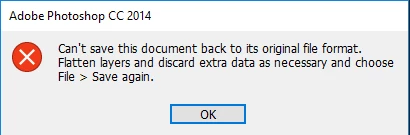

PS:Thus this the issue am facing.

Thanks.

This topic has been closed for replies.

4 replies

c.pfaffenbichler
Community Expert
Community Expert
April 19, 2017

After saving the layered image as a new file you can »Relink to File« the existing SO to that.

Participating Frequently
April 19, 2017

i didn't get it what you want to say

Participant
May 10, 2020

I'm having the same issue

Alfred Pennyworth
Participating Frequently
April 19, 2017

The original starting document is likely in a format that doesn't support layers, e.g. jpeg.

You need to save as a tiff or psd that does support them as jjmack says.

Participating Frequently
April 19, 2017

Well sir it smart objects save s as psd  and still the same issue

JJMack
Community Expert
Community Expert
April 19, 2017

Try using Save as and use the file type pull-down and select a Layered file format(PSD, PSD, Tiff).   What format file did you open the document with?   What was the original format?

JJMack
Participating Frequently
April 19, 2017

I will give you an example.

Me doing a design has number layers one of these layers are smart object thing, this smart object  has layers with different type "jpeg, psd, png"  it wouldn't save and gives me the same issue, mean while i was doing anything with any number of layer you can imagine and put with different type. as i have been learning  for years this is normal and this one of the reasons why the smart object is created and adobe made it for.

it's for sure saving smart object is PSD !

I am using Photoshop  smart object for years and it was perfectly fine well i can say great and nothing better.

recently this issue made my progress  goes down little bit.

Chuck Uebele
Community Expert
Community Expert
April 19, 2017

It looks like you're using an older version of CC. Have you tried updating to 2017? Is there a reason you're staying with 2014?

Participating Frequently
April 19, 2017

I used 2015.5 and 2017 with the latest update and still the same