

geijss60614128
Participant
October 24, 2019
Question

Smart object text alignment

  • October 24, 2019
  • 6 replies
  • 1122 views

Hello everyone!

I have a question about Smart objects and text-alignment.

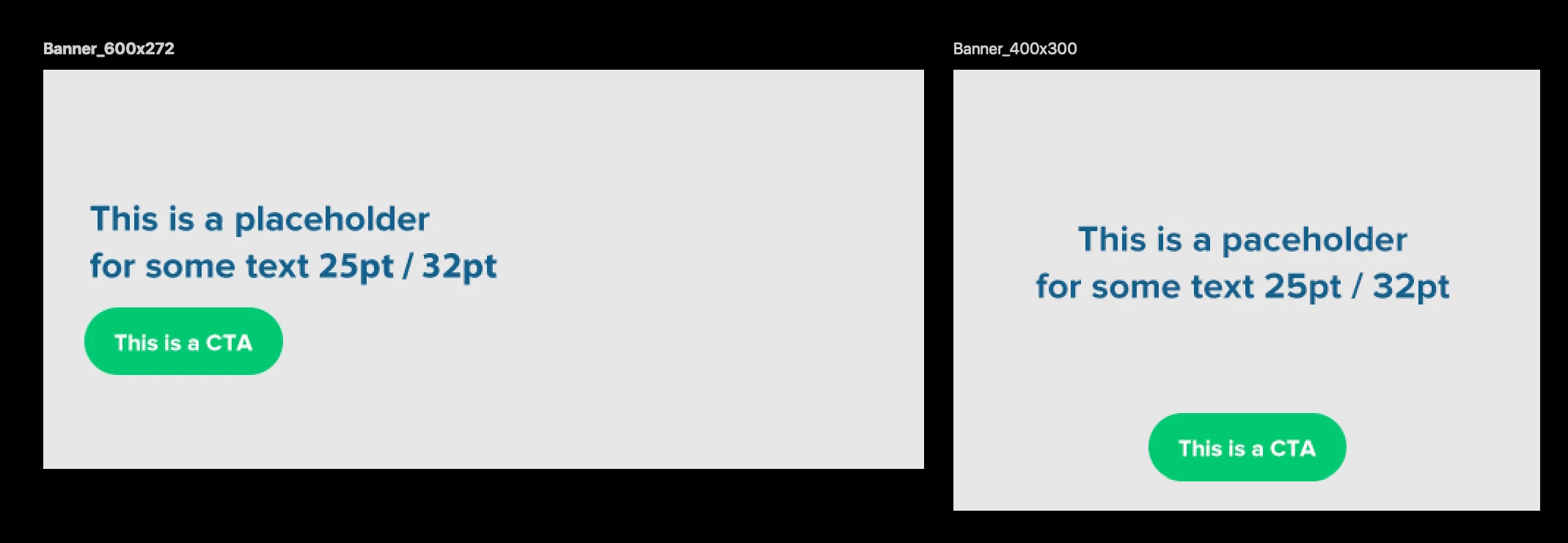
What I want is a smartobject so I can change te text fast in my banners (different sizes).
But as you can see in my example the banner_600x272 has a text-alignment on the left and the banner_400x300 has it centered. 

How can I do that? Is it even possible without scripting and things like that?
 

This topic has been closed for replies.

6 replies

Chuck Uebele
Community Expert
Community Expert
October 25, 2019

Yea, that would be a great new feature. It would be best if they could do that and keep the text vector qualities, as putting a vector inside a SO will produce a pixel based output, so enlarged text may not look as sharp. 

You can submit a feature request here: https://feedback.photoshop.com/photoshop_family

GeijsSleijpen
Participating Frequently
October 25, 2019

Going to do that! Thanks 🙂


Do you also have te problem with the Artboard Duplicate? Or you don't use artboards that much?
https://community.adobe.com/t5/Photoshop/Duplicate-2-Artboards-weird-placement/m-p/10693279


Chuck Uebele
Community Expert
Community Expert
October 25, 2019

No, they don't update. What I'm saying is that it's not possible to do what you want. To be able to change the text wording in a smart object, you will have to keep all the formatting the same, unfortunately. If you do have multiple instances where you need centered or left justified text, then you need to make separate SOs for them, but you will only have to change say two SO layers. 

GeijsSleijpen
Participating Frequently
October 25, 2019

Yeah that's what I thought 😞 

It would be nice to have a text layer that you can sync but that the style is different. 

Chuck Uebele
Community Expert
Community Expert
October 24, 2019

To do that, you have to have different smart objects. 

GeijsSleijpen
Participating Frequently
October 25, 2019

Yes but then they don't update when you change the text right? It's just 1 text other format/layout (how do you say that)

Or do you know how?

Chuck Uebele
Community Expert
Community Expert
October 24, 2019

Yes, it does matter. Once something is in a smart object, It can only be fully edited by going into the smart object. You can't ajust text that is in a smart object by doing so by trying to go on the smart object layer. If you don't want the SO's to be exactly the same, then you have to create them using new smart object via copy, with creates two completely different SOs, so if you change one (ie text) you will also have to change the other. Linked creates a file that can be used across different files, where as embedded is only for one file.

geijss60614128
Participant
October 24, 2019

Yes I know that the smart object does that 😉 That's te problem. 

I just want to have 1 text and 2 different alignments.


If I use 2 different smart objects I better can't use a smart object at all right? (i can use just text and copy + paste ) I just want to make it easier for myself to change text in different banners (artboards) 


Chuck Uebele
Community Expert
Community Expert
October 24, 2019

Also are they in the same file? Did you use embedded or linked SO?

geijss60614128
Participant
October 24, 2019

Now it are 2 smart objects but that's not what I want. Does it matter if it's linked or not? 

I just have created a text > convert to smart object. But if I go into the smart object and change it it wil change in the other banner too ofcourse. 

Do you know a sollution?

Chuck Uebele
Community Expert
Community Expert
October 24, 2019

Those two screen shots show two different smart object layers that were created from one smart object - correct? How did you create the second SO layer - ctrl/cmd-j or new smart object via copy?