


Participant
June 30, 2024
Answered

Smart object with exact size

  • June 30, 2024
  • 1 reply
  • 192 views

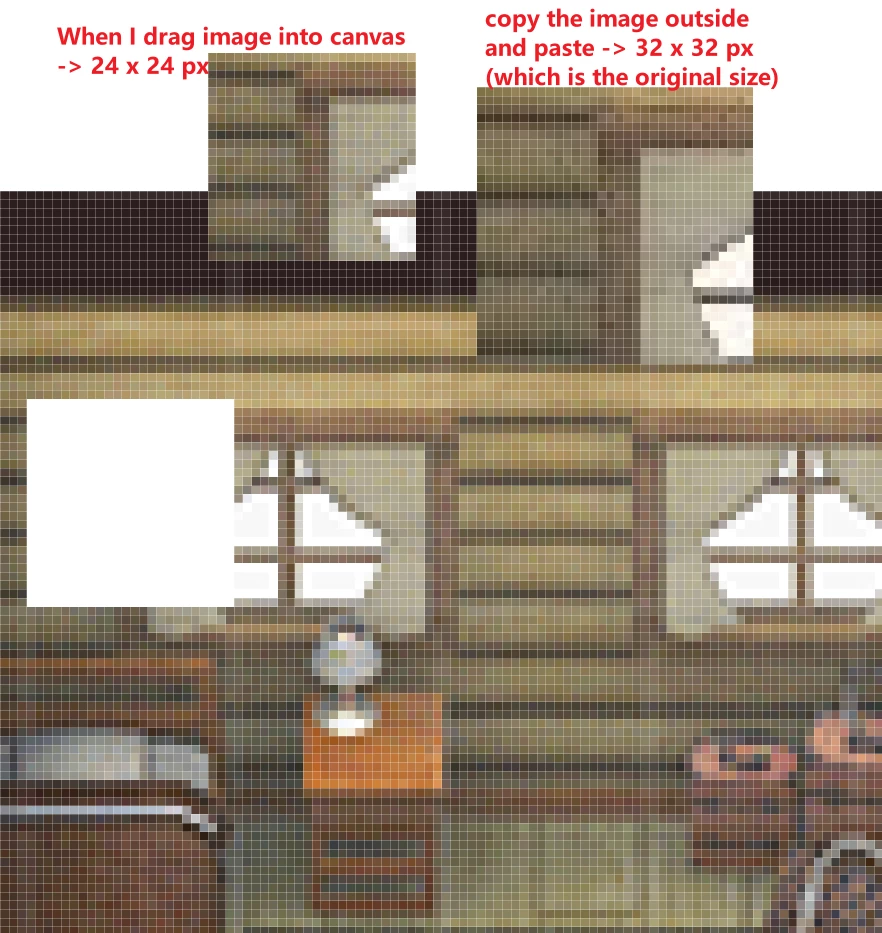
Hi. Recently, I was working with some pixelated images. When I dragged the images into the canvas, they became smart objects and were resized to different dimensions. However, if I copy and paste the images, I get the original size I want. How can I prevent smart objects from resizing themselves when dragging images into the canvas?


This topic has been closed for replies.
Correct answer Stephen Marsh

Smart objects use the resolution/PPI value for relative sizing.


Apart from copy/paste, other options are discussed here:


https://community.adobe.com/t5/photoshop-ecosystem-discussions/scripts-to-place-embedded-amp-place-linked-at-1-1-scale-ignoring-ppi/m-p/14032422


1 reply

Stephen Marsh
Community Expert
Stephen MarshCommunity ExpertCorrect answer
Community Expert
June 30, 2024

Smart objects use the resolution/PPI value for relative sizing.


Apart from copy/paste, other options are discussed here:


https://community.adobe.com/t5/photoshop-ecosystem-discussions/scripts-to-place-embedded-amp-place-linked-at-1-1-scale-ignoring-ppi/m-p/14032422