MahaB82A
June 28, 2025
Answered

Solid color creation & Mask

  • June 28, 2025
  • 1 reply
  • 181 views

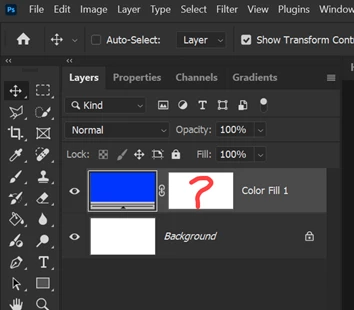
When we create solid color why mask appear with that? because if we deleted the mask solid color still exist.



Correct answer Conrad_C

An empty mask appears by default for all of the Fill layer types so that if you wanted to restrict the fill to an area, you can immediately start painting in the mask. The reason the fill color still exists when you delete the mask is because nothing has been painted into it yet.


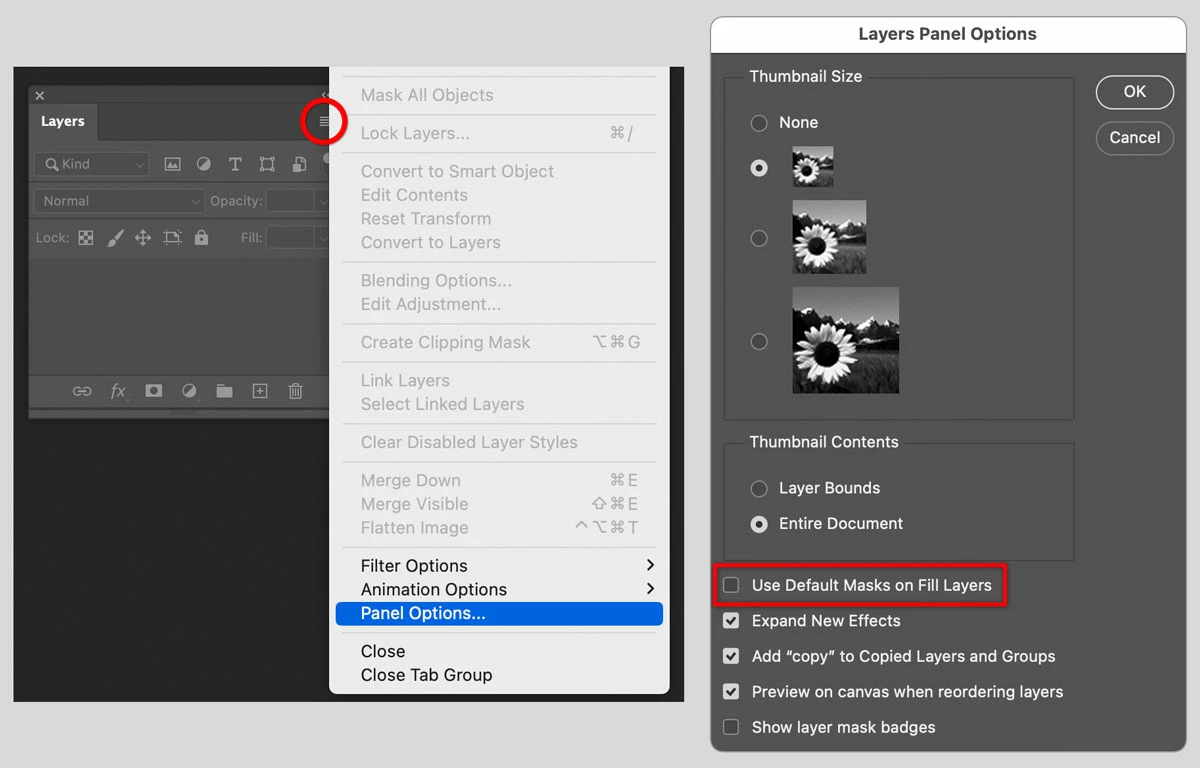
I don’t usually mask off solid color layers, so I think having those empty default masks clutters the Layers panel. This is why Adobe makes them optional: If you don’t want a mask to be added to every new Fill type of layer, then open the Layers panel menu, choose Panel options, and disable Use Default Masks on Fill Layers. I have done this, and I like it better this way. If that layer needs a mask in the future, it only takes one click to add it.


1 reply

Conrad_C
Community Expert
Conrad_CCommunity ExpertCorrect answer
Community Expert
June 28, 2025

An empty mask appears by default for all of the Fill layer types so that if you wanted to restrict the fill to an area, you can immediately start painting in the mask. The reason the fill color still exists when you delete the mask is because nothing has been painted into it yet.


I don’t usually mask off solid color layers, so I think having those empty default masks clutters the Layers panel. This is why Adobe makes them optional: If you don’t want a mask to be added to every new Fill type of layer, then open the Layers panel menu, choose Panel options, and disable Use Default Masks on Fill Layers. I have done this, and I like it better this way. If that layer needs a mask in the future, it only takes one click to add it.


MahaB82A
MahaB82AAuthor
June 28, 2025

Thanks for the detail explanation.