


[SOLVED] Scrubby Zoom & Alt Brush Resize - Lag - Photoshop 2020
Hi there,
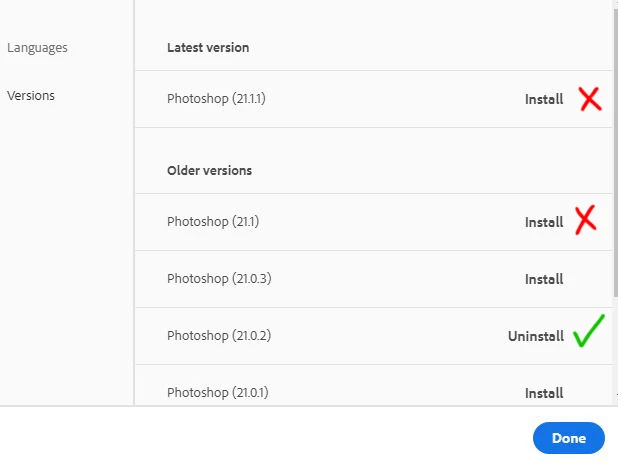
I've updated yesterday to Photoshop 21.1.1. Previously, I was using Photoshop 21.0.2.
In the latest version of Photoshop, there is a split second lag when using Scrubby Zoom, or when using the Alt key to resize brushes. Dragging left or right, doesn't have an effect for a fraction of a second. Then it jumps to resize. This happenes every time. It feels almost like it's waiting to see what I want to do.
I know a split second doesn't sound like a lot, but it's exceptionally annoying when it wasn't there before. It makes my workflow stutter.
I uninstalled Photoshop 21.1.1. and installed a slightly older version, 21.1. It had the same issue. I went back and reinstalled Photoshop 21.0.2 and the Scrubby-Zoom/Alt-Resize lag dissappeared completely.
Also, this is not a tablet issue. I have tested this at my work (Games Studio in the UK), where I use a Wacom Cintiq PRO 32, and Photoshop 21.1.1 has the same problem.
I am using a Huion KAMVAS GT-221 PRO HD at home, and once again, Photoshop 21.1.1 has the laggy scrubby zoom.
All Pen Display drivers are up to date at work and home.
My home PC specs are:
Intel® Core™ i7-9700K 3.6 GHz
64GB RAM
NVIDIA GeForce RTX 2080 Super 8GB
Windows 10
Photoshop has around 41GB RAM assigned, so I don't think it's a performance issue.
Is there something I can do to fix this, beside never updating Photoshop? 😄
Thanks a lot. Any help would be much appriciated.
17th of June, 2020 UPDATE:
I have enabled Windows INK. It does work with Windows INK.

 AdChoices