TEJAFX
Known Participant
May 17, 2025
Answered

Some Tools are Missing and Not Adding to Quick tool Bar

I updated Photoshop to version 26.6.1 a few days ago. After that update, some tools are missing from the toolbar and even when I add them via keyboard shortcuts, they are not added.

Ged_Traynor
Ged_TraynorCorrect answer
Community Expert
May 17, 2025

@TEJAFX you have mentioned which tool are missing.

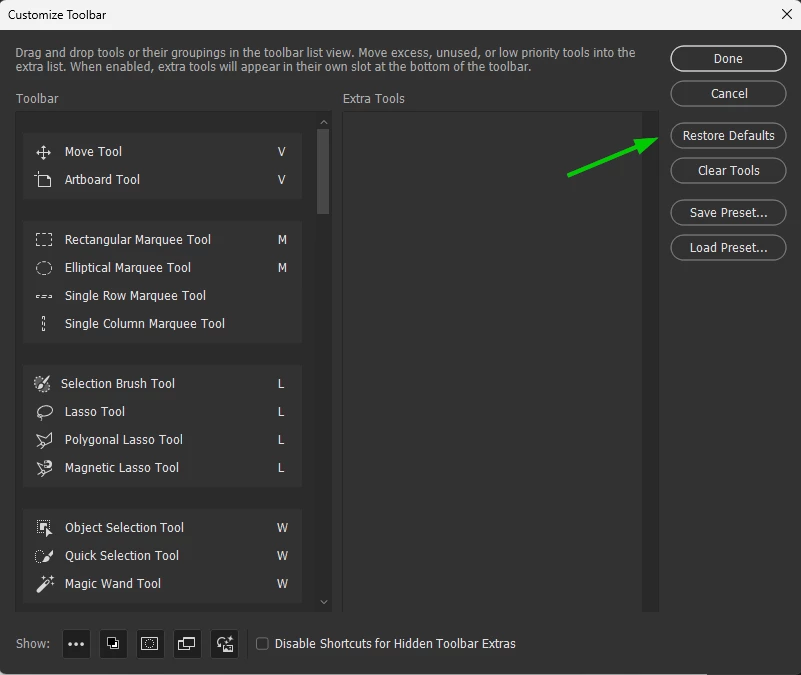
Try restoring the defaults

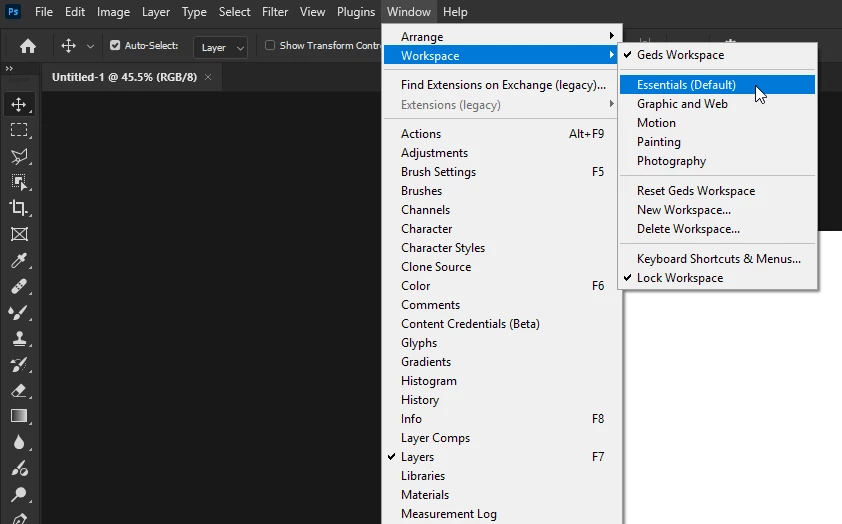
Make sure you're working in the essentials workspace

If none of the above helps, try manually resetting your Photoshop preferences
https://helpx.adobe.com/ie/photoshop/using/preferences.html#Manually
Remember to back up your settings before doing the preference reset
https://helpx.adobe.com/ie/photoshop/using/preset-migration.html

2 replies

TEJAFX
TEJAFXAuthor
Known Participant
May 17, 2025

Thankyou @Ged_Traynor it has worked. 

Translate
Ged_Traynor
Community Expert
Ged_TraynorCommunity ExpertCorrect answer
Community Expert
May 17, 2025

@TEJAFX you have mentioned which tool are missing.

Try restoring the defaults

Make sure you're working in the essentials workspace

If none of the above helps, try manually resetting your Photoshop preferences
https://helpx.adobe.com/ie/photoshop/using/preferences.html#Manually
Remember to back up your settings before doing the preference reset
https://helpx.adobe.com/ie/photoshop/using/preset-migration.html

Translate