Known Participant
November 3, 2024
Answered

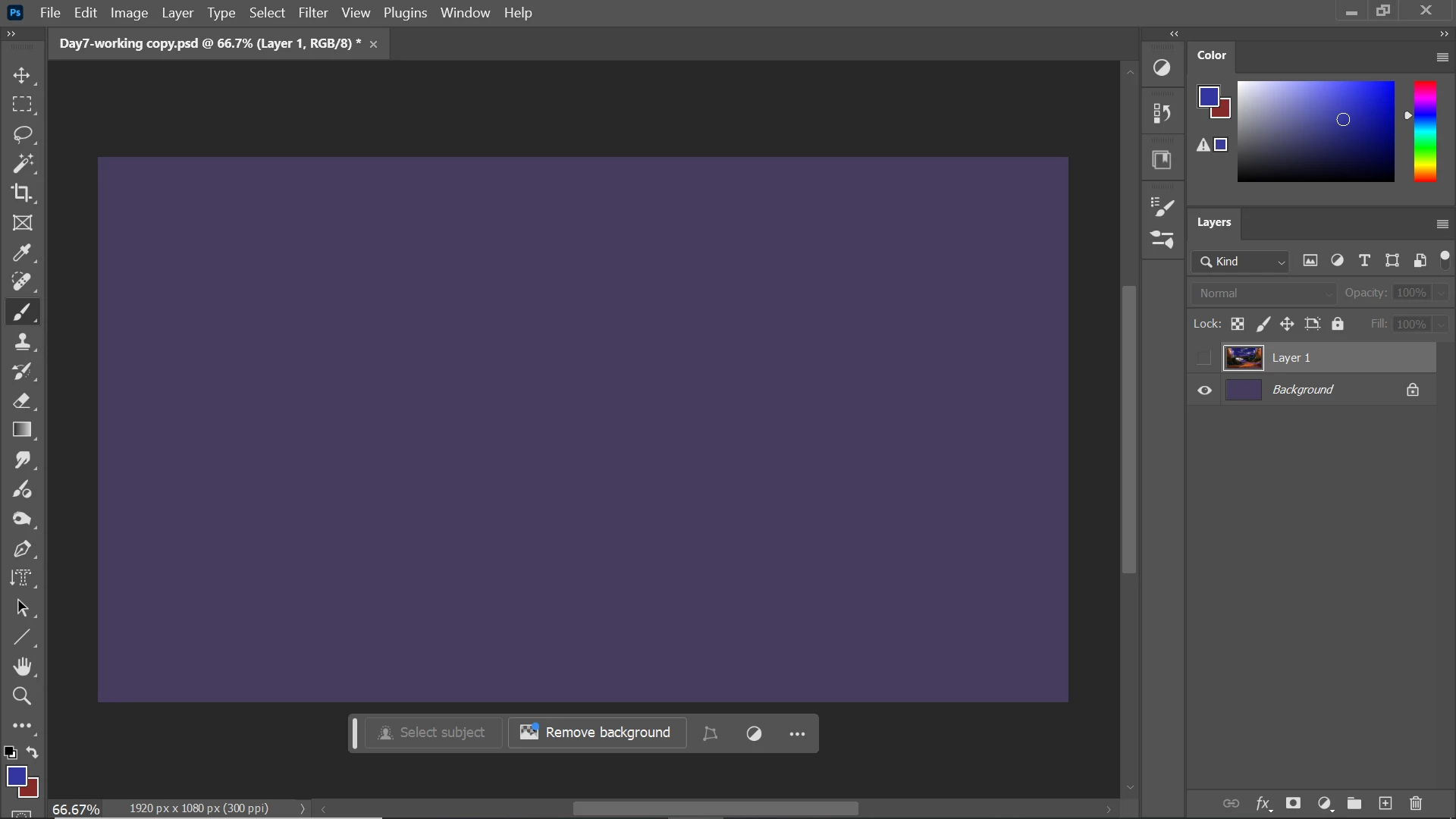
Some tools dissapeared

  • November 3, 2024
  • 2 replies
  • 647 views

The tools that normally appear in the upper side of the screen, like opacity, mode, and flow are gone. You can see it in the attached screenshot below. How do I add them back?

 

This topic has been closed for replies.
Correct answer c.pfaffenbichler

You can also try Window > Options. 

2 replies

c.pfaffenbichler
Community Expert
c.pfaffenbichlerCommunity ExpertCorrect answer
Community Expert
November 3, 2024

You can also try Window > Options. 

Known Participant
November 3, 2024

thank you! I can't find a way to put it back though, it appeared and i can move it everywhere but a blue line won't appear to set it on the top side

c.pfaffenbichler
Community Expert
Community Expert
November 3, 2024

Have you tried resetting the Workspace, as per @D Fosse ’s advice? (Window > Workspace > Reset …)


Where are you dragging the Options Bar exactly? 


D Fosse
Community Expert
Community Expert
November 3, 2024

You have accidentally hid the options bar.


Check it under the Window menu, and it should come back. If not, reset workspace, or worst case reset Preferences altogether.