

davescm
Community Expert
Community Expert
August 1, 2025
Question

Something for the Weekend - Part 246 - Holding Pattern!

  • August 1, 2025
  • 34 replies
  • 4384 views

Hi,

Thanks to all who took part in our previous challenge, there were some great ideas to hide the cellphone mast. 


This week we have something a bit different. I made this cell like pattern in Adobe Substance 3D Designer. It was for a different purpose and was made with a full set of 3D maps to use as a material. I wondered though what this group could make with the Base Colour map? So here it is. You could use all of it, part of it, or tile it (it was made to tile) and use the extended pattern to make something new.


When you post your response can you add just a few words on how you went about it. It may help others see the potential of different approaches, software, and tools to such a challenge.

The “rules”:

  • Use the starter image as at least part of your own image entry.
  • Anything goes, as long as it meets the forum rules on decency, copyright, etc.
  • Anyone, and everyone, is welcome to have a go, whether you are a complete beginner or a Photoshop expert. This is not just for our forum “regulars”.
  • The challenge is not limited to Photoshop. Any Adobe software can be used. 
  • There are no prizes apart from the chance to practice, show off your skills, or bring a bit of humor and fun. Don't be shy, join in and have a go!
  • The starter image is made available for you to use in this forum challenge only.


To download the starter image, hover over the image and click on the circle with the arrows at the top right. Then, when the image opens in its own window, right click and choose “Save Image As/Save Target As” (or similar depending on your browser).
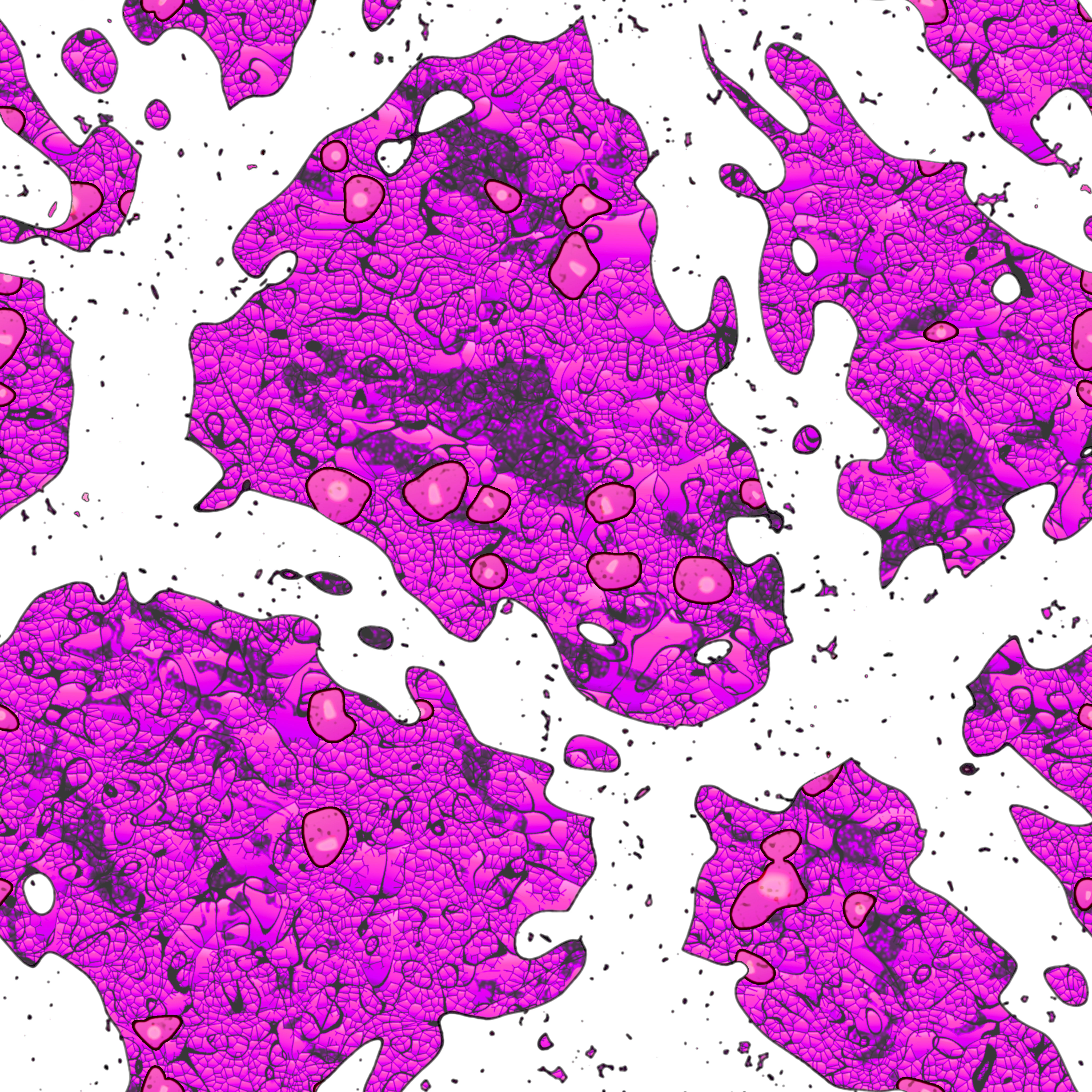


When posting back your image — please use the blue reply button in this first post and use the 'Insert Photos' icon at the top of the reply box. If posting a comment on someone else’s entry, then please use the grey reply button next to their image post.


Have fun!


Dave

34 replies

Junior Rocha
Community Expert
Community Expert
August 7, 2025

Me and My Photoshop Toolbar Tattoo.
PS: The tattoo is real, I got it in 2017.


davescm
Community Expert
davescmCommunity ExpertAuthor
Community Expert
August 7, 2025

Now that is dedication! The pattern fits very nicely on the shirt. 🙂

Dave

Junior Rocha
Community Expert
Community Expert
August 10, 2025

Thank you man! 👊

lambiloon
Community Expert
Community Expert
August 6, 2025

Ali Sajjad / Graphic Design Trainer / Freelancer / Adobe Certified Professional
davescm
Community Expert
davescmCommunity ExpertAuthor
Community Expert
August 7, 2025

Ooh, you'll get letters from Adobe for that! 🙂
Dave

Community Expert
August 5, 2025

Four baby turtles, lost and curious, swam through a mysterious purple ooze deep beneath the city streets. The air buzzed, the ooze shimmered—and in that glowing moment, everything changed.

They didn’t know it yet, but the “Secret Ooze” was no ordinary slime... it was the beginning of something mutant. 🐢💥

davescm
Community Expert
davescmCommunity ExpertAuthor
Community Expert
August 6, 2025

The story behind the story, Nick. I like it when an idea comes with a bit of a tale. 🙂  
Dave

Community Expert
August 16, 2025

I love to tell a story and I love the TMNT!

August 4, 2025

The Jellyfish are back. 
Check out the take away cups. 


davescm
Community Expert
davescmCommunity ExpertAuthor
Community Expert
August 5, 2025

I had to look hard, but the pattern is there 🙂
Dave

August 5, 2025

hahaha... Like any good virus it's spreading around. 🙂 
I suggested looking at the cups to help those looking for the print. 


davescm
Community Expert
davescmCommunity ExpertAuthor
Community Expert
August 4, 2025

Islands :


I took the image into Substance Designer to invert it and create height and normal maps as well as a recolour. Then I took those maps into Blender 3D and used the height map to create the 'islands'. I added a plane for the ocean, some volumetric 'clouds' and 'mist', then lit and rendered it, before finishing in Photoshop.


Dave


August 5, 2025

Wow!! and we are on wizardly level of editing 😄

davescm
Community Expert
davescmCommunity ExpertAuthor
Community Expert
August 5, 2025

Thank you 🙂 Really it is just playing around in 3D
Dave

Harold Silva
Community Expert
Community Expert
August 4, 2025

Espero sea de su agrado

Harold Silva B.
davescm
Community Expert
davescmCommunity ExpertAuthor
Community Expert
August 5, 2025

I love that - it's full of character. Nicely done , Harold. 🙂
Dave

Community Expert
August 4, 2025

somehow this remindes me of the famous Boulder Dash game back in the 80ties / 90ties  🪨


(inserted rocks and pusher man from https://www.c64-wiki.de/wiki/Boulder_Dash )


Nils

davescm
Community Expert
davescmCommunity ExpertAuthor
Community Expert
August 5, 2025

Haha - nice idea, it must be a new level 🙂
Dave

didiermazier
Community Expert
Community Expert
August 4, 2025

Grafs

Jacob Bugge
Community Expert
Community Expert
August 4, 2025

Didier, you really have a tough burd in a tough place there.


She is taller in the original image, the ratio being a wee bit over 5/4. It was about 5/3 in 245,

so something happens in the uploads.


Warren Heaton
Community Expert
Community Expert
August 3, 2025

davescm
Community Expert
davescmCommunity ExpertAuthor
Community Expert
August 4, 2025

Coffee has arrived, just at the right time, Warren. 🙂
Dave

Turtle.PSD
Participating Frequently
August 3, 2025


Generated the image in Firefly.

Made a displacement map for the pants.
Made a pattern of the challenge pic and used a clipping mask on the pants with it.
Applied the displacement map.

Then had a little fun in Liquify with the face/neck after spot removing facial features.

Ran it through Camera Raw.

Brushed on a face to tie it all together.   = D

davescm
Community Expert
davescmCommunity ExpertAuthor
Community Expert
August 4, 2025

She looks like a scary ginger-bread woman! Nice job fitting the pattern to the pants, Turtle. 🙂
Dave