

davescm
Community Expert
Community Expert
December 19, 2025
Question

Something for the Weekend - Part 256 - Merry Christmas!

  • December 19, 2025
  • 37 replies
  • 7167 views

Hi,
Thanks to everyone who took part in our previous 'Gavel' challenge. There were some great ideas and very clever interpretations of the gavel.

This week, in the run up to Christmas, I thought we should have a Christmas based theme. Instead of a Christmas tree, which we have used before, I chose a Christmas plant. So we have a 3D render of a Poinsettia. The plant itself is a model from the XFrog plant library, the two gift-wrapped presents are from Adobe Substance 3D Assets. The table, vase and wall, I modelled in Blender. All textures are from Adobe Substance 3D assets and were applied in Adobe Substance Painter. I lit the scene in Blender and rendered it, before taking it into Photoshop for finishing.

Now that we have our Christmas scene, what will you make with it?

The “rules”:

  • Use the starter image as at least part of your own image entry.
  • Anything goes, as long as it meets the forum rules on decency, copyright, etc.
  • Anyone, and everyone, is welcome to have a go, whether you are a complete beginner or a Photoshop expert. This is not just for our forum “regulars”.
  • The challenge is not limited to Photoshop. Any Adobe software can be used. 
  • There are no prizes apart from the chance to practice, show off your skills, or bring a bit of humor and fun. Don't be shy, join in and have a go!
  • The starter image is made available for you to use in this forum challenge only.


To download the starter image, hover over the image and click on the circle with the arrows at the top right. Then, when the image opens in its own window, right click and choose “Save Image As/Save Target As” (or similar depending on your browser).
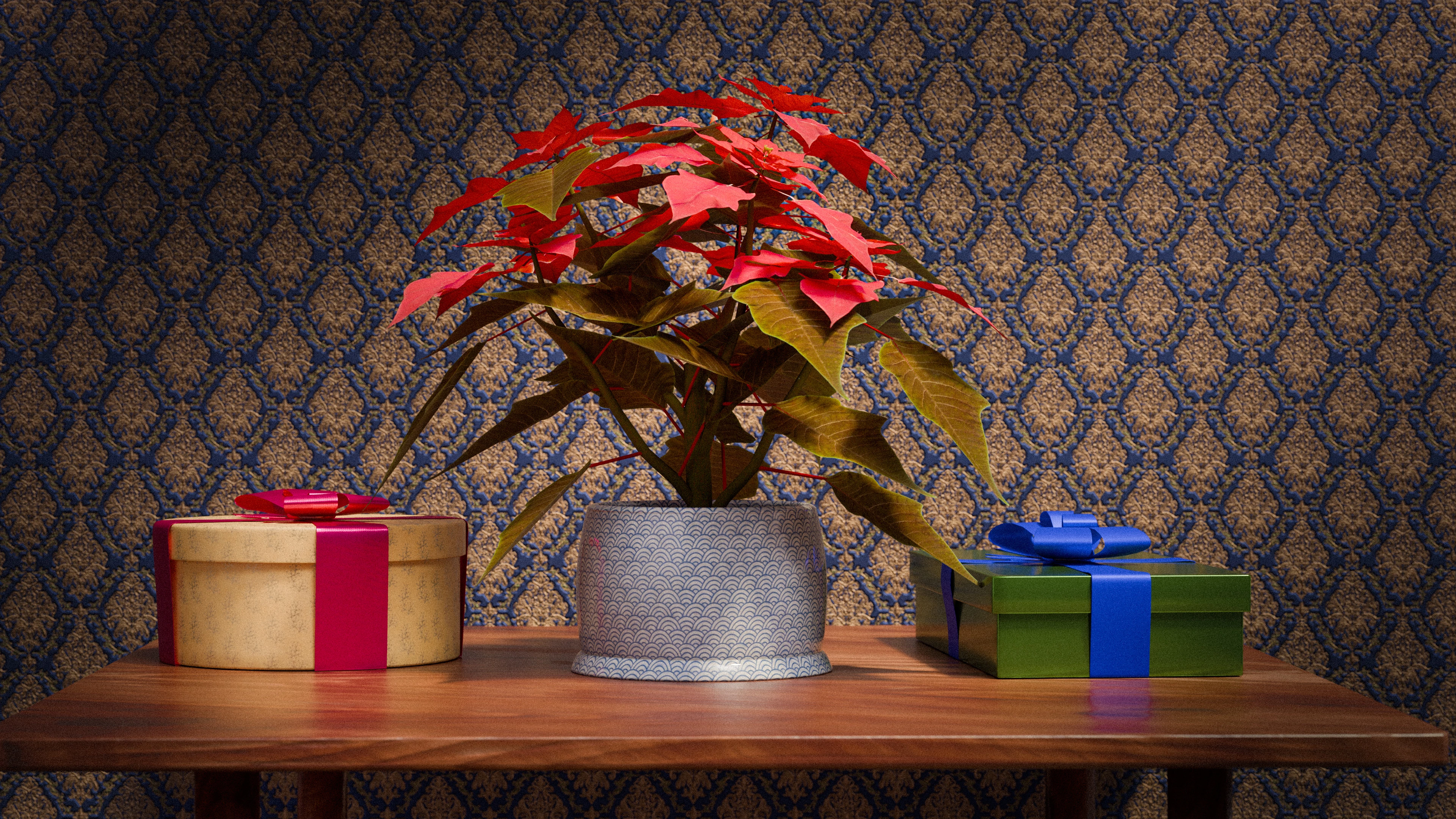
SFTW256_Poinsettia.jpg

When posting back your image — please use the blue reply button in this first post and use the 'Insert Photos' icon at the top of the reply box. If posting a comment on someone else’s entry, then please use the grey reply button next to their image post.


Have fun!


Dave.

37 replies

Participating Frequently
December 22, 2025

Just for fun, used Firefly not Photoshop


Firefly_Using the referenced image for the starting frame, add Santa Claus behind the table w 640188 (1).png

davescm
Community Expert
davescmCommunity ExpertAuthor
Community Expert
December 22, 2025

@active_power1549 Please use the image icon in the forum posting box to embed your image. Posting it as an attachment is showing an error and we can't see your image.
Dave

Trevor.Dennis
Community Expert
Community Expert
December 22, 2025
quote

@active_power1549 Please use the image icon in the forum posting box to embed your image. Posting it as an attachment is showing an error and we can't see your image.
Dave


By @davescm


Ahhh so that's what is happening. I was getting the same error with some images yesterday.    Pasting directly to the thread also causes it to show as a big thumb nail.  I fixed one a few minutes ago, so the error is not consistant.  In fact the image I could view yesterday was referred to by other posters in the thread, so they were obviously able to view the image.  I tried Chrome and Edge, and I did a hard reset on the page.  Didn't work.


Actually, not so sure now.  I tried Active Power's link and was getting a different error to earlier.


[EDIT]  What I have been seeing

image.png


Joseph Labrecque
Community Expert
Community Expert
December 22, 2025

Untitled-1.jpg

davescm
Community Expert
davescmCommunity ExpertAuthor
Community Expert
December 22, 2025

Nice job, Joseph. You've created a lovely scene. The new crop around the picture works really well. 🙂
Dave

jane-e
Community Expert
Community Expert
December 22, 2025


Repotted (render by Dave in SFTW 60)


SFTW256_Poinsettia JE01.jpg

Dave, this Christmas render is so exquisite that I hesitated to touch it! Truly beautiful!


Happy Christmas to all, and to all a good night!


Jane


davescm
Community Expert
davescmCommunity ExpertAuthor
Community Expert
December 22, 2025

Nice job with the re-potting, Jane, and of course bonus points for using the pot from SFTW 60. 
Thanks for your comments on the starter image, I enjoyed making it but it is there to be pulled apart 🙂
Dave

Community Expert
December 22, 2025

SFTW256_Poinsettia_2.jpg

davescm
Community Expert
davescmCommunity ExpertAuthor
Community Expert
December 22, 2025

I had to look up what Yggdrasil was and ended up going down the rabbit hole of Norse mythology. A nice idea, Ronald. 🙂

Dave

Community Expert
January 9, 2026

Yggdrasil is the world tree, the Axis Mundi. In a spiritual context, it is the original Christmas tree.

Trevor.Dennis
Community Expert
Community Expert
December 21, 2025

xmas-25-final.gif

Peru Bob
Community Expert
Community Expert
December 22, 2025

@Trevor.Dennis 

I thought about trying to do a jack-in-the-box like that, but couldn't figure out how.

How did you do that?

Peru Bob
Community Expert
Community Expert
December 21, 2025

SFTW256_Poinsettia submitted.jpg

davescm
Community Expert
davescmCommunity ExpertAuthor
Community Expert
December 22, 2025

Back to a traditional style tree, Bob. The reflections in the table work well.
Dave

yassirabidy
Community Expert
Community Expert
December 21, 2025

Firefly_Gemini Flash_A glowing magical portal behind the poinsettia, swirling aurora colors, floating glit 227811.png

YASSIRDESIGNS
davescm
Community Expert
davescmCommunity ExpertAuthor
Community Expert
December 22, 2025

A little magic spear around the plant, Yassirabidy. Welcome to SFTW 🙂
Dave

JR Boulay
Community Expert
Community Expert
December 20, 2025
Acrobate du PDF, InDesigner et Photoshopographe
davescm
Community Expert
davescmCommunity ExpertAuthor
Community Expert
December 22, 2025

Another good use of previous SFTW objects, JR. That's a really good job with the background change.
Dave

JR Boulay
Community Expert
Community Expert
December 20, 2025

Thou shalt have a gift!


(Another recycled challenge)


Making of:

- Change the sky
- Ask Gemini to dress the statue in Christmas clothes
- Ask Gemini to add snow
- Cut out the plant and position it
- "Harmonise" the layer
- Ask Gemini to add snow to the plant
- Cut out the two gifts separately
- Place the two gifts on top of each other over the basket
- Ask Gemini to integrate them into the basket
- Ask Gemini to add snow to the gifts
- Replace the face with the original as it has been distorted by Gemini. This must be done manually as, strangely, "Harmonise" is not working properly and is useless in this case
- Merge the layers and adjust the tones of the whole image


Acrobate du PDF, InDesigner et Photoshopographe
davescm
Community Expert
davescmCommunity ExpertAuthor
Community Expert
December 22, 2025

Bonus points for using the Poinsettia and gifts in the Nairn statue.  A clever change of season too 🙂
Dave

GeekyGirlRex7295714
Community Expert
Community Expert
December 20, 2025


image.png

 Not a creature was stirring...

Writer | Developer | Facilitator | Geek!
davescm
Community Expert
davescmCommunity ExpertAuthor
Community Expert
December 22, 2025

I love the cat hiding in the tree. Is it only me, willing the mouse to stay in the box? 🙂
Dave