



davescm
Community Expert
Community Expert
June 19, 2026
Question

Something for the Weekend - Part 261 - Know the Drill!

  • June 19, 2026
  • 25 replies
  • 632 views

Thanks to all who took part in our previous challenge. Who would have though a whisk could be so versatile.

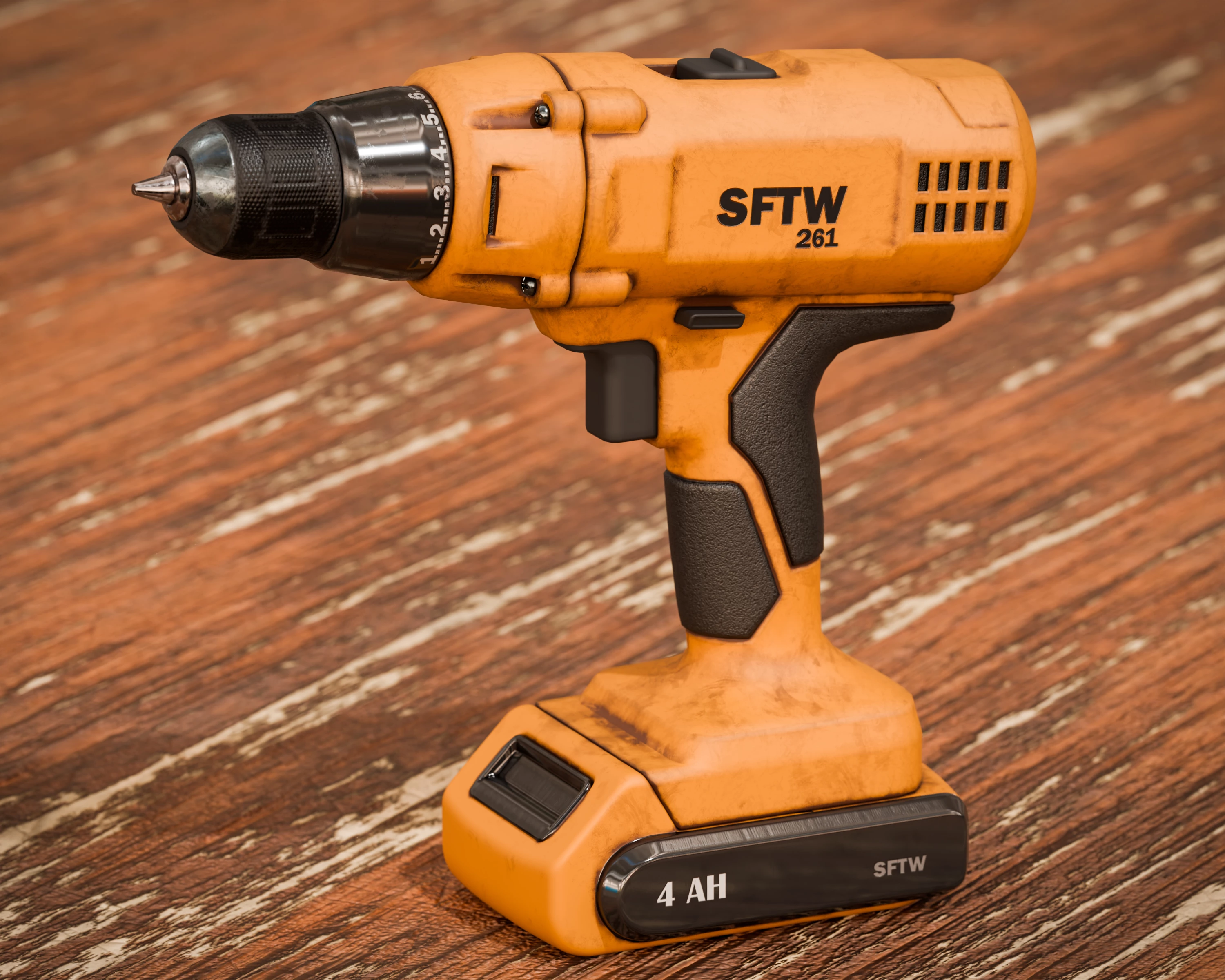
This week we start with a cordless drill. Actually it is a model from Adobe 3D assets, to which I added textures in Adobe 3D Substance Painter before rendering in Blender 3D.

The challenge is, what can you make with the drill?

The “rules”:

  • Use the starter image as at least part of your own image entry.
  • Anything goes, as long as it meets the forum rules on decency, copyright, etc.
  • Anyone, and everyone, is welcome to have a go, whether you are a complete beginner or a Photoshop expert. This is not just for our forum “regulars”.
  • The challenge is not limited to Photoshop. Any Adobe software can be used. 
  • There are no prizes apart from the chance to practice, show off your skills, or bring a bit of humor and fun. Don't be shy, join in and have a go!
  • The starter image is made available for you to use in this forum challenge only.


To download the starter image, click it then, when the image opens in its own window, right click and choose “Save Image As/Save Target As” (or similar depending on your browser).


When posting back your image — please use the reply button in this first post and use the 'Insert Photos' icon at the bottom of the reply box. If posting a comment on someone else’s entry, then please use the reply button next to their image post.


Have fun!


Dave.

    25 replies

    Trevor.Dennis
    Community Expert
    Community Expert
    July 12, 2026

    I decided I’d missed a trick when I did the DeWalt Atom car with Dave driving, and I had some credits I needed to burn because they reset tomorrow.  This time I used a 4 second loop of 720P in Firefly with a GIF in mind.  Despite using the same image for first and last frame I had to cut the last three frames in Photoshop. 

    Then use Handbrake with the 480P preset that drops the size to 720x480 (16:9)

    Check the Dimension tab


    And most importantly the Video tab and drop the frame rate top 15fps (halve the file size)

    Open the resulting file in Photoshop and use File > Export > Save for Web

    I think the file size was around 7mb at that stage.  You can crop the frame and export again, or use Image Size to drop the size.  I wanted to keep the size so I reduced the colors to 64 which took the file size to 4.5Mb and below the forum’s 5mb limit.

    It does lose some impact at that color depth, but if you double click the black and white swatches and set them to full black and full white, you win back some contrast.


    Trevor.Dennis
    Community Expert
    Community Expert
    July 12, 2026


    fbeaume
    Community Expert
    Community Expert
    July 12, 2026

    Love that Trevor!

    davescm
    Community Expert
    davescmCommunity ExpertAuthor
    Community Expert
    July 3, 2026

    The new challenge is up and running here : 

    Come and take part 😊
    Dave

    EuanWilliamson
    Community Expert
    Community Expert
    July 3, 2026

    My dyslexia, always words challenge round way wrong


    Best regards, Euan.
    davescm
    Community Expert
    davescmCommunity ExpertAuthor
    Community Expert
    July 3, 2026

    How much will we be charged for that? 😉
    Dave

    EuanWilliamson
    Community Expert
    Community Expert
    July 3, 2026

    Not so much, drill less cords are quite cheap ;-)

    Best regards, Euan.
    Semaphoric
    Community Expert
    Community Expert
    July 3, 2026


    Battle stations! All hands on deck!


    davescm
    Community Expert
    davescmCommunity ExpertAuthor
    Community Expert
    July 3, 2026

    When is a drill not a drill…?  😁
    Dave

    Trevor.Dennis
    Community Expert
    Community Expert
    July 2, 2026

    One last upload (two really).  I wanted to create a looping background for the sporty car I made from the drill.  My idea was to use the same image for both first and last frame reference, and describe the moving background I was after.  It worked a treat, but there is a tiny glitch that is my error — I should have deleted the last frame when I stacked the video clips because there are two frames with no movement.  AFAIK Veo 3.1 is the only model that lets us upload first and last frames.  As before, I generated 720P and used Topaz Video to upres to 1080P 

    Exporting even a single loop of the 720P produced a 60Mb GIF, and took some work to get below the forum’s new 5Mb limit.  I used Handbrake to reduce the video to 576P and 12fps, which exported to a 13Mb GIF You can downsize video inside Photoshop if you are making a GIF, and I had to reduce to 500px wide and 64 colors to get it down to 4Mb.  It was looking a bit flat but you can win back some contrast by double clicking the darkest tone in the color table and moving it nearer to full black.


    davescm
    Community Expert
    davescmCommunity ExpertAuthor
    Community Expert
    July 2, 2026

    Wow - you have excelled yourself here, Trevor. The car itself looks great but as an animation - excellent.
    Dave

    Trevor.Dennis
    Community Expert
    Community Expert
    July 3, 2026

    Thanks Dave.  I was more pleased with the GIF than the video because the problem solving was more interesting.  Even it was basically just using Handbrake with the right settings. 

    I’d thought that Veo 3.1 was the only model that allowed both first and last frame reference images, but I now think there is no option to add the last frame reference until you upload the first frame. That is true with the ones I have tried so far.  I am also wondering if we can specify that the last frame should be the same as the last in the prompt?  This will give us the option of different aspect ratios and shorter loop times, which in turn will mean a lot less frames meaning higher resolution for a given file size, and better colour rendition.  You would still need to use Handbrake to reduce the frame rate to 12fps which is what frame animations use anyway.

    I should also have spent more time on the reference image.  The Ai mangled your ear, for instance.  I fixed that in the single thumbnail and title frame, but the animation was based on a compromised still image.  It was a case of being excited and wanting to see if the idea worked, but we learn as we proceed. 

    My next project is to try and create a looping Gorillaz type cartoon for my brother who you know plays and sings in a pub band.  There’ll be no lip sync, but right now his visuals are none too flash so I should definitely be able to improve on that.

    Looking forward to the next thread Dave. I wonder what it will be? :-)


    Trevor.Dennis
    Community Expert
    Community Expert
    June 30, 2026

    The last GIF was made manually in Photoshop, but I was interested to see what Firefly could do. The prompt was simple and it only used 200 credits.  I used Premiere Pro again to reverse half thew clips to make the explosion effect bounce, but I also tried the Topaz Video slow-mow effect for the first time.  Topaz Video comes with Studio, but I have hardly used it and I wanted the practice.  The movement is a bit jerky I’m thinking. That might be me or might be the way it works.   Firefly produced the exploding drill on a white background.  To knock out the white, set the clips to Multiply in Effect Controls > Opacity.


    davescm
    Community Expert
    davescmCommunity ExpertAuthor
    Community Expert
    June 30, 2026

    Is that what happens if you use the wrong battery? 😯 Another nice animation, Trevor.
    Dave
     

    Trevor.Dennis
    Community Expert
    Community Expert
    June 30, 2026


    They have dropped the maximum file size down from 10Mb to 5Mb and this a very unsatisfactory compromise in order to upload.  It’s reduced to 64 colors and 580 pixels wide, but I had to remove the nice fade that made the loop less abrupt.  It was all done in Photoshop apart from reversing the video, (it’s infinitely easier to animate a video timeline) 


    jane-e
    Community Expert
    Community Expert
    June 30, 2026

    Very nice, Trevor, I love it!


    Jane

    JR Boulay
    Community Expert
    Community Expert
    June 29, 2026

    May the drill be we you!


    I’m struggling for inspiration this week. It’s probably down to the heatwave.

    Acrobate du PDF, InDesigner et Photoshopographe
    Trevor.Dennis
    Community Expert
    Community Expert
    June 30, 2026

    I think the Amalgamated Construction Workers Union would have something to say about this.  

    JR Boulay
    Community Expert
    Community Expert
    June 30, 2026

    Before becoming a general, he worked on the construction of the Death Star

    Acrobate du PDF, InDesigner et Photoshopographe
    Trevor.Dennis
    Community Expert
    Community Expert
    June 26, 2026

    This is my younger brother Glyn. He is 74 now so a fair few years ago.  A while back I tried to get Firefly to make video of him riding the pig while it bucked like a rodeo bull, but it wouldn’t do it.  I have since realised that Firefly and Gemini 3.1 (which I use most of the time) will put up one of those orange ‘read the guidelines’ errors whenever it decides there are youngsters in the original image.  Using phrases like ‘young boy’ or ‘young girl’ in the prompt is going to cause the Ai to say no.


    Nancy Sherwood recently put up a link to a FatherPhi video in which Phi Nguyen lies to Ais like ChatGTP.  The videos are hilarious and he so easily confuses the heck out of several Ai models.  Check him out. They are funny as heck.

    So I wondered if we could cheat with the Photoshop partner Ai models.  In my first attempt I described Glyn as an ‘old man’ and got an error saying that the description did not match the content.  I tried again describing Glyn as a ‘young man’ which I thought was a believable compromise.  In my first attempt I used this old image of mine as a reference, and the Ai took it too far making it unrecognisable as Glyn and the farm. 

    So I tried again without the reference using this prompt:

    The young man standing next to the pig is to be riding the pig. The pig is bucking like a rodeo bull. The young man holds on to a rope tied around the pig with his right hand and waves his left hand in the air to help him balance. The background to be moved back to give the bucking pig more room but identifiable as the same location. The young man’s face to be unchanged. The pig to be the same as the original. The overall look to be exciting. The lighting to be dynamic and cinematic.

    I am sure I could get it better than the above. Using Firefly to expand the background before using Gemini.  

    I think we can bypass some of the Ai restraints by being careful with prompts.  You could add a moustache to the person in the original and remove it later.  I have other ideas that I am reluctant to share on an open forum, but they are basically about knowing that the Ai is not all powerful and can be tricked.  Check the FatherPhi channel to see what I mean.  

    I am going to try again with Firefly to make a video of Glyn riding the pig. 

    Trevor.Dennis
    Community Expert
    Community Expert
    June 27, 2026

    FYI I couldn’t persuade Veo 3.1 that Glyn an adult.  I put a cowboy hat on him, but it still gave me a ‘content does not match the prompt’ error.  I eventually got Ray3 to produce 10 seconds of 720P @ 24fps, but it didn’t follow my prompt especially well (probably my fault) and despite telling it keep the face clearly recognisable as that in the First Frame reference, it didn’t look anything like my brother.  It also used 1000 credits which even with Firefly pro was significant.  I just wanted to make my brothers smile, but they liked the still image above.  We really did ride those big pigs when dad was away fishing.  That’s given me an idea — try and recreate some of the crazy things we got up to on the farm.  It’s going to be still images only though.

    Have you noticed that there’s a Chinese video model on Firefly?


    daniellei4510
    Community Expert
    Community Expert
    June 24, 2026

    The Dentist.


    Adobe Community Expert | If you aren't submitting your assets in sRGB, you probably didn't read the rules.
    Community Expert
    June 28, 2026

    @daniellei4510 - I had a similar idea for my images. I’d be concerned with this dentist based on the direction the drill is facing and what comes next.