



davescm
Community Expert
Community Expert
September 11, 2026
Question

Something for the Weekend - Part 267 - A close shave!

  • September 11, 2026
  • 102 replies
  • 1109 views

Thanks to everyone who submitted an image to our previous ‘Move Closer’ challenge. 

This week we start with a straight razor, a popular shaving tool until the safety razor came out although some still use the straight razor today. What will you make from this object? Will you incorporate it in a scene or make something completely new from it? Please add a few words with your image describing how you went about it, it may help others and it is always good to see alternative approaches. 

The “rules”:

  • Use the starter image as at least part of your own image entry.
  • Anything goes, as long as it meets the forum rules on decency, copyright, etc.
  • Anyone, and everyone, is welcome to have a go, whether you are a complete beginner or a Photoshop expert. This is not just for our forum “regulars”.
  • The challenge is not limited to Photoshop. Any Adobe software can be used. 
  • There are no prizes apart from the chance to practice, show off your skills, or bring a bit of humor and fun. Don't be shy, join in and have a go!
  • The starter image is made available for you to use in this forum challenge only.

To download the starter image, click it, then, when the image opens in its own window, right-click and choose “Save Image As/Save Target As” (or similar, depending on your browser).
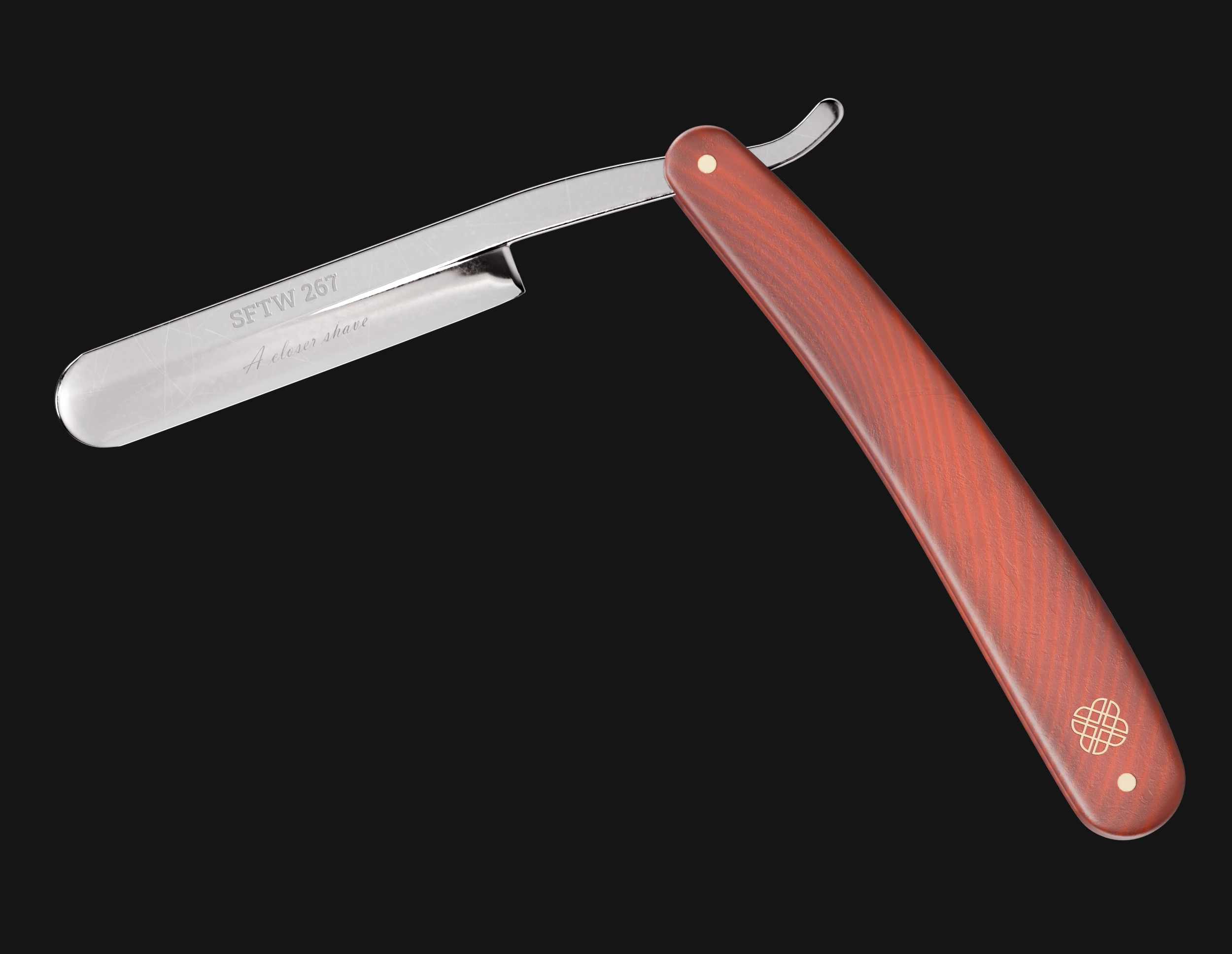
When posting back your image, please use the reply button in this first post and use the 'Insert Photos' icon at the bottom of the reply box. If posting a comment on someone else’s entry, then please use the reply button next to their image post.


Have fun!


Dave.

    This topic is closed to new replies. Start a new post to keep the conversation going.

    102 replies

    davescm
    Community Expert
    davescmCommunity ExpertAuthor
    Community Expert
    September 25, 2026

    Thanks to everyone who took part in this challenge. The new challenge is now up and running at the link below:


    Dave

    Community Expert
    September 23, 2026

    Here’s another cartoon. Made through prompting my process of prompt refinement in chatGPT, iterations of prompt wording in Firefly. Then used Photoshop to touch up the image and add a few other details.
     

    Firefly: Gemini 3.1 (Nano Banana 2)
    Initial prompt:
    comic strip style image
    1. A fluffy sheep is standing peacefully in a field beside a sign saying: “← Shearing Day”
    2. It spots the sign and panics.
    3. It sprints towards a hedge with a narrow gap.
    4. It squeezes through the narrow gap becoming a cloud of wool.
    5. It stands out of the gap, completely bald, looks back at the hedge, and says: “That was a close shave.”

    It took me a while to get the sheep to display as running in the opposite direction to the sign. Having ‘opposite’ text did not work. If I included text saying the sign points right and the sheep runs to the left (or vice versa), it did not work. Sheep always ran to the right. So included the left arrow (←) in the sign text.

    davescm
    Community Expert
    davescmCommunity ExpertAuthor
    Community Expert
    September 24, 2026

    Haha - you’re becoming our AI comic book specialist, Dean :-) I wonder if the titles in each frame are superfluous though?
    Dave

    Community Expert
    September 24, 2026

    Yes - the frame titles are not needed. Should be ‘show, not tell’.

    Overall the story has translated well in visuals. There are still slight differences between frames that make the break continuity somewhat. Is that just being picky with details?

    JR Boulay
    Community Expert
    Community Expert
    September 22, 2026

    Shaved side of the Moon


    Acrobate du PDF, InDesigner et Photoshopographe
    davescm
    Community Expert
    davescmCommunity ExpertAuthor
    Community Expert
    September 22, 2026

    Brilliant!. I like the hint of the spectrum colours on the handle. 
    Dave

    Participating Frequently
    September 22, 2026

    Love seeing how everyone turns the same simple object into something completely different.

    Trevor.Dennis
    Community Expert
    Community Expert
    September 22, 2026

    Everyone is welcome to have a go. They don’t need to be super flash, and if you have a few Generative Credits you can use AI to create your interpretation of the razer.

    Community Expert
    September 20, 2026

    Here’s a new version. Made in Firefly - Gemini 3.1 (Nano Banana 2), touched up with Photoshop.
     

    Firefly: Gemini 3.1 (Nano Banana 2)

    Initial prompt - then iterations in the lines of ‘change this’, ‘change that’.
    Comic strip story in 4 scenes
    Scene 1 – The Big Throw An Australian man stands proudly in the outback, holding a boomerang. “Watch this, mate. I’ve been practising for years!” He launches it dramatically into the sky.
    Scene 2 – Waiting… He watches the boomerang disappear into the distance. A kangaroo beside him looks up too. The man smiles confidently. “Any second now…”
    Scene 3 – Still Waiting… The sun is setting. The man and kangaroo are still staring at the empty sky. The man scratches his head. “Maybe I threw it a bit too well.”
    Scene 4 – Surprise Return The next morning, the man opens his front door. The boomerang is sitting on the doorstep beside a tiny suitcase. A note reads: “Sorry I’m late. Took the scenic route.”

    Community Expert
    September 20, 2026

    I should also credit chatGPT for helping me craft the story and format it into the 4 scenes. 
    I realised after my first iteration that scene 1 didn’t have anyone mentioned in relation to who the Aussie is talking to. So in the GenAI image process, an iteration was ‘have the kangaroo in all scenes’.

    Trevor.Dennis
    Community Expert
    Community Expert
    September 20, 2026

    ​@DeanUtian Thanks for sharing the process.  There is a real learning curve to GenAI so sharing the load is going to lead to better results and less GenCreds wasted.

    Some of us did Dave Cross Photoshop Sumit 8 last week, and Jesús Rameriz had an excellent session on GenAI.  He also mentioned his free Prompt Vault plugin which is a great way to manage prompts that you might use again.  There is at least one super useful prompt in the example image.  I’ve been using Gemini 3.1 for sharpening, but Jesús said that Flux is the better model for improving detail.


    Community Expert
    September 20, 2026

    Since I am in Australia, I have that theme.
     

    Background image:
    Firefly: Gemini 3.1 (Nano Banana 2)
    Prompt: man throwing a boomerang in aussie outback

    The shadows are weird. Didn’t feel like fixing them just yet. Maybe will think of a larger story to this scene and will work on something.

    davescm
    Community Expert
    davescmCommunity ExpertAuthor
    Community Expert
    September 22, 2026

    Throwing it, no problem. Catching it …! 😮
    Dave

    Myra Ferguson
    Community Expert
    Community Expert
    September 17, 2026

    It cuts smoothly through the water.

    davescm
    Community Expert
    davescmCommunity ExpertAuthor
    Community Expert
    September 17, 2026

    Nice use of the handle Myra. I also like the colour grading on this one, it reminds me of old film.
    Dave

    derekwatson
    Community Expert
    Community Expert
    September 17, 2026

    A Razorbill for the birdwatchers...


    Derek Watson
    davescm
    Community Expert
    davescmCommunity ExpertAuthor
    Community Expert
    September 17, 2026

    That’s the second bird we’ve had this week, Derek. ‘Razor Bill’ 😂
    Dave

    bebarth
    Community Expert
    Community Expert
    September 17, 2026

    Oups!…


    davescm
    Community Expert
    davescmCommunity ExpertAuthor
    Community Expert
    September 17, 2026

    Haha, poor granpa … 😄 A lovely image, @bebarth
    Dave

    didiermazier
    Community Expert
    Community Expert
    September 15, 2026