

davescm
Community Expert
Community Expert
November 9, 2018
Question

Something for the weekend - Part 45 - Secret of the falls

  • November 9, 2018
  • 17 replies
  • 4809 views

Hi

This waterfall is High Force in Teesdale close to where I live. It's a wonderful place particularly at this time of the year , despite the grey skies. However , I wonder what secrets lie in this gorge.

So the challenge this week is to reveal the secrets of these falls.

I don't know if the "rules" need repeating but , for the benefit of anyone joining us for the first time:

Anything goes as long as it meets the forum rules on decency, copyright etc.

Anyone and everyone is welcome to have a go - whether you are a complete beginner or a Photoshop expert.

There are no prizes apart from the chance to practice, show off, or bring a bit of humour and fun. Don't be shy - come and have a go!

When posting back your edited images please use jpeg and downsize to 1200px on the long side.

To download the image below in jpeg format with ICC color profile (sRGB) and without the forum scaling artefacts , right click and then use Save Image As /Save Target As (or similar depending on your browser).
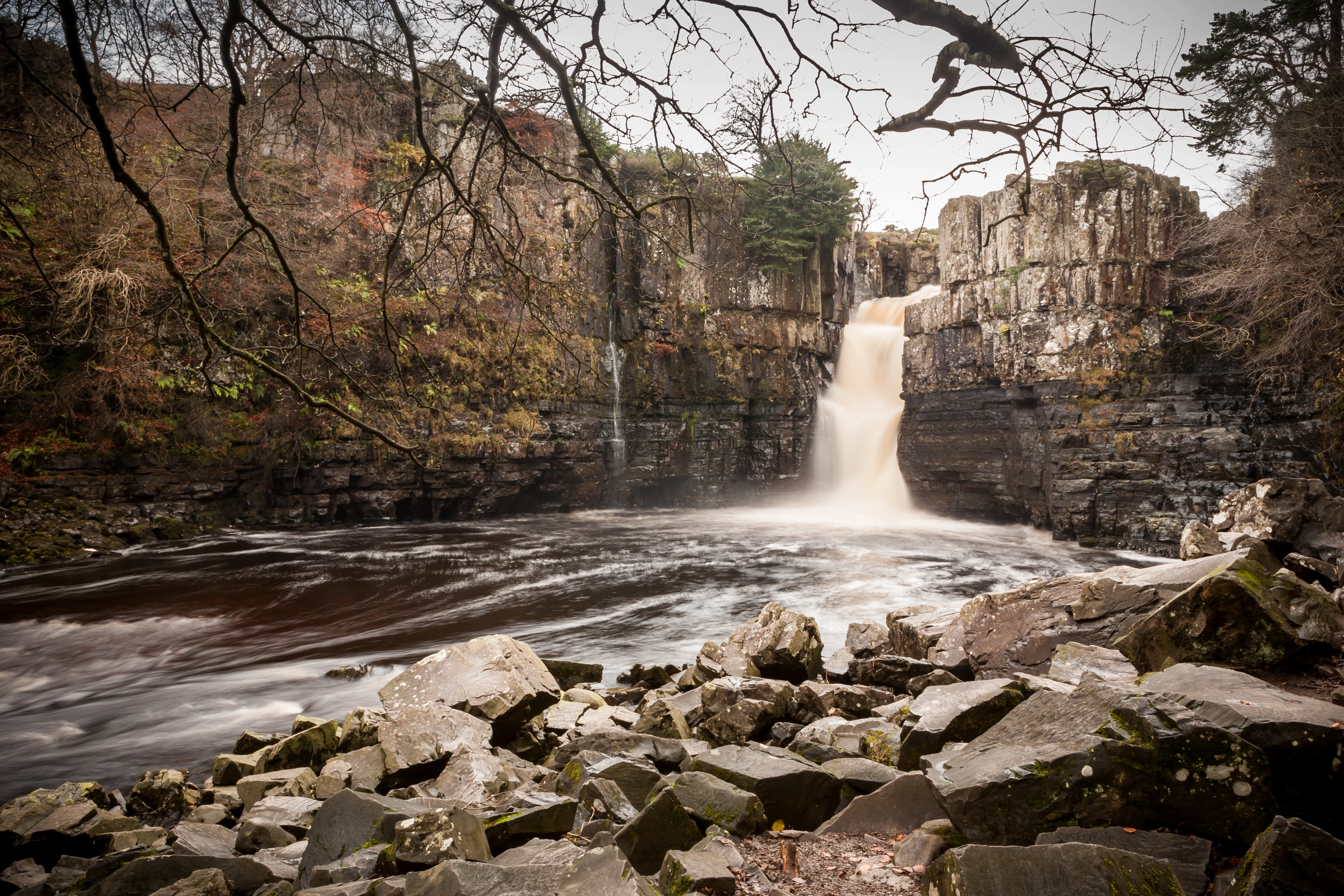
Have fun.

Dave

This topic has been closed for replies.

17 replies

jane-e
Community Expert
Community Expert
November 16, 2018

Ussnorway7605025
Legend
November 16, 2018

a little risque

Jacob Bugge
Community Expert
Community Expert
November 14, 2018

Maybe the deadliest dark blue coldness, unless unlikely friends huddle up and counter it with warmth, if only in a twinkle,

Maybe unknown to most (others than Trevor and me), the unlikely friends met in 2002, when the big one crashed a party of at least five hundred of the little ones, and literally lost it, then was inevitably found out, unable to answer the watchword question "What's the word?" (the answer of course being "Bluebird's the word."), and then eventually (and equally inevitably) getting cornered; after that, the mutiny in the South Sea (where only some were on the gun deck), and now this.

This is my very first live GIF. The actual reworking of the fall and the gorge took less than half a minute, but I struggled with the giffing for quite some hours over several days to get grasp it and get it (more or less) right at long last.

Trevor.Dennis
Community Expert
Community Expert
November 15, 2018

https://forums.adobe.com/people/Jacob+Bugge  wrote

This is my very first live GIF. The actual reworking of the fall and the gorge took less than half a minute, but I struggled with the giffing for quite some hours over several days to get grasp it and get it (more or less) right at long last.

In my experience, the whole Photoshop frame animation thing is highly non-intuitive, and there is very little in the way of properly useful guides and tutorials.  I've worked it out as I went, and discovered new tips and tricks along the way, but over a fair bit of time.  If you have an orange bade, I'd say go learn Animate because it was a proper timeline with parallel assets.  With Photoshop  you  can automate the first moving object to an extent, but additional objects have to  manually synced to frames already created.  That's why rotating animations work well because you usually only need enough frames to cover one segment, and the previous segment catches up and gives you seamless animation with a fraction of the frames you'd otherwise need.

Tweening is of limited use unless you tween opacity. It also tends to create choppy movement,  and you end up using HEAPS of frames to try and counter that, leading to large file sizes, and a total nightmare if you want to sync additional objects to those frames.  I don't have an answer for  the choppy movement, but motion blur helps.  Fast movement looks better than slow movement with the viewer's mind/eye filling in the gaps.

I prefer to create a unique layer for each frame, rather than moving a single layer.  Using the one layer can get you into incredible trouble if you get out of sync, and there is no  way to fix it  other that to start that section from the beginning.   Free Transform > Step & Repeat is a big advantage producing layers.  If you create those layers in a group, you can Free Transform the group to fine tune position and angles.  That is a godsend. Unfortunately Smart Objects don't respond well to Step & Repeat,  so you loose quality with each step, so you need to create at a much higher resolution than you intend exporting to.

Keep colours simple and  muted so you can reduce colour depth when exporting.  Having the colour depth halves the file size.  It is still difficult to make the animation more than 800 pixels without making file size too big.  I cringe if I have to go about two or three Mb because they take forever to load.

Having frame and layer numbers match helps with syncing multiple objects.  If I had to give just one piece of advice, it would be 'make sure you select ALL frames when doing an edit, unless you only want it to affect the selected frame.  This is another way to get into trouble. 

A workflow I use when syncing a lot of frames to layers:

  1. Starting from layer one, and frame one selected, turn on layer one.
  2. Then select layer two (the state the screen shot below is in)
  3. Advance one frame (Ctrl n — the motion workspace changes a lot of common shortcuts)
  4. Move eyes back to the Layers panel, and turn on the selected layer.
  5. Select the next layer... repeat until done

In the example below frame and layers have the same number making the above workflow unnecessary, but if you have 50 frames and the numbers don't match, it can save you some grief.

It's as easy to paste  in a video as an image to the Adobe forums, and as the video is streamed as it plays, and the frame animation has to fully download, the bandwidth works better for us,  So Animate and After Effects will produce much nicer animations, and with video, you can have sound.  I hope to follow my own advice before too very much longer, but even when you think you have some more time on your hands, she who must be obeyed finds new ways to fill it for you. 

Jacob Bugge
Community Expert
Community Expert
November 15, 2018

Thank you very much for your thorough explanations and instructions. I will see how (much) I can get better for my needs and within my ability.

Before giving up and returning to PS for my overly simple case, I tried to download GIMP (mentioned as a tool to create animated GIFs), only to find no mentioning of animation at all. So it seems that they form a rather neglected area. I first saw a simple forum GIF about fifteen years ago (1/4 ghosts moving sideways).

ScooterD76
Legend
November 12, 2018

LOL, davescm It's a basket for disc golf-

Image result for disc golf

Any time I see a nature photo I'm always thinking "needs a basket"

Trevor.Dennis
Community Expert
Community Expert
November 12, 2018

ScooterD76  wrote

LOL, davescm It's a basket for disc golf

Well you learn something new every day.  It looks a bit physical, but I love how the disks fly.  Much straighter and flatter than a Frisbee.

Semaphoric
Community Expert
Community Expert
November 11, 2018

Made a wrong turn at the Amazon.


davescm
Community Expert
davescmCommunity ExpertAuthor
Community Expert
November 11, 2018

Hi

Jerry - I like the way he is peeping through the water. The ring should fall into Dean's river of gold.

Jacob - nice idea. Its amazing that when you take natural shapes and mirror them left/right you start to see faces in the formations.

Hi Ken - very dark. I'd not seen the series so I looked it up and you have the style captured

Semaphoric - send him back to the Amazon - he'll frighten the children here.

Like I said earlier - I wasn't sure whether this week's picture would generate many images. I'm glad to say I was wrong !

Dave

Trevor.Dennis
Community Expert
Community Expert
November 12, 2018

KShinabery212
Community Expert
Community Expert
November 11, 2018

So my wife and I have been watching the 'Chilling Adventures of Sabrina' on Netflix...... and this happened.

It is comprised of several layers.... and I even had to repaint the branches over the moon.

I would take it a few steps further..... but I do not have the time.

And you can find the font for the show's logo online!  Very cool!

Let's connect on LinkedIn. https://www.linkedin.com/in/kshinabery/
Trevor.Dennis
Community Expert
Community Expert
November 11, 2018

KShinabery212  this is like the river of blood I was expecting from, Graham.  Very spooky.

I masked in the tree limb and smaller branches for post #19.  There is bugger all colour in the sky, so any channel works.  It  was still a wee bit thin after a Levels and brush set to Overlay to reinforce the alpha channel, but the tree is mostly silhouette, so I copied the masked in tree a couple of times with it set to Multiply.  

It's usually a good idea to put some of the foreground back in front of composited objects IMO.  It gives them depth, and moves the object 'into' the scene.  Any little clue we can give the eye that 'this is real' adds up to  a more convincing composite/montage.

kphotopage
Legend
November 11, 2018

Davescm, Thank you for the warm welcome.

I found this page via another Adobe member.

Long ago and for YEARS, I was an avid Photoshopper.

Seldom even turn on PS these days.

I’m a CC subscriber.

Fun PS image to do.

Source images are half the battle.

K

Jacob Bugge
Community Expert
Community Expert
November 11, 2018

Hidden depths.

kphotopage
Legend
November 11, 2018

FudgeRocks

K

davescm
Community Expert
davescmCommunity ExpertAuthor
Community Expert
November 11, 2018

Hi

Kphotopage - welcome to Something for the Weekend.

I had to look twice there. At first I thought it was just a pile of fudge until I looked closer and saw the rock shapes of the original image in there - clever!

Dean - a river of gold - I'll take a bucket and sample a bit of that

Dave

KJerryK
Legend
November 11, 2018

Lost it again

Community Expert
November 11, 2018

My thought of the week.

Jacob Bugge
Community Expert
Community Expert
November 10, 2018

The unknown Blondin performance.

Trevor.Dennis
Community Expert
Community Expert
November 10, 2018

Wow, so many entries this week.

davescm
Community Expert
davescmCommunity ExpertAuthor
Community Expert
November 10, 2018

Wow indeed

Jerry - That is very timely for this weekend's Rememberance Sunday

Ged - I'll have two of whatever drink you had to come up with that one

Jacob - It seems dangerous sports are popular here this weekend !

Trevor I like that ice skating penguin. Did you model it or draw it?

Great stuff, if you have just stumbled upon this thread - come and join in !

Dave