Participant
January 25, 2022
Answered

Spacebar moves the whole picture, not my ellipse

  • January 25, 2022
  • 3 replies
  • 229 views

Hi, quick question. When using the marquee tool, my spacebar moves the whole picture, not my ellipse. Do you have any idea why? Thanks ya'll.

This topic has been closed for replies.
Correct answer Conrad_C

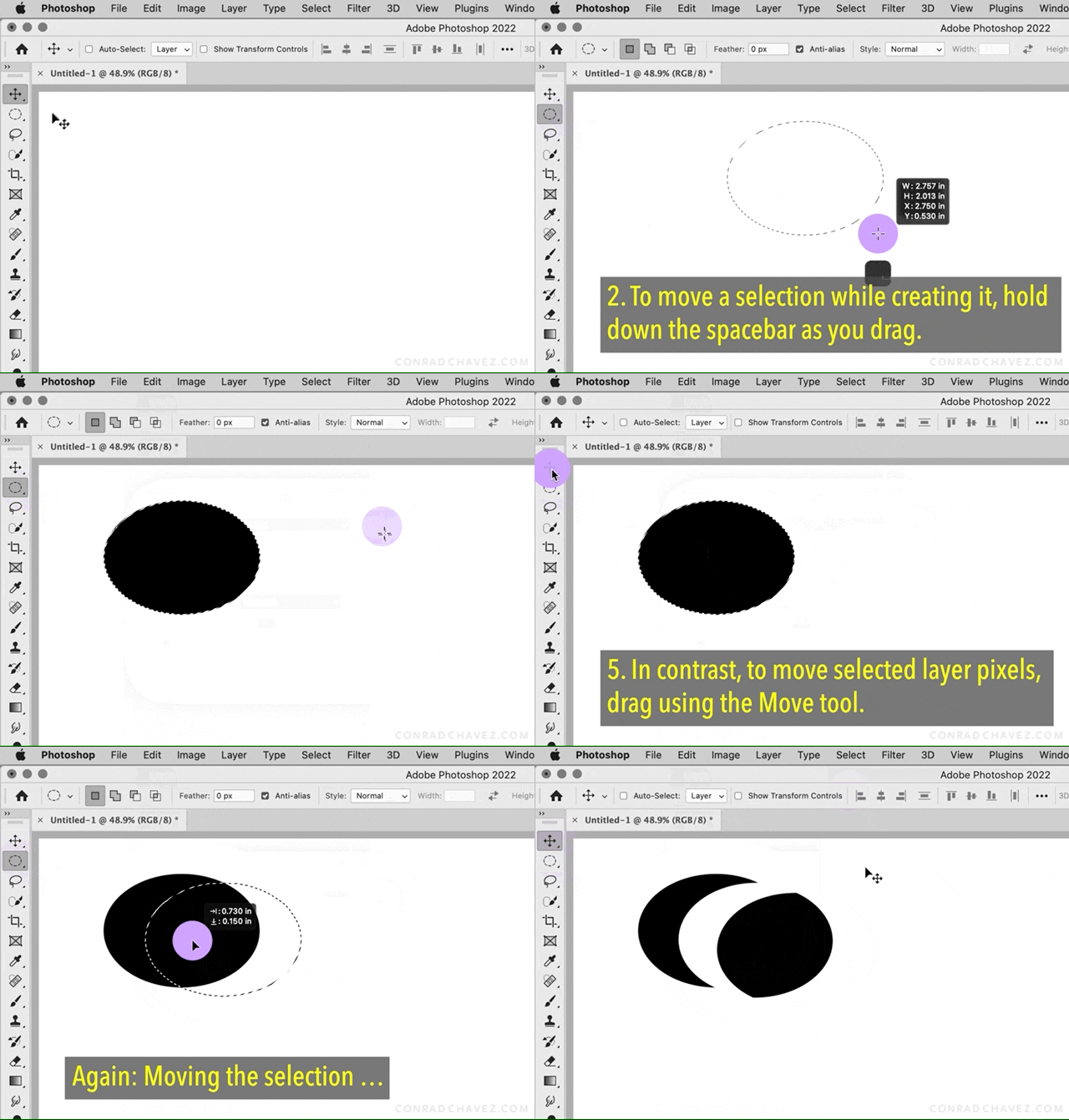
Your original post talked about moving a selection with the spacebar, which works only if you’re drawing the selection and have not yet released the mouse button. But this reply talks about positioning the pointer inside the selection so that you get the different pointer icon, but that works only after you’re finished drawing the selection and releaesd the mouse button. So those are two different states.


Does the video below help show the differences between moving a selection while creating it, moving a selection after creating it, and moving selected pixels?
 

3 replies

TreeFryAuthor
Participant
January 25, 2022

I'm so sorry if I'm not making any sense ya'll. I really apprecaite the help. But here's some photos of what I mean. You see how when my instructor goes into the ellipse, a small white box appears next to the cursor? Mine doesn't do that. Because he moves the ellipse after that, and that's what I'm trying to replicate, but it won't let me move it.

Conrad_C
Community Expert
Conrad_CCommunity ExpertCorrect answer
Community Expert
January 26, 2022

Your original post talked about moving a selection with the spacebar, which works only if you’re drawing the selection and have not yet released the mouse button. But this reply talks about positioning the pointer inside the selection so that you get the different pointer icon, but that works only after you’re finished drawing the selection and releaesd the mouse button. So those are two different states.


Does the video below help show the differences between moving a selection while creating it, moving a selection after creating it, and moving selected pixels?


TreeFryAuthor
Participant
January 26, 2022

You're literally a genius, I wasn't supposed to take my hand off when I clicked space! Wow, I'm so sorry for how unnecessarily hard I made that, thank you guys so much!!

Conrad_C
Community Expert
Community Expert
January 25, 2022

Are you trying to move the ellipse selection as you are dragging the tool to draw it, or after you release the mouse button?


The spacebar moves a selection only if you’re still in the middle of drawing it, when you have not yet released the mouse button. After you release the mouse button, the spacebar switches to its normal shortcut of scrolling the document; then you have to move the selection using the method Bojan described.

Bojan Živković11378569
Community Expert
Community Expert
January 25, 2022

Are you trying to move selection? Navigate mouse inside selection (with selection tool active), it will turn into white arrow, click and drag to move selection. If you press Spacebar it will temporary switch to Hand tool.

TreeFryAuthor
Participant
January 25, 2022

Anytime after I make my ellipse and move my mouse to the center and try to move the ellipse, it just creates another ellipse inside. Am I supposed to be holding down a button while clicking or am I just dumb or is something wrong?