Participant
Mar 21, 2018 12:12 AM UTC
Answered

Splatter Brush

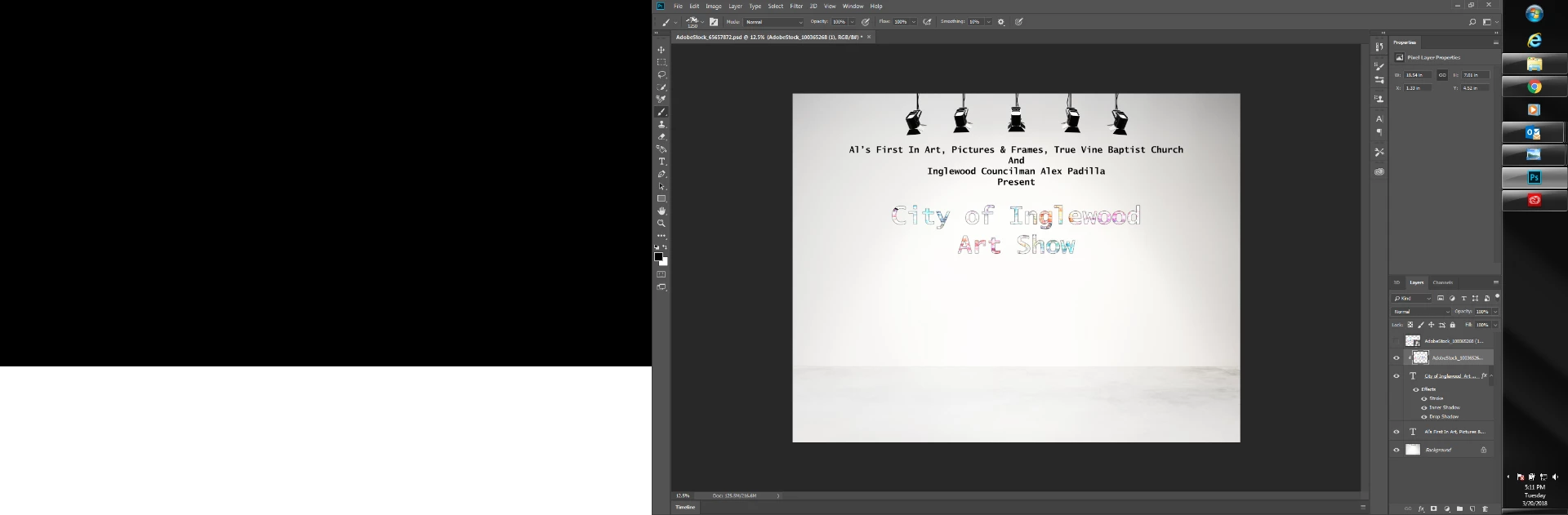
Hello,  I am new to Photoshop CC.  I am using the clipping mask option to flare up my text.  I also want to use a splatter paint brush to make my font more interesting.  However, whenever I enable the paint brush (splatter type) and click it does nothing.  My hope was that it would bring out the picture that was used for the clipping mask.  I know that the photo is right underneath the text, but when I click to splatter nothing happens.  What am I doing wrong?
    This topic is closed to new replies. Start a new post to keep the conversation going.
    Srishti Bali
    Srishti BaliCorrect answer
    Community Manager
    Oct 27, 2026 6:10 PM UTC

    Hi All

    If you're trying to create splatter effects in Photoshop, you might find this tutorial by ​@Joseph Labrecque  helpful: 

    It covers choosing and customizing splatter brushes, working with masks, and troubleshooting common issues when brush strokes aren't appearing as expected.

    Keep in mind that when using a clipping mask, your brush strokes will only be visible within the boundaries of the underlying layer.

    Thanks, Srishti Bali | Community & Engagement Strategist, Digital Imaging | Adobe

    5 replies

    Srishti Bali
    Community Manager
    Srishti BaliCommunity ManagerCorrect answer
    Community Manager
    Oct 27, 2026 6:10 PM UTC

    Hi All

    If you're trying to create splatter effects in Photoshop, you might find this tutorial by ​@Joseph Labrecque  helpful: 

    It covers choosing and customizing splatter brushes, working with masks, and troubleshooting common issues when brush strokes aren't appearing as expected.

    Keep in mind that when using a clipping mask, your brush strokes will only be visible within the boundaries of the underlying layer.

    Translate
    Thanks, Srishti Bali | Community & Engagement Strategist, Digital Imaging | Adobe
    c.pfaffenbichler
    Community Expert
    Community Expert
    Mar 21, 2018 10:18 AM UTC

    Could you please post a meaningful screenshot with the pertinent Panels (Layers, Channels, Options Bar, …) visible?

    Translate
    Saro_CHN
    Participating Frequently
    Mar 21, 2018 6:00 AM UTC

    Your splatter brushes will not be visible outer clip mask area. Just release the clip mask layer above the text and see and there will be lot of paints. Whatever you paint in the edges of the text outer on clip mask layer will not be visible outer mask area.

    Translate
    jacks785
    Participating Frequently
    Mar 21, 2018 5:10 AM UTC

    Splatter brushes can splash your images with bloody strains, paint splash. Sometimes is can just act as a stamp tool but with the Photoshop tool you can still add stroke width, spread etc to create a much realistic stamping of the brush. These brushes are in Photoshop .abr format and will work only with Adobe Photoshop software.

    Translate
    Trevor.Dennis
    Community Expert
    Community Expert
    Mar 21, 2018 1:29 AM UTC

    Difficult to say without seeing your Brush panel. As your layers are set, the Splatter brush will only show where it overlaps the text, which I'm guessing you have right.

    If the brush preset does not already have Build-up checked, do so.  That will make it continue to lay down as long as the mouse button is pressed (or pen in contact with the tablet)

    I think you already have Color Dynamics checked, but we'd need to see the contents.  You also need the foreground and background colours to be something other than black and white to make the most of that, but I think you already have that right.

    Translate