
keithm1972
Inspiring
January 20, 2021
Answered

Split rectangle into two equal shapes at diagonal?

  • January 20, 2021
  • 1 reply
  • 3504 views

I'm not looking to copy the exact headers as shown below, but I want to try the basic idea of splitting a rectangle in half in a similar angle so I have two layers and can try different things to them, such as an image on one half and text on the other, keeping each piece equal.


How do I do this in Photoshop? I was playing with the direct selection tool, but grabbing random points just makes a mess.

 

Correct answer davescm

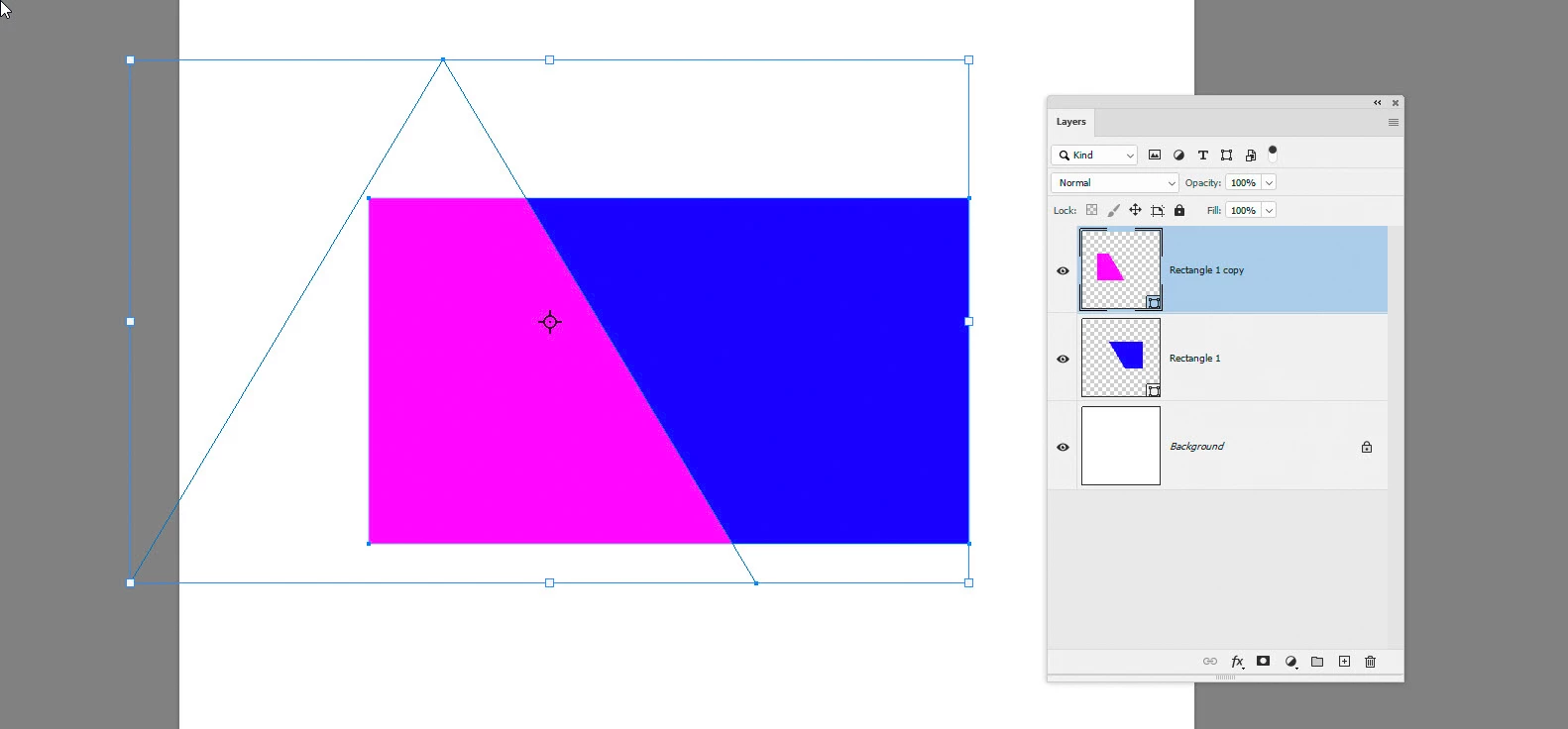
Use a rectangle shape and add a triangle to it with Path operations (in the options bar) set to Subtract - that will give you the blue shape shown as layer rectangle 1

Then duplicate the layer

On that duplicated layer, select the paths and set path operations to Intersect Shape Areas. That will give you the magenta area in the layer rectangle 2


You can now clip images to those shape layers as required


Dave

1 reply

davescm
Community Expert
davescmCommunity ExpertCorrect answer
Community Expert
January 20, 2021

Use a rectangle shape and add a triangle to it with Path operations (in the options bar) set to Subtract - that will give you the blue shape shown as layer rectangle 1

Then duplicate the layer

On that duplicated layer, select the paths and set path operations to Intersect Shape Areas. That will give you the magenta area in the layer rectangle 2


You can now clip images to those shape layers as required


Dave

davescm
Community Expert
Community Expert
January 23, 2021

After I responded to this I realised (after eagle eyed guru @Norman Sanders  pointed it out to me🙂 ) that  you wanted two equal  shapes. You can use the same method but add guidelines so that the triangle intersects the centre of the rectangle.

Dave

keithm1972
Inspiring
January 25, 2021

Thanks, I appreciate the update!